
 AI Summary
Maharashtra government has launched MahaSarathi portal and all state residents who have completed their MahaID registration on MahaSarathi portal can now download their MahaID card in PDF format after logging into MahaSSO.
No physical MahaID card is sent to your home after registration. MahaID is linked to your Aadhaar number, so the card is only a digital copy of your ID and the profile details attached to it.
How to download MahaID card PDF from MahaSarathi portal
Below is the step by step process to download your MahaID card PDF.
STEP 1 - Open mahasarathi.maharashtra.gov.in in any browser, click the Login button at the top right of the homepage and pick 'Citizen Login' from the drop-down.
STEP 2 - On the MahaSSO page, choose the 'Maha ID' or 'Aadhaar' tab, type that number in the box and click Login.
STEP 3 - An OTP is sent to your registered mobile. Type it in and click 'Verify OTP'.
STEP 4 - A DigiLocker screen comes up next (If you've not already completed this step). Click 'Skip for Now'.
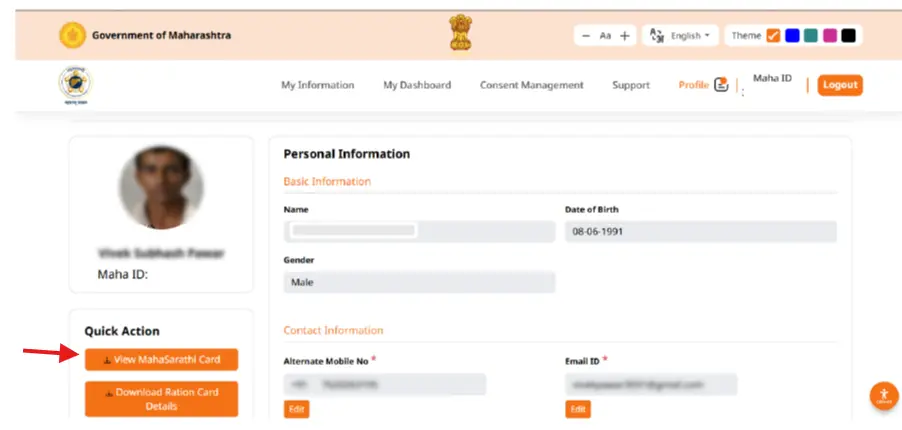
STEP 5 - After login, My Information page opens, click profile in the top menu bar, next to Support.
STEP 6 - Quick Action box appears on the left side, below your photo and MahaID number. Click 'View MahaSarathi Card' and save the file as a PDF on your phone or computer.
MahaID card download from DigiLocker
Since 17 June 2026 the Mahasarathi Family ID has been issued inside DigiLocker too, and nearly 14 crore Maharashtra residents can also download it from there.
- Open the DigiLocker mobile app or go to digilocker.gov.in and sign in to your account.
- Go to Issued Documents and search for Mahasarathi or MahaID or Family ID Maharashtra.
- Fill in the details asked on the form and give your consent.
- Fetch the credential, which gets issued at once and stays saved in your DigiLocker account for downloading or sharing later.
FAQ's
Is MahaID card given as a physical card?
No. MahaID is a number linked to your Aadhaar and the card exists only in digital form. Print the downloaded PDF yourself if you need a paper copy.
Can I download the card without logging in?
No. The portal opens the card only inside your own account, so a MahaID or Aadhaar login with OTP is the only way in.
Does the MahaID card download cost anything?
No, it is free on both MahaSarathi portal and DigiLocker. Any website or agent asking for money to make or download your card is not official.
My name or photo on the card is wrong. What can I do?
Details on the card come from Aadhaar and other department records, not from the portal itself. Get the record corrected at its source first, since the card picks up the updated data after that.
महाड download