

 AI Summary
New Bharat Gas Connection online registration / application form 2026 is available at my.ebharatgas.com. Bharat Petroleum Corporation Limited (BPCL) allows people to apply for a new LPG gas connection online from home. Once the connection is released, cylinder booking can be done through call, SMS, mobile app or WhatsApp from the registered mobile number. Central govt. revises LPG cylinder prices on the 1st of every month. Under PM Ujjwala Yojana, eligible families get ₹300 subsidy per 14.2 kg cylinder on the first 4 refills in a year through DBT payment.
Bharatgas online new connection registration system lets applicants complete all formalities online without visiting any distributor. Liquefied Petroleum Gas (LPG) is the main cooking fuel used in Indian homes, and BPCL is one of the biggest LPG suppliers in the country. People can fill the application, upload documents and track the status from home.
LPG has a number of providers in the Indian market and BPCL (Bharat Gas) is one of them. The online process saves time and there is no need to visit any nearby distributor for the initial formalities.
New Bharat Gas Connection Apply Online at My Ebharatgas Portal
All applicants should keep a scanned copy of Photograph, Proof of Identity (POI) and Proof of Address (POA) ready before filling the New Bharat Gas Connection apply online form. Each document should be in JPG or PDF format and the file size should not exceed 500 KB.
Bharat Gas New Connection Online Application / Registration Form 2026
Below is the complete process to fill the Bharat Gas New Connection online application / registration form:-
STEP 1 - Visit the official Bharatgas portal at my.ebharatgas.com.
STEP 2 - On the homepage, click on the "Apply for new connection online" link or directly open https://my.ebharatgas.com/bharatgas/LPGServices/ApplyNewConnection.
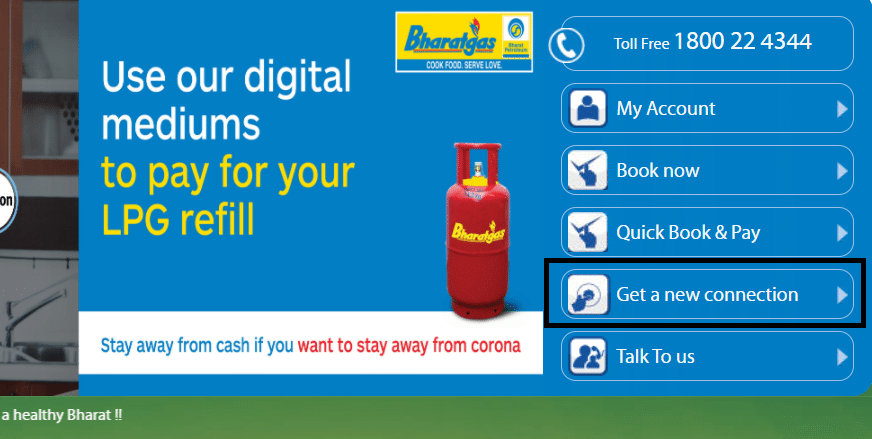
STEP 3 - In the new window, go to the "Find Your Nearest Bharatgas Distributors" section, enter the "State" and "District" name and click on the "Show List" button.

STEP 4 - The list of nearest Bharatgas distributors will open with the name of the distributor, location, contact and address.
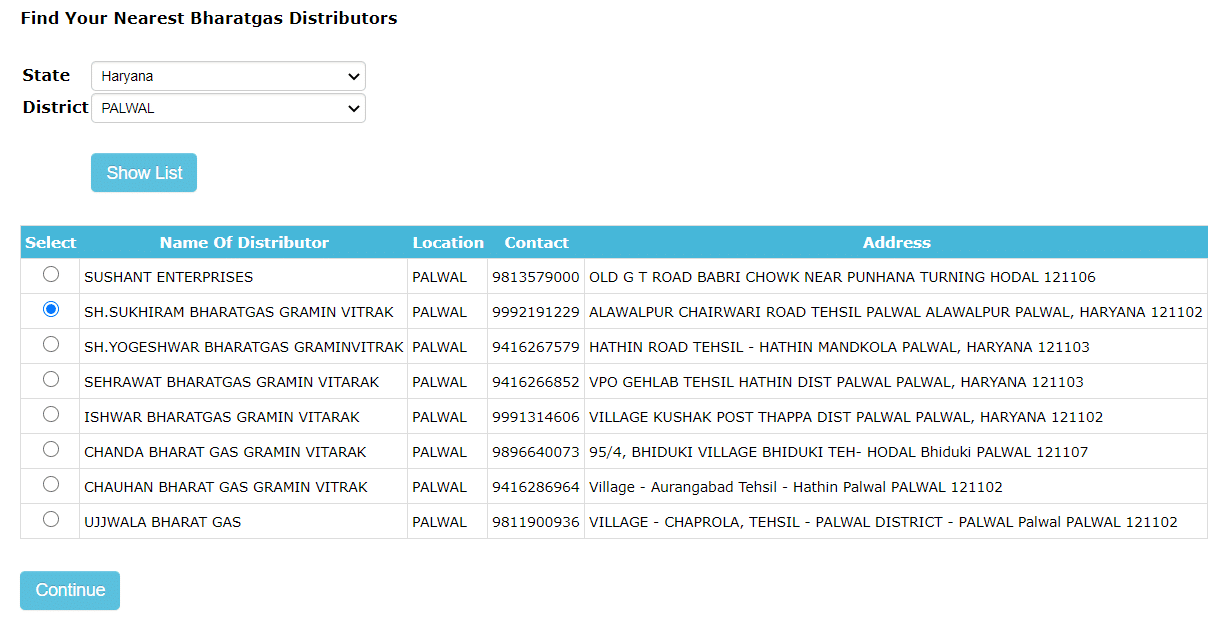
STEP 5 - Select the nearest LPG gas distributor and click on the "Continue" tab. The Know Your Customer (KYC) form will appear.
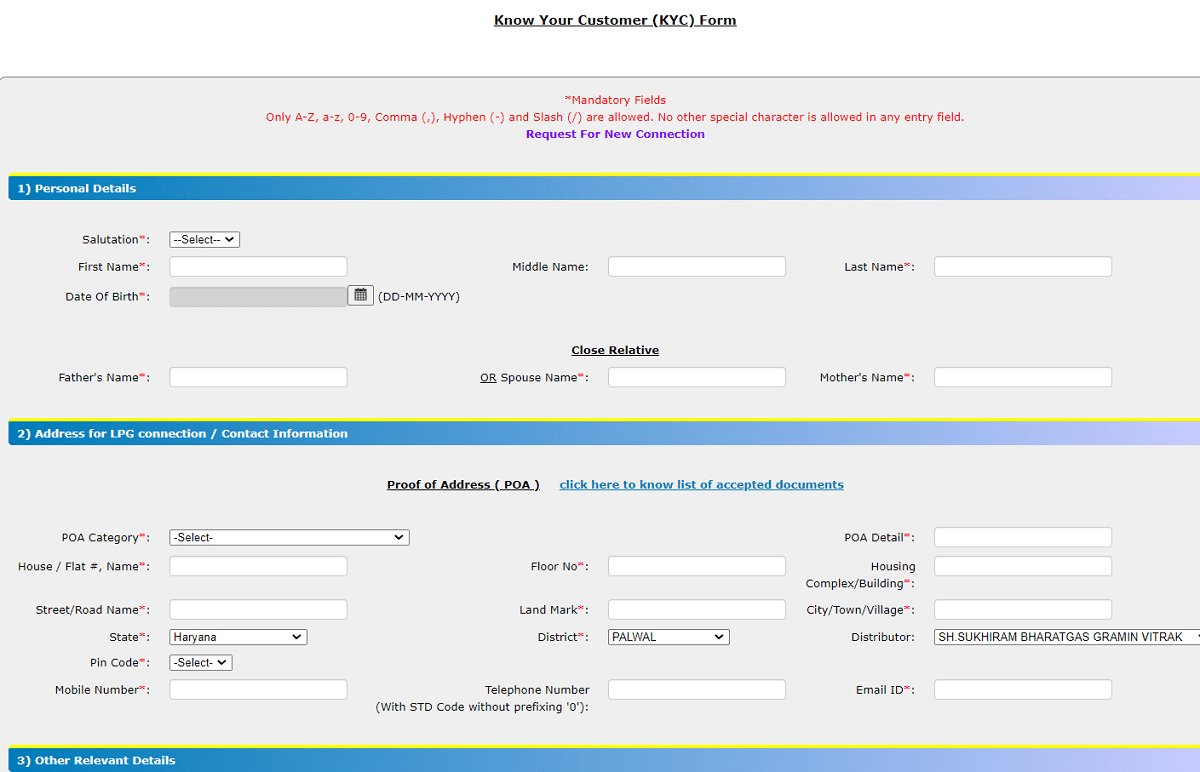
STEP 6 - Enter personal details, address for LPG connection, contact information, other relevant details, cash transfer details and document submission details.
STEP 7 - Tick the declaration, enter the captcha, validate the OTP sent on SMS and email ID and click on the "Submit" button to complete the New Bharat Gas Connection online application form.
Once the registration is cleared for release of LPG connection, applicants can choose to pay online and complete the process. If scanned copies of documents are not ready, people can still apply online and submit the photograph and copies of POI and POA to the distributor along with the printed copy of the online application.
| Detail | Information |
|---|---|
| Scheme Name | New Bharat Gas Connection |
| Launched By | Bharat Petroleum Corporation Limited (BPCL) |
| Beneficiaries | Indian households without an LPG connection |
| Application Mode | Online and offline process |
| Official Website | my.ebharatgas.com |
| Helpline | 1800 22 4344 |
| LPG Leak Emergency Number | 1906 |
Offline Process to Apply for Bharat Gas New Connection
To apply for a new gas connection through offline process, follow the steps given below:-
- Visit the nearest Bharat Gas dealer or office and collect an application form.
- Submit the filled Bharatgas registration form along with the required documents to the dealer or office.
- Applicants will receive a call confirming the request and the application will be processed within 4 to 5 working days.
List of Documents Required to Apply Online for Bharat Gas New Connection
Here is the complete list of documents required to fill the Bharat Gas New Connection online application form:-
| Recent Photograph | Scanned copy of photograph in JPG or PDF format (file size less than 500 KB) |
| Proof of Identity (PoI) | Any one of the following - Aadhaar (UID), Passport, PAN Card Number, Voter ID, ID issued by state / central government, Driving License |
| Proof of Address (PoA) | Any one of the following - Aadhaar (UID), Driving License, Lease Agreement, Voter ID, Telephone / Electricity / Water Bill, Passport, Self Declaration attested by Gazetted officer, Ration Card, Flat Allotment / Possession Letter, House Registration Document, LIC Policy, Bank / Credit Card Statement |
KYC Documents - Valid photo ID and residence proof that will be mentioned in the registration form.
Bharat Gas Booking Online Procedure
After completing the Bharat Gas Connection online registration, people can start booking cylinders. For online booking, sign in to the Bharat Gas account and select the "booking" option. Enter the asked details such as delivery date and time and submit the form. A notification will confirm the booking. Bharat Gas accepts a booking only 21 days after a previous booking was made.
Bharat Gas Booking Offline Procedure
Offline booking can be done using any of the options given below:-
Bharat Gas Booking Through SMS
In case a Bharat Gas user lives in a metro city or a state capital, booking can be done through SMS. Register the mobile number with the local Bharat Gas LPG distributor. After successful registration, a cylinder can be booked by sending "LPG" message to 57333. Users of Tata, Vodafone, MTNL and Idea can send the same SMS to 52725. After some time, a confirmation SMS along with a booking reference number will be received on the registered mobile number. Once the cylinder is delivered, an SMS confirming the delivery will be received.
Bharat Gas Booking Through IVRS
A cylinder can be booked through the 24 X 7 IVRS facility which is available across the country. Register the landline or mobile number with the local Bharat Gas distributor. Then call the state's IVRS number and follow the instructions to book the cylinder. If the mobile number is registered, a confirmation SMS will be received.
Bharat Gas Booking Through Mobile App (for Android and iPhone)
Smartphone users can download the "Bharat Gas" mobile app from Play Store or from the official website. To activate the booking service, provide the mobile number, distributor code and consumer number, all of which are available on the Transparency Portal (accessible through the official website). Submit the information, after which an activation code will be received. Provide the security code whenever the app is used.
Bharat Gas Booking Through WhatsApp
BPCL also offers cylinder booking through WhatsApp in many locations. Register the mobile number with the local distributor and use the official Bharatgas WhatsApp number to place the booking. Confirmation and delivery updates come on the same number.
Bharat Gas LPG Subsidy Registration With Aadhaar Card
Eligible people can get LPG gas subsidy benefits on the basis of the eligibility criteria. Bharat Gas LPG subsidy can be registered with the Aadhaar card. Link the Aadhaar card to the bank account and receive the subsidy directly into the bank account through DBT payment. To register for the subsidy, provide Aadhaar card details, bank details such as bank name, IFSC/MICR Code, account number and name. Under PM Ujjwala Yojana, the government gives cash support of ₹2050 for a 14.2 kg cylinder connection and ₹1300 for a 5 kg cylinder connection.
Registering for LPG Subsidy Without Aadhaar Card
If the applicant does not have an Aadhaar card, bank account details can be submitted to the local Bharat Gas distributor. The distributor will issue an acknowledgement slip for the same. Applicants will have to provide the subsidy form called "PAHAL", which can be collected from the distributor or downloaded online from the official website.
FAQ's
Here are some of the most frequently asked questions about Bharat Gas:-
How can I Download Bharat Gas Connection Application Form Online
Visit the official website at my.ebharatgas.com, click on the "My LPG" tab in the main menu, then click on "New User" in front of the Pahal logo on the top right corner. New users can download the Bharat Gas connection application form.
Which Documents are Required to fill the New Bharat Gas Connection Apply Form
Recent passport size photograph, Proof of Identity (PoI) and Proof of Address (PoA) are the documents required to apply online for a new Bharatgas connection.
What is the toll free number of Bharatgas
The toll free number is 1800 22 4344. For LPG leak emergencies, call 1906.
Can we Book Bharatgas with SMS / IVRS
Yes, Bharatgas can be booked with SMS, IVRS, mobile app and WhatsApp.
What are the different products of Bharat Gas
Bharat Gas Industrial LPG, Bharat Gas Piped LPG, Bharat Gas Auto LPG and Bharat Metal Cutting Gas.
For more details, click the link - https://my.ebharatgas.com/bharatgas/LPGServices/ApplyNewConnection
need a new gas delarship agaensy
please my connection lpg gas