
 AI Summary
Bihar Voter List PDF and the latest electoral roll are available for download on the official website of Chief Electoral Officer, Bihar at ceoelection.bihar.gov.in. Residents of Bihar can search their names in the Bihar E-Roll, check the online voter list and download the Voter ID card (e-EPIC) from the same portal.
Chief Electoral Officer (CEO) of Bihar, Sh. Vinod Singh Gunjiyal, IAS, manages the election process across the state. The final electoral roll for Bihar was published on 30 September 2025 after the Special Intensive Revision (SIR) and covers about 7.4 crore electors. The latest draft and final rolls, including the SIR final roll and supplementary revision rolls, are available on the ECI download page.
How to Download Bihar Voter List 2026 PDF (Final Electoral Roll)
Downloading the final electoral roll PDF of Bihar, or the district and polling station wise voters list, is easy. Follow the steps below.
STEP 1 - Open the Download E-Roll page on the official website of Election Commission of India at voters.eci.gov.in/download-eroll. This page lists the draft and final electoral rolls of every state.
STEP 2 - Select Bihar from the state name drop-down on the page. Once selected, the districts of Bihar will appear in the district field.
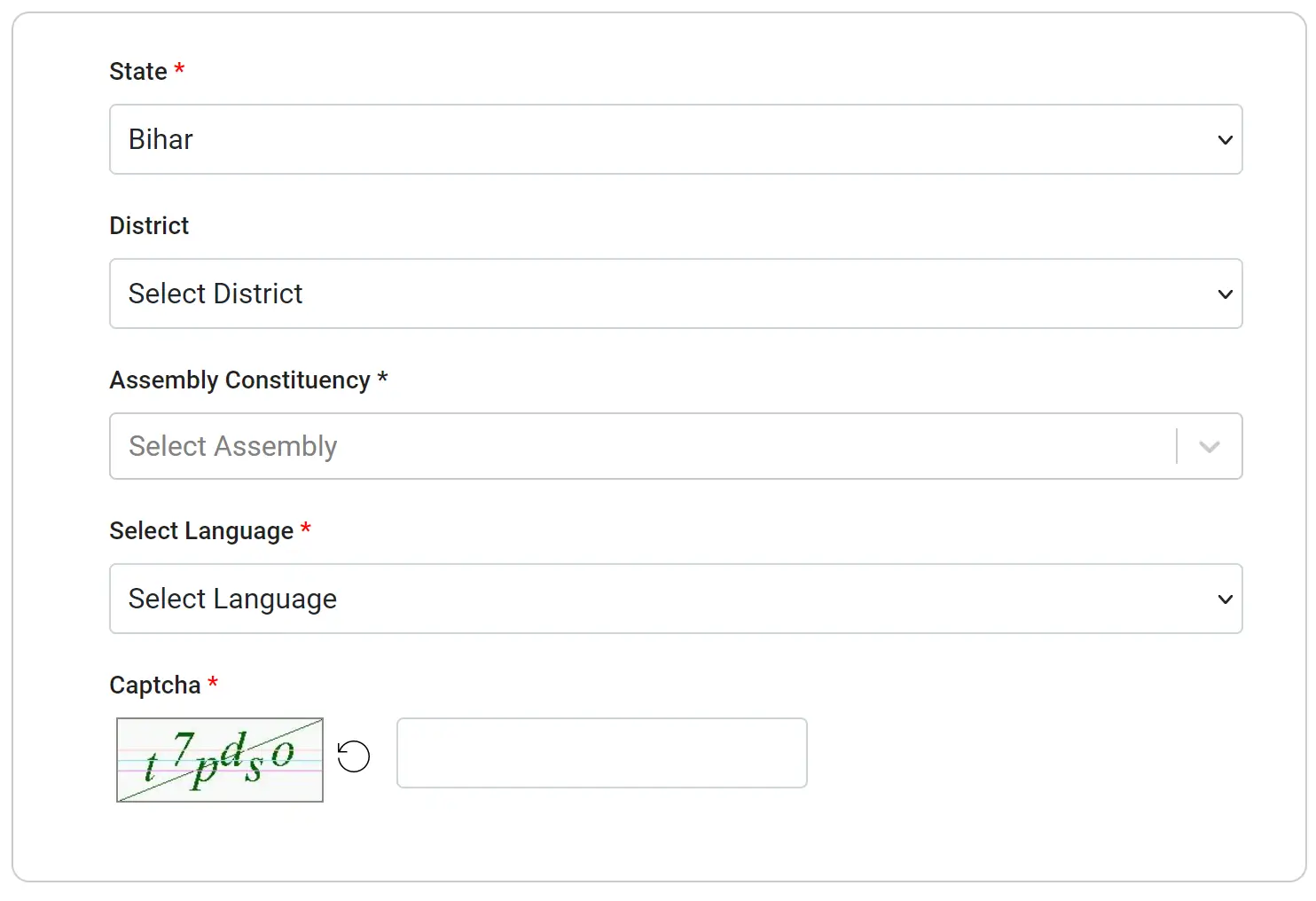
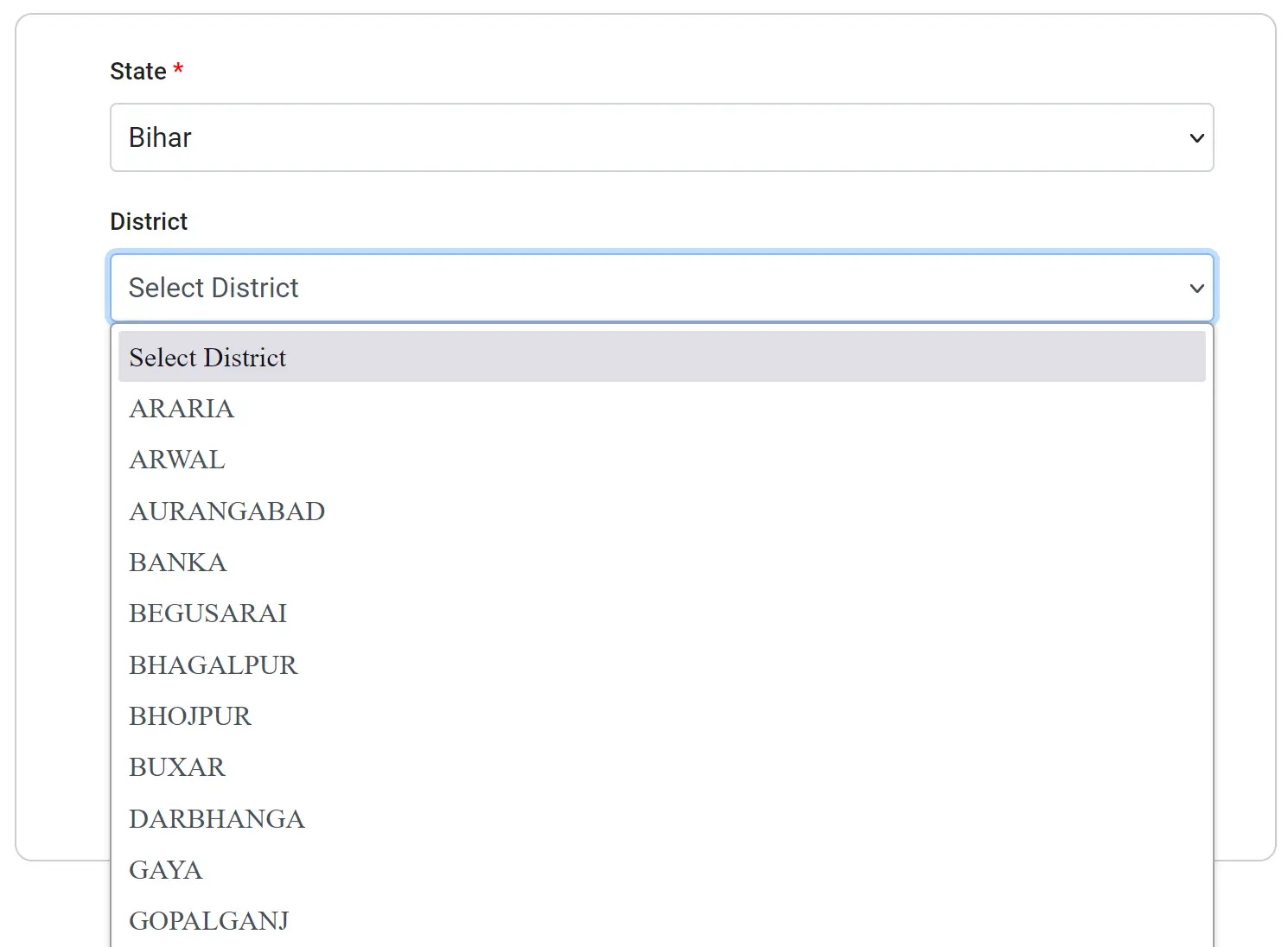
STEP 3 - Select your district from the district drop-down. A district may have several assembly constituencies, so in the next step you have to select your assembly constituency.
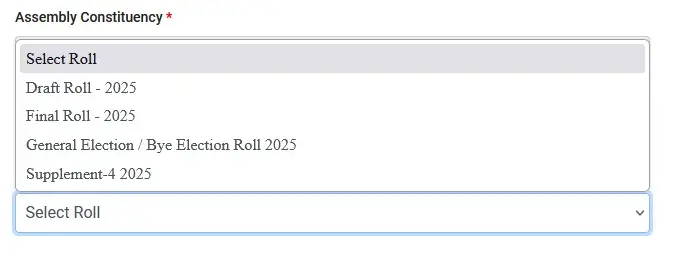
STEP 4 - After selecting the assembly constituency, you will see the polling station or area wise electoral roll PDF download links for both the draft roll and the final roll. Find your polling station or area by looking at the list or by typing in the search box.
STEP 5 - Once the voters list for the selected district and assembly constituency is displayed, click the download link in front of your polling station or area name. Enter the correct captcha text before clicking the download icon.

STEP 6 - Select the preferred location on your computer or phone and save the file as PDF. You can rename the file as per your choice.
| Detail | Information |
|---|---|
| Scheme Name | Bihar Voter List / Electoral Roll |
| Managed By | Chief Electoral Officer (CEO), Bihar |
| Official Website | ceoelection.bihar.gov.in |
| Download Electoral Roll | voters.eci.gov.in/download-eroll |
| Search Name in Voter List | electoralsearch.eci.gov.in |
| Latest Final Roll | SIR Final Roll published on 30 September 2025 |
| Voter Helpline | 1950 |
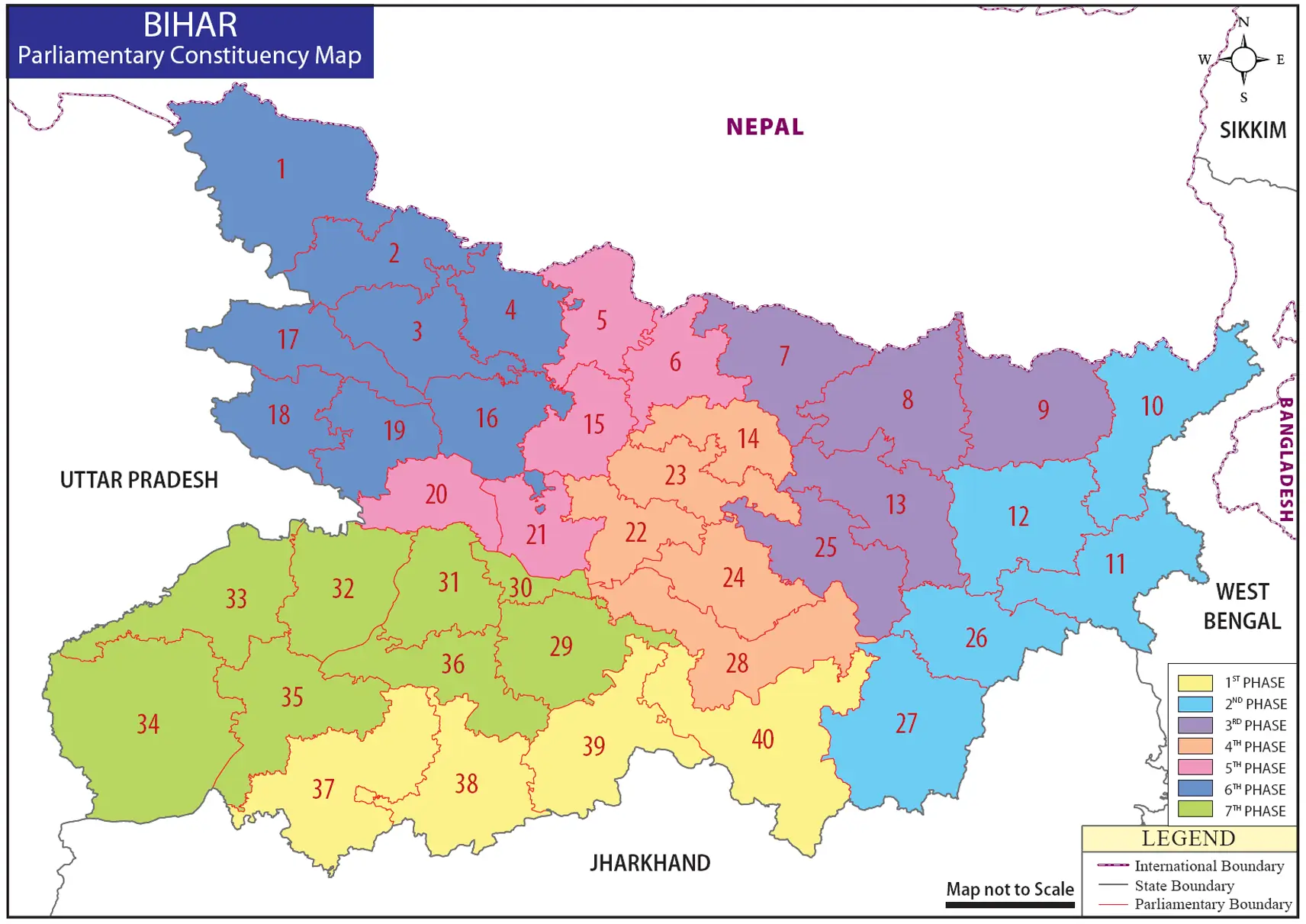
Bihar Parliamentary Constituency Map
Check Name in Bihar Voter List 2026
Here is a simple guide to check your name in the Bihar voters list.
STEP 1 - Check Your Name Using a PDF: Download the Bihar voters list PDF to your computer or mobile device, open the file and search for your name or your father's name in the document.
STEP 2 - Check Your Name Using Your Phone Number: Go to the electoral search section on the Election Commission of India website at ECI Electoral Search.
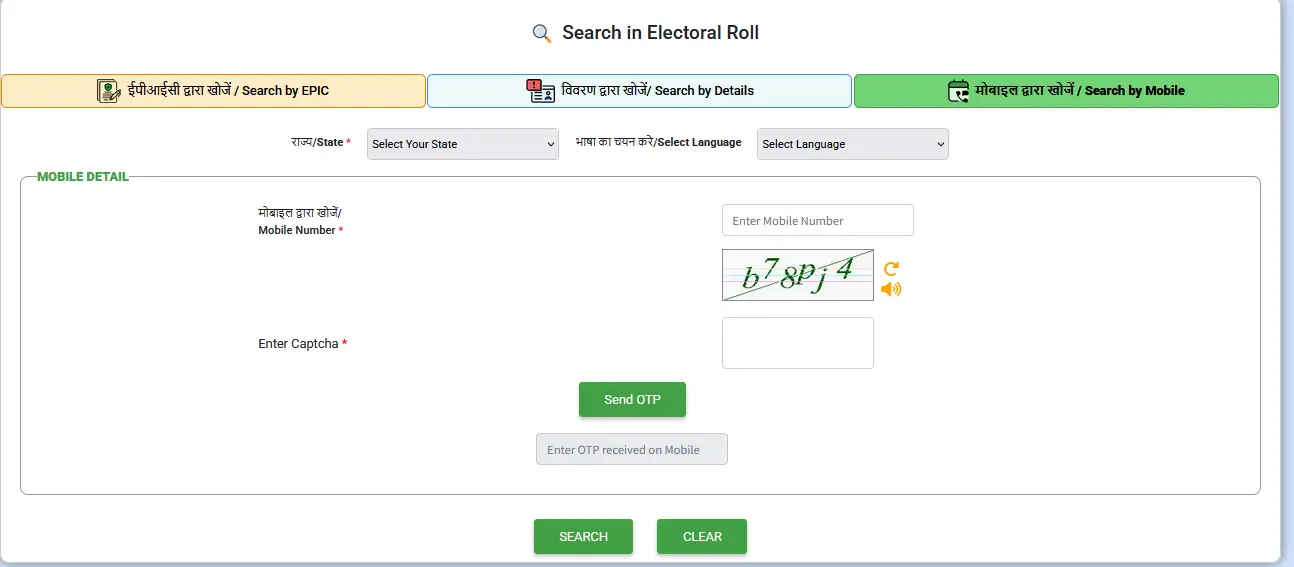
Click on the option that says "मोबाइल द्वारा खोजें / Search by Mobile". Choose your state and preferred language, enter your registered phone number and the captcha text, click on "Send OTP", enter the OTP sent to your phone and click on "Search" to find your name. This method works only if your mobile number is registered with your voter ID card in Form 8. If it is not registered, use a different method.
STEP 3 - Check Your Name Using Your EPIC Number: Visit the same ECI website link.
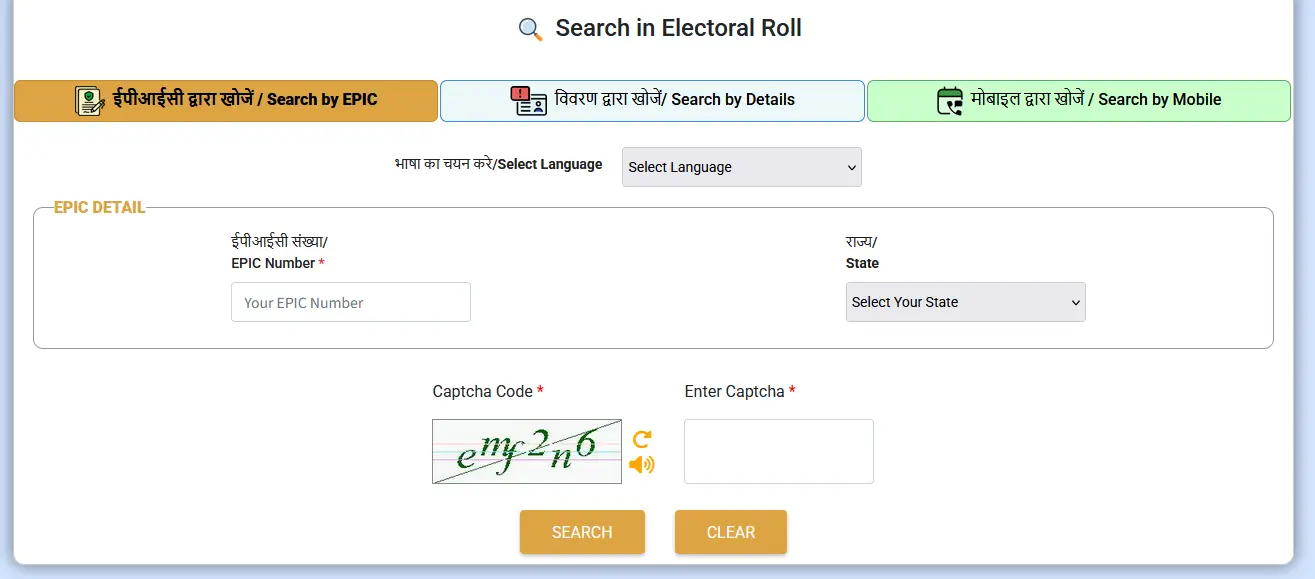
Click on the tab that says "ईपीआईसी द्वारा खोजें / Search by EPIC". Enter your EPIC number (the 10-digit alphanumeric code on your voter ID), select your state (this is optional), enter the captcha text and click "Search". If your EPIC number is correct, your voter details will be displayed. If it is incorrect, you will get a message saying so.
STEP 4 - Check Your Name by Entering Personal Details: On the ECI website, choose the "विवरण द्वारा खोजें / Search by Details" option.
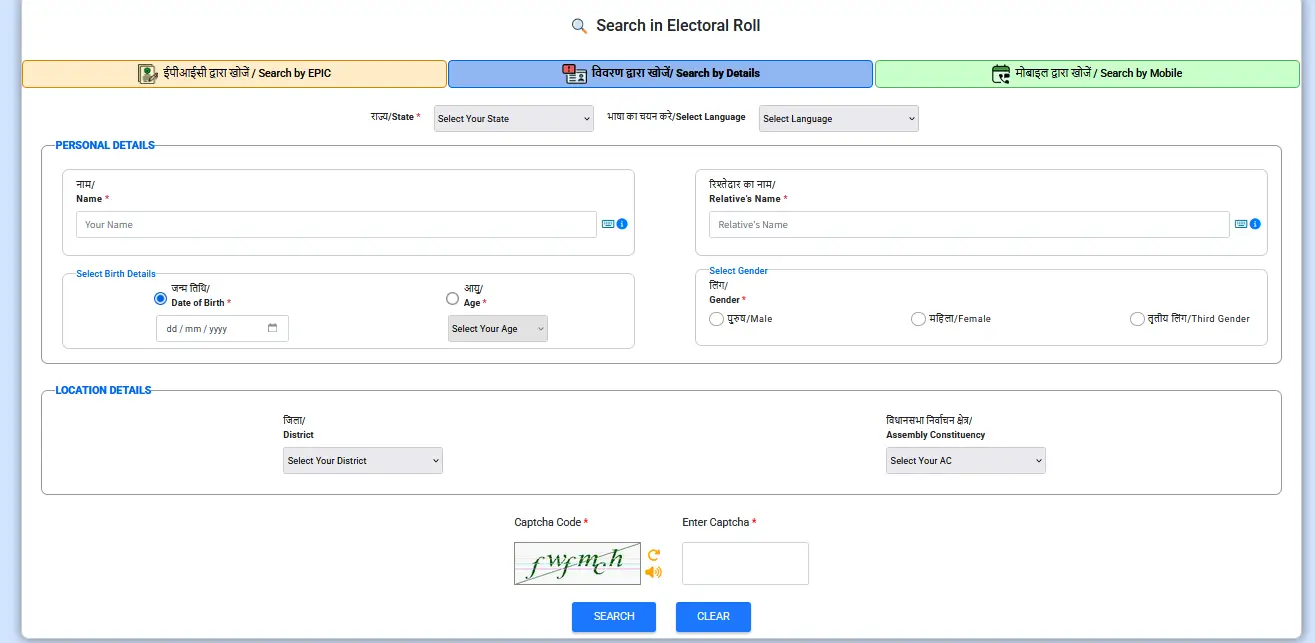
Enter your personal details like name, date of birth, gender, father's name, state and district, then click "Search". If your details match those in the voters list, your voter ID details will appear on the screen.
Voters can also use the CEO Bihar election search page at CEO Bihar Election Search to look up their name in the General Constituency (GC) and Territorial Constituency (TC) rolls by entering the first three characters of their name and their relative's name.
Download Bihar Voter ID Card PDF Online
Here is a simple guide to download your Bihar Voter ID Card online as a PDF with your photo.
STEP 1 - Visit the Official ECI Website: Access the Election Commission of India official website by clicking this link: ECI Official Website.
STEP 2 - Click on the e-EPIC Download Link: On the website, look for the option labeled "e-EPIC Download" and click on it.
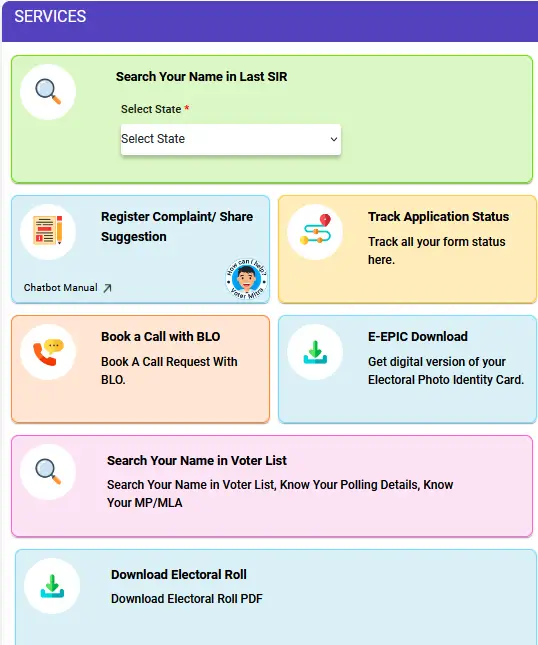
STEP 3 - Login or Sign Up: If you already have an account, enter your username and password on the login page, complete the CAPTCHA verification and click "Log in". If you do not have an account, select "Sign Up" on the login page, provide your mobile number, enter the captcha code to register and follow the prompts to create your account.
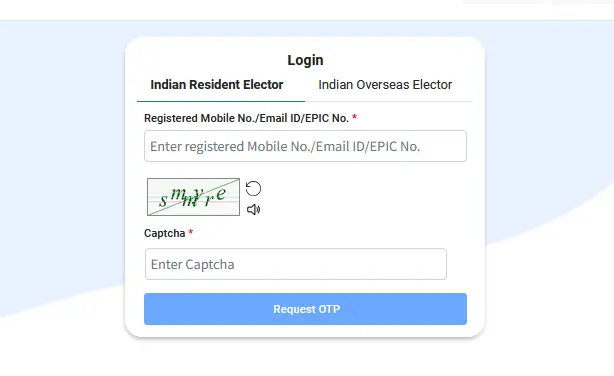
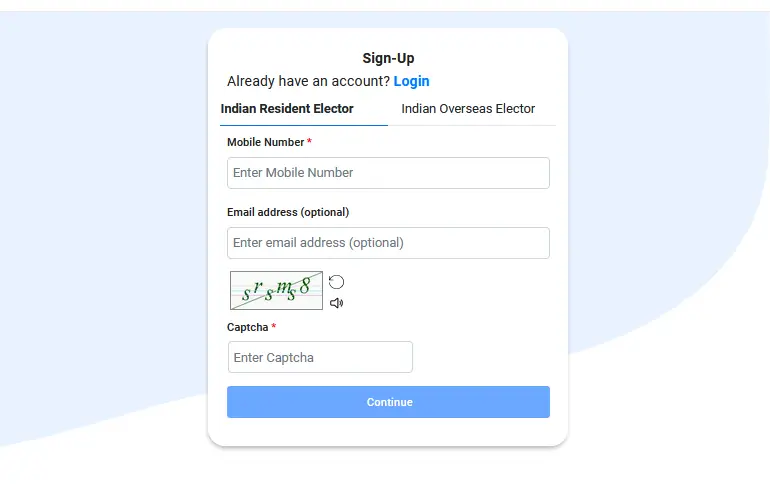
STEP 4 - Enter Your EPIC Number: Type in your 10-digit EPIC number (found on your Voter ID card), select your state from the drop-down menu and click the "SEARCH" button.
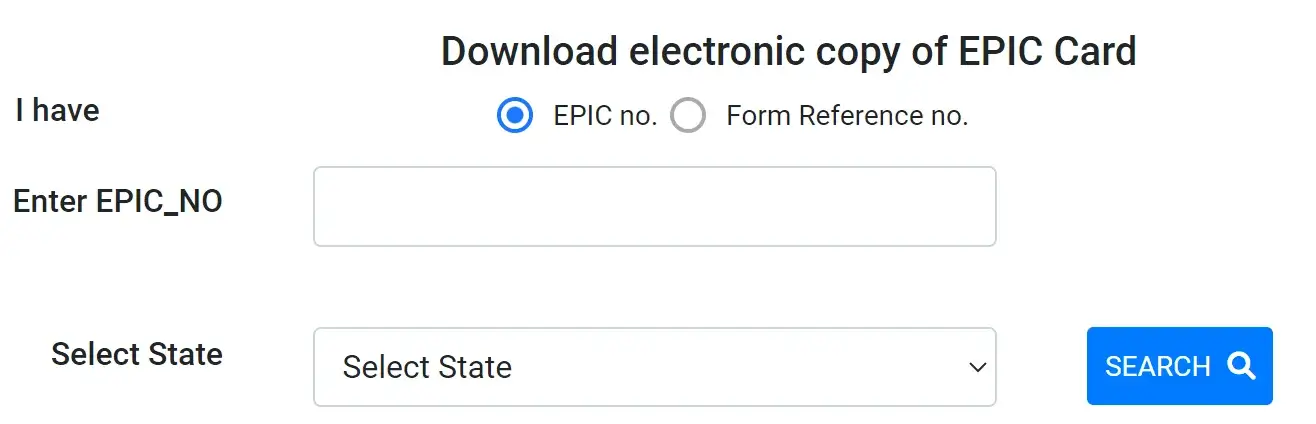
STEP 5 - Review Your Voter ID Details: Your Bihar voter ID details will appear on the screen. Check the information for accuracy and validate your mobile number using the OTP sent to your phone.
STEP 6 - Download Your Voter ID Card: Click on the download icon or button and save the Bihar voter ID Card PDF to your computer or mobile device.
This process allows you to easily download a digital copy of your Bihar Voter ID card from the comfort of your home.
For the neighboring state, the Jharkhand Voter List article explains the same download and name search process.
FAQ's
How can I download the Bihar voter list PDF?
Open voters.eci.gov.in/download-eroll, select Bihar, choose your district and assembly constituency, find your polling station and download the electoral roll PDF after entering the captcha.
What is the official website of CEO Bihar?
The official website of Chief Electoral Officer, Bihar is ceoelection.bihar.gov.in. The older ceobihar.nic.in address is no longer in use.
How can I check my name in the Bihar voter list?
Use the ECI electoral search page at electoralsearch.eci.gov.in and search by mobile number, EPIC number or personal details. You can also use the CEO Bihar election search page.
How can I download my Bihar Voter ID card?
Visit voters.eci.gov.in, click on e-EPIC Download, log in or sign up, enter your EPIC number and download the PDF of your voter ID card.
What is the voter helpline number for Bihar?
The voter helpline number is 1950. Call this number for any help related to the electoral roll and voter ID.
Votar id
OKKK
Imtiyazahmad65223@gmail.com
Village- sarouni, po+via-madhepur , ps- madherpur,dist - madhubani, Bihar
HI SIR I AM RITESH KUMAR RAI FROM BIHAR DIST MADHUBANI JEELA ARER VILAGE NAVKARHI P/O NAVKARHI
I WANT TO APPLY NEW VOTER ID CARD PLEASE HELP ME 8519879445/8074257446 CONTACT ME
your post nice
sarkriresult.co
Great Article Sir Jee.
Lekin Bihar Voter List download karne par Photo nahi dikha raha hai uske liye kya karu?
Yes Mujhe Bhi Yahi Jan na Hai
And Thanku So Much Sir
Respected
Dear sir/madam
I m Gendali devi my new EPIC NO. YTH3087004 my mobile no. +919123251539
I was send request for correction in voter id
My voter id successfully correct. But in 15.2.2021 voter list my old EPIC NO. Printed.
When my new EPIC no. YTH3087004 is show in new voter list. Plz as soon possible issue new updated voter list.
Ok thanks
Sir voter list mai sr no aaya hai lakin epic no nahi diya hai to election lad shakta hu kya
Good
Very Very Nice Information Sir
Thanku So Much
Very Very Helpful Information Sir
Thanku So Much
Thanku Very Sir
Ab Lagta Hai List Check Kar Sakte Hai
Thank you so much for this info, voter list of bihar should be made public for clear understanding.
sir i m from bihar... plz guide me how to apply for voter card
Thanku Sir
Very helpful and informative post
Acha infomation hai sir
Lekin Bihar Voter List download karne par mera ya kisi ka Photo nahi dikha raha hai uske liye kya karu? iske liye kuch bataiye zaroor
nice information
Nice Information sir...
Bahut bahut dhanyawad sir
Votar ID
Like your every post 🙂
thank you for the great list sir
My name is Rashmi. I am looking for one of our working help who left us in 1972.His name is Sonelal Yadav. I am looking for him. I will highly appreciate if I get his contact details through your help.
Best Regards