

 AI Summary
Samagra Kerala is the official digital learning portal of the Kerala General Education Department, hosted at samagra.kite.kerala.gov.in. Kerala Infrastructure and Technology for Education (KITE) built this portal, and State Council of Educational Research and Training (SCERT) Kerala manages the study content on it. Students from class 1 to class 12 can find textbooks, question banks, e-resources, videos and discussion forums in one place.
Samagra portal was started as a support system for online classes and has grown into a full learning platform. In 2026, it was upgraded with Samagra Plus, which adds AI-based quizzes, personalized study plans and entrance exam preparation tools. Teachers can also download the latest SCERT teacher texts and handbooks for classes 1 to 10 from this portal.
What is Kerala Samagra Plus Portal?
Samagra Plus is a single online platform for school education in Kerala. Government of Kerala launched this portal, and IT@School developed it. IT@School later became KITE, which now runs the portal. The portal holds digital learning material like videos on different subjects, solutions to posted questions, discussion forums and more. SCERT Kerala manages the content on this portal.
The main aim is to give quality online education to students. The portal covers resources from class 1 to class 12, making it a single platform for all school-related material. It includes eBooks that students can download, and it allows users to answer questions posted on the platform. Anyone, including students, teachers and experts, can take part.
For students looking for study support, also check the Kerala Vidyajyothi Scheme, which gives financial help to differently-abled students for uniforms and study material.
Objective of Samagra Kerala
The main goal of Samagra Kerala is to make online education easy to access and efficient for students by giving them a platform for digital content. The portal saves students time by keeping everything in one place, which makes studying and learning simpler. This system also aims to improve the literacy rate and increase employment opportunities in the state. Through the portal, students can download eBooks, and their doubts can be answered by experts, making it an interactive learning experience.
samagra.kite.kerala.gov.in Portal Details
| Name Of The Scheme | Samagra Kerala |
| Launched By | Government Of Kerala |
| Developed By | KITE (Kerala Infrastructure and Technology for Education) |
| Beneficiary | Students, teachers and citizens of Kerala |
| Objective | To Provide Online Quality Education To The Students |
| Official Website | https://samagra.kite.kerala.gov.in/ |
| Year | 2026 |
| State | Kerala |
| Mode Of Application | Online |
Benefits and Features of Samagra Kerala
Samagra Kerala portal helps students with their education through digital content like videos, solutions to questions and a discussion forum. KITE built the portal, and SCERT Kerala manages the study material on it. Students can download eBooks and access all their study material from class 1 to class 12 in one place. Public exams are also conducted on the basis of the question bank available on this portal. Anyone, like students, teachers, schools or experts, can answer questions posted on this platform.
Services Provided Through the Samagra Kerala Portal
The portal offers a range of digital services for students and teachers. The main services are given below.
- Edutainment: Fun educational activities for students to learn and enjoy.
- E-Resources for Kids: Digital tools made especially for teaching and learning.
- General Resources: Stories, poems, experiments and videos.
- E-Resources: Extra learning material made to improve teaching and learning.
- Question Pool: A collection of subject-wise questions to help with exams.
- Textbooks: Soft copies of SCERT Kerala textbooks from class 1 to class 12.
Samagra Kerala Registration, Login and Downloads
Procedure To Register On Samagra Plus Kerala Portal
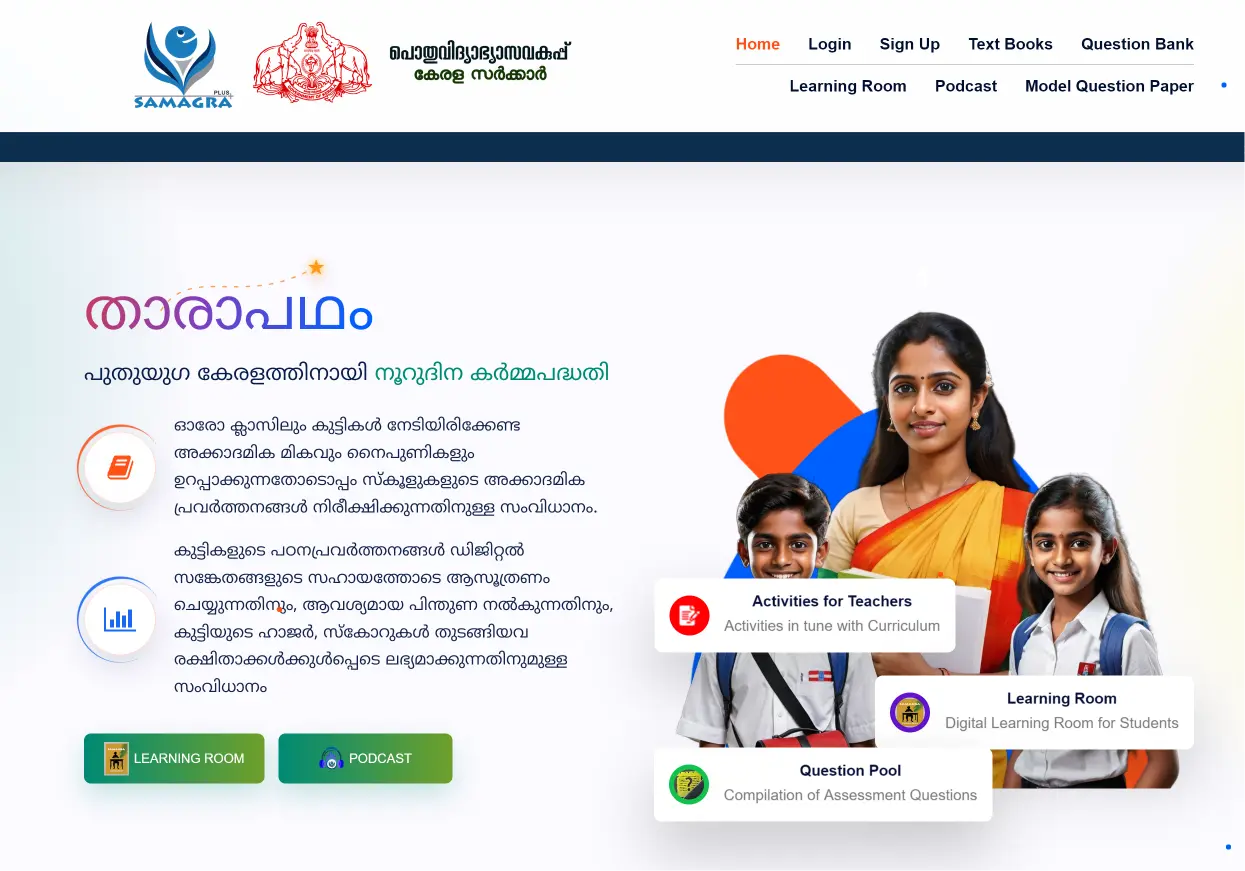
STEP 1 - Go to the official website of the Samagra portal. The home page will open before you.
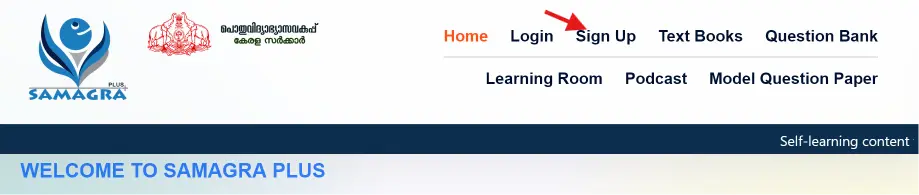
STEP 2 - On the home page, click on the Sign Up option.
STEP 3 - A new page will appear. Enter your name, email id, gender, date of birth, teaching section and password.
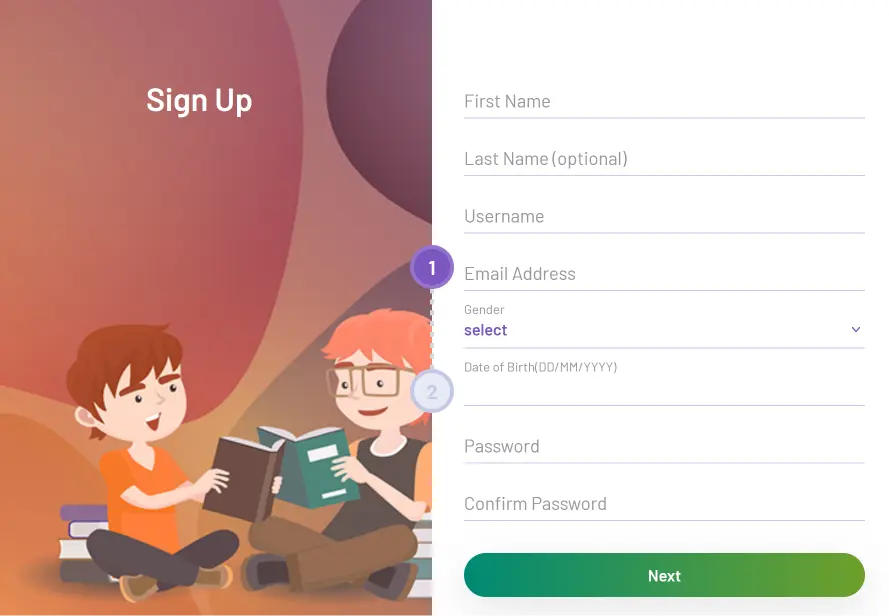
STEP 4 - Click on Next, fill rest of the fields and complete all proceeding steps. By following this procedure, you can register on the Samagra Kerala portal.
How to Log In to Samagra Kerala
STEP 1 - Go to the official Samagra Kerala website and click on the Login option. A login page will appear as below.
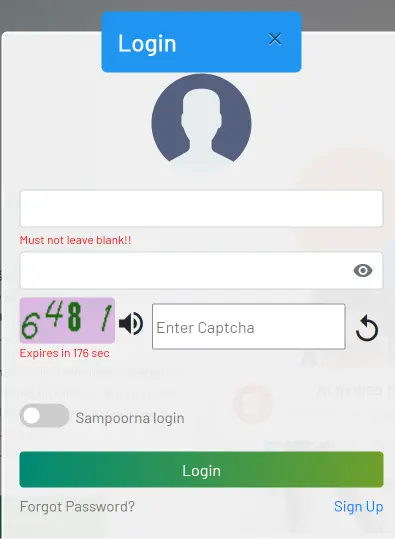
STEP 3 - Enter your username, password and the captcha code.
STEP 4 - Click on Login. Higher secondary and vocational higher secondary students can also log in with their Single Window Admission ID to access Samagra Plus learning services.
Procedure To Do Important Downloads
STEP 1 - Visit the official website of the Samagra portal. The home page will open before you.
STEP 2 - On the home page, click on Downloads.

STEP 3 - A new page will appear with all the downloads. Click on the option of your choice.
STEP 4 - The selected file will start downloading on your device.
View Details About Edutainment
STEP 1 - Go to the official website of the Samagra portal. The home page will open before you.
STEP 2 - On the home page, click on the View option under Edutainment.
STEP 3 - Select medium, standard, subject and topic.
STEP 4 - Click on Submit. The required information will appear before you.
Procedure To Get Details About E Resources For Kids
STEP 1 - Go to the official website of the Samagra portal. The home page will open before you.
STEP 2 - Click on the View option under the E-Resources for Kids section.
STEP 3 - Select medium, standard, subject, chapter and topic.
STEP 4 - Click on Submit. By following this procedure, you can get details about e-resources for kids.
View General Resources
STEP 1 - Visit the official website of the Samagra portal. The home page will open before you.
STEP 2 - On the home page, click on the View option under the General Resources section.
STEP 3 - Select medium, class and subject.
STEP 4 - Click on Search. The required information will appear before you.
Procedure To View E Resources
STEP 1 - Go to the official website of the Samagra portal. The home page will open before you.
STEP 2 - Click on the View option under E-Resources.
STEP 3 - A new page will appear. Select medium, standard, subject, chapter and topic.
STEP 4 - Click on Submit. By following this procedure, you can view e-resources.
Procedure To Download Question Banks
STEP 1 - Go to the official website of the Samagra portal. The home page will open before you.
STEP 2 - On the home page, click on the Question Bank link.
STEP 3 - Select medium, class, subject, and chapter.

STEP 4 - The question bank will appear before you. You can also download these question banks. SCERT Kerala also releases model question papers and answer keys for SSLC and other board exams on this portal, and these follow the latest textbook and syllabus pattern.
Download Textbooks
STEP 1 - Visit the official website of the Samagra portal. The home page will open before you.
STEP 2 - Click on the View option present under the Textbooks section.
STEP 3 - A new page will appear. Select your medium, class and subject.
STEP 4 - Textbooks will appear before you. You can also download these textbooks.
Download SCERT Teacher Texts and Handbooks
SCERT Kerala publishes new teacher texts and handbooks on the Samagra portal to help teachers implement the revised state curriculum. Teachers of classes 1 to 10 in government, aided and unaided schools can download the latest SCERT teacher handbooks for the 2026-27 academic year from this portal. The teacher texts include detailed lesson plans, unit plans, learning objectives, teaching techniques and activities to make classes engaging.
Samagra Plus AI Features
In 2026, the Samagra portal was upgraded with Samagra Plus, an AI-powered learning ecosystem built by KITE. It adds AI-based quizzes, instant feedback, personalized study plans and more than 5,000 AI-generated, teacher-vetted learning resources. The KeyTo Entrance tool provides over 30,000 AI-generated questions to help higher secondary students prepare for entrance exams.
Samagra Plus also includes a Teaching Manual generator, multilingual translation through BHASHINI, an AI chatbot for concept explanation, a quiz generator and speaking practice tools. These features are made for both students and teachers in the classroom.
For more details on the question bank and e-resources, check the Samagra KITE Kerala Portal guide. Teachers and students can also use KITE's KOOL online learning platform for training courses.