

 AI Summary
MP Online Kiosk Registration: MP Online is an e-Governance scheme of Madhya Pradesh Government which handles online delivery of government services to state residents. State government runs MP Online Portal in partnership with IT consultancy firm TCS. MP Online was first set up in July 2006.
With presence in all 51 districts of the state in over 350 tehsils, MPOnline has been helping several government departments deliver their services at the doorstep of common people. State government has also set up more than 28000 Kiosks across the state to deliver government services to the people.
State government is still inviting online applications for allotment of Kiosks. Interested candidates who wish to start a MPOnline Kiosk can fill the online registration form at the official website of MPOnline at mponline.gov.in. Applicant, if found eligible, would be allotted a Kiosk after verification of all the details.
MP Online Kiosk Registration Form & Login at mponline.gov.in
Below is the complete procedure to apply online for Kiosk Allotment. Fill the MP Online Kiosk Registration Form and Make Login as mentioned below:-
STEP 1: Visit the same official MPOnline Limited website at https://www.mponline.gov.in/Portal/Index.aspx
STEP 2: On the homepage scroll over the "Kiosk / For Citizens" section in the main menu and then click at the "Apply for Kiosk" link or directly click this link
STEP 3: Read all the Instructions about the Kiosks carefully and verify the details to apply for New Kiosk Allotment. Afterwards, MP Online Kiosk Registration Form for MPOnline Authorized Kiosk Allotment will appear as shown below:-
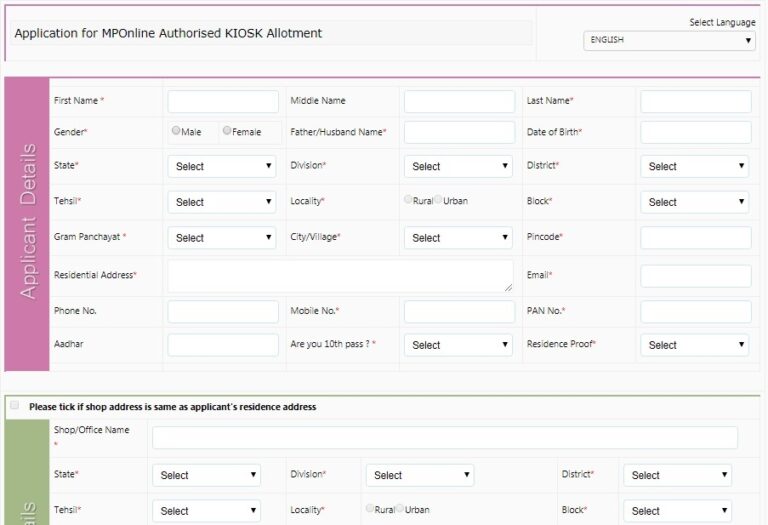
STEP 4: Here candidates can fill the "Applicant Details, Shop Details, Asset Details, Attachment, Disclaimer & Security Check" and click at the "Submit" button.
STEP 5: Finally, candidates can make MP Online Kiosk Login to get allotment for a new MP online kiosk.
Candidates can also see complete procedure to fill the registration form - How to Apply for MP Online Kiosk
MP Online Kiosk Highlights
Quick details about the MP Online Kiosk allotment process are given in the table below:-
| Detail | Information |
|---|---|
| Scheme Name | MP Online Kiosk |
| Launched By | Madhya Pradesh Government (with TCS) |
| Beneficiaries | Citizens of Madhya Pradesh |
| Application Mode | Online |
| Official Website | mponline.gov.in |
Check MP Online Kiosk Application Status
All the candidates can now check the Online Registration Status using the application number and take a printout of the completed registration form using the links given below:-
STEP 1: Check MP Online Kiosk Registration Status using "Kiosk Registration Fee Payment" link or directly click this link to open page as shown below:-
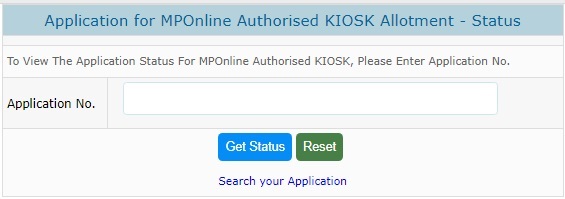
STEP 2: Here applicants can enter their application number and click at the "Get Status" button to check MP Kiosk online application status.
Check Payment Status - Verify / Re-verify Payment Details
Applicants can now check their MP kiosk online payment status online at the official website. Candidates can verify or re-verify their payment details using the links given here:-
- Check Payment Status - Click Here
- Candidates can check the Payment Re-verification Status through the link - Payment Re-verification
Print MP Online Kiosk Apply Online Form (Duplicate Kiosk Form)
Candidates can now print the MP kiosk online application form at the same official website. At the homepage, go to the "Kiosk / For Citizens" section and then click at the "Print Application" link. The direct link for Duplicate MP online kiosk form generation is given here: http://www.mponline.gov.in/Portal/UserInterface/KIOSK/frmDuplicateKioskGeneration.aspx
The MP kiosk online re-print apply form page will appear as shown below:-
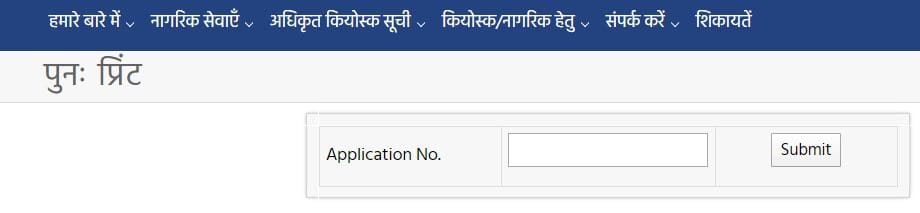
Here applicants can enter the application number to reprint the MP online kiosk application form.
People can also find out the list of authorized kiosks across the state in the MP Online Authorized Kiosk List.
MPOnline Kiosk Helpline Number
In case of any query, candidates can contact the officials through the following helpline numbers:-
Customer Care (8:30 AM - 08:30 PM): 0755-6720200
MPOnline Office Telephone Number: 0755 6720222
For Kiosk related information: 0755-6644830-832
References
All the candidates can Make Complaints using the link - MP Online Complaint / Grievance
St sc catigri walo ka scholarship yojna ke fom kyo nhi bhare ja rhe he dir
MP Online kiosk SBI CSC Registration karana chahta hoon Poori jankari karayen
send your contact no. shribalaji.csc@gmail.com
Sir ji mujhe SBI ki kiosk chahiye process bataye
Mujhe CSC kholna hai please process bataiye v help kijiye taki main apna rojgar suru kar saku
Parvati Lodhi, check the process to open your own Common Service Centre - Apna CSC Online Registration