

 AI Summary
MPOnline Limited, the e-governance arm of Madhya Pradesh government, delivers online services of many state departments directly to citizens. The network now covers all 55 districts and more than 428 tehsils through thousands of Authorized Kiosks and Common Service Centers (CSCs). MP Online Authorized Kiosk List 2026 is available on the official portal, and people can print or download the MPOnline Kiosk Owner List. Citizens can locate kiosks in Indore, Bhopal, Vidisha and other cities at mponline.gov.in.
MPOnline Ltd. provides e-services like college and university admission, online ticket booking for national parks in MP, bill payment, and online application for government jobs. People can fill the MP Online Kiosk Registration Form / Login for allotment of a new franchise and check status on the official MP Online Portal. This portal is a joint venture of MP government and Tata Consultancy Services (TCS).
MPOnline Portal serves all areas of the state so that people in small towns and villages can also use government services. Citizens can check the nearby service centers in the mponline kiosk list and contact officials for help or complaints. The complete MP Online Authorized Kiosk List helps people locate kiosks near them in major cities like Indore, Bhopal, Vidisha at mponline.gov.in.
The complete procedure to locate an authorized kiosk in your city and to see the authorized kiosk list is given below.
| Detail | Information |
|---|---|
| Scheme Name | MP Online Authorized Kiosk List |
| State | Madhya Pradesh |
| Run By | MPOnline Limited (MP Government and TCS joint venture) |
| Coverage | All 55 districts and more than 428 tehsils |
| Kiosk Network | Thousands of Authorized Kiosks / Common Service Centers |
| Official Website | mponline.gov.in |
| Helpline | 0755-6720200 |
STEP 1 - Visit the official website https://www.mponline.gov.in/portal/
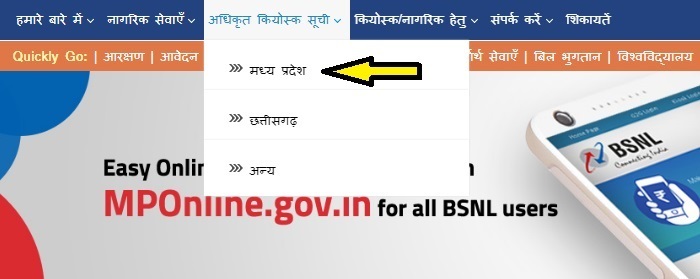
STEP 2 - On the homepage, scroll over the "Authorized Kiosk List" tab in the menu and then click on the "Madhya Pradesh" section as shown in the figure.
STEP 3 - Direct link: candidates can directly check the authorized kiosk list through the link given here - https://www.mponline.gov.in/portal/UserInterface/KIOSK/AuthKIOSKList_new.aspx

STEP 4 - Here candidates have to select State (Madhya Pradesh), Division and District, then type any detail about the nearest kiosk and click the "Search" button to open the mponline kiosk list. A representative image of the kiosk list is given below.
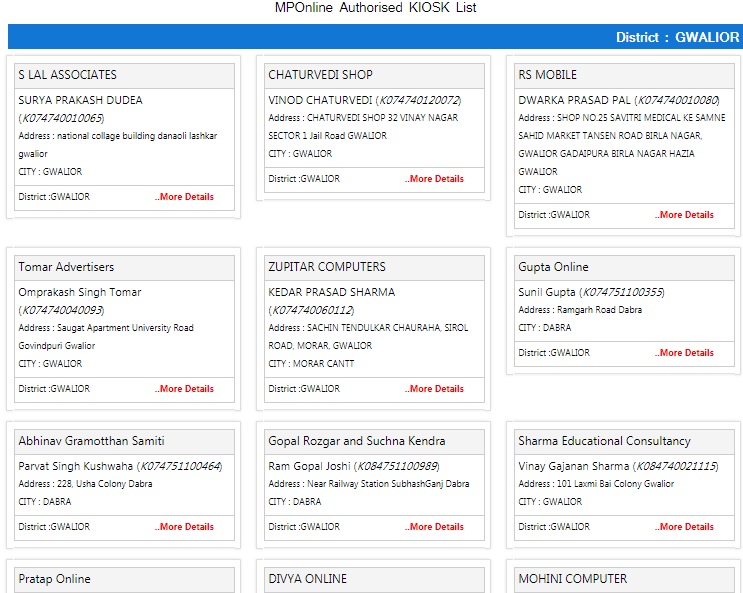
STEP 5 - Candidates can now see the complete list after entering the above details. Citizens can also see kiosk lists of major divisions like Indore, Bhopal, Vidisha, Gwalior, Ujjain, Sagar, Jabalpur, Rewa, Chambal, Narmadapuram and Shahdol in MP.
Download MP Online Kiosk Owner List
STEP 1 - Open the authorized kiosk list page on the official portal using the direct link - https://www.mponline.gov.in/portal/UserInterface/KIOSK/AuthKIOSKList_new.aspx
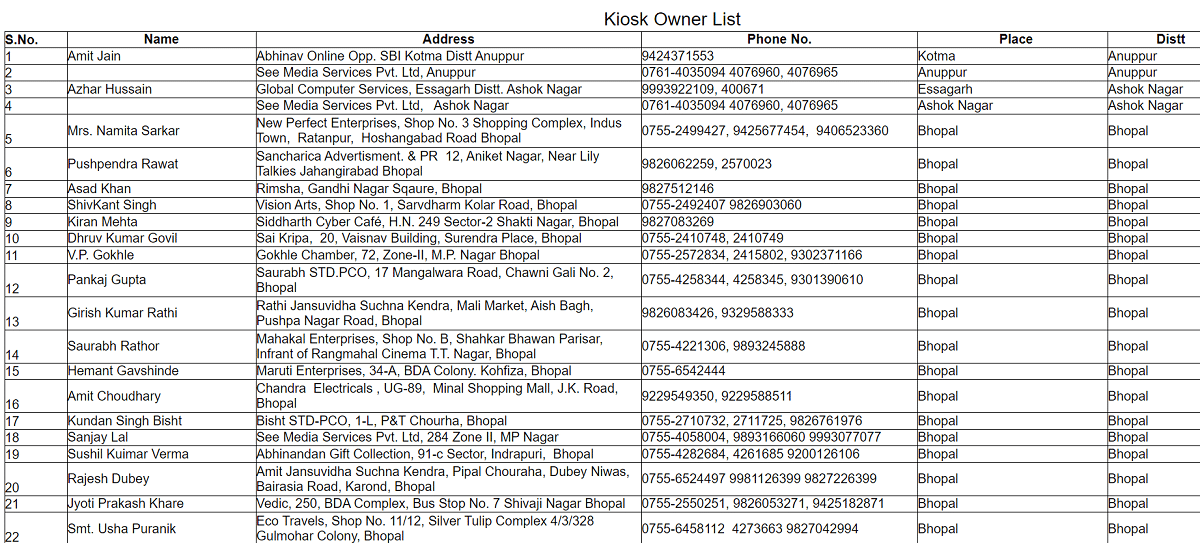
STEP 2 - The MPOnline Kiosk Owner List page will open as shown below.
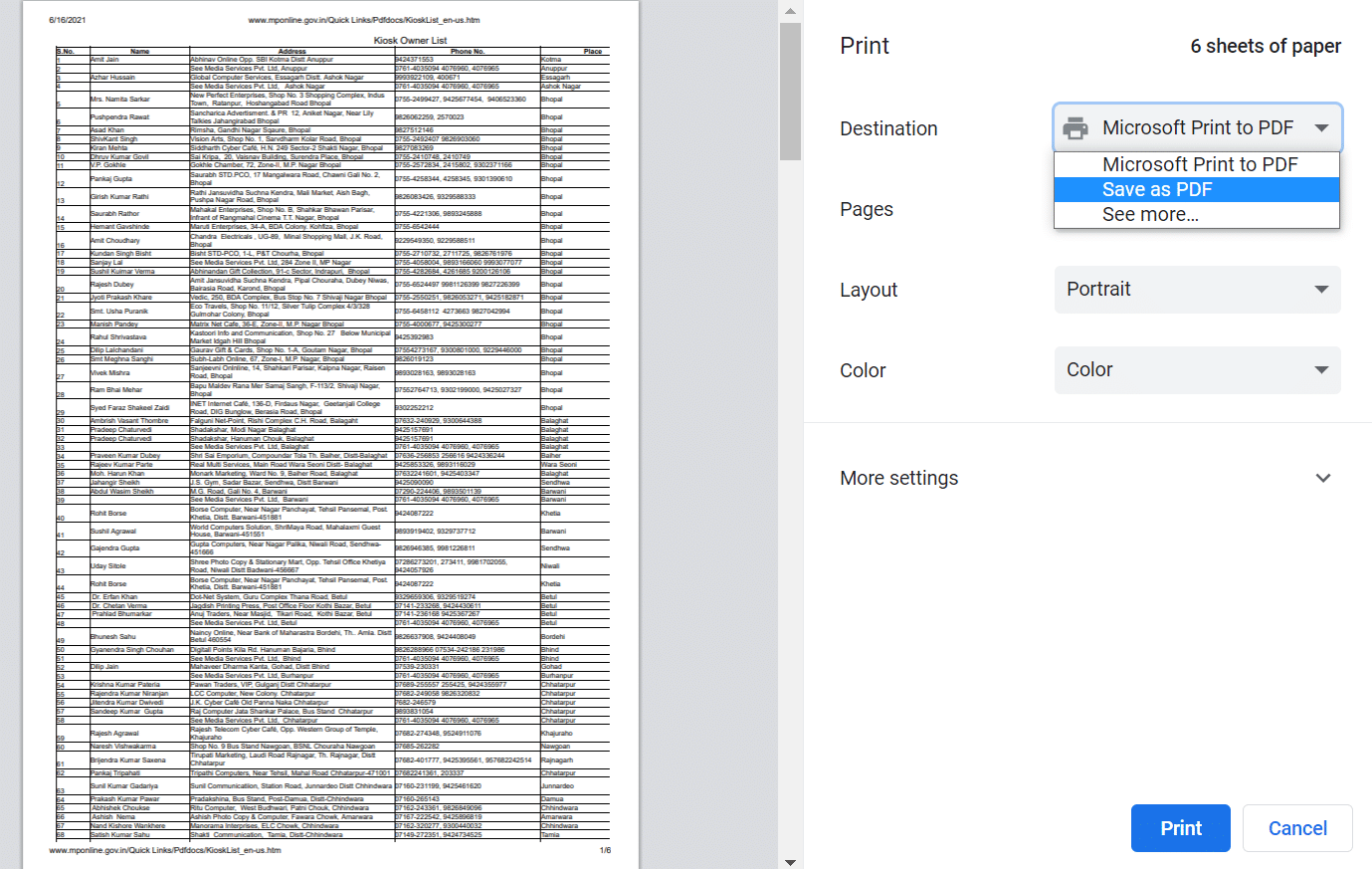
STEP 3 - All candidates can press "CTRL+P" buttons on their desktop or laptop to open the print page. Then select the destination as "Save as PDF" to download MP Online Kiosk Owner List.
MPOnline Kiosk Helpline No.
Customer Care (8:30 am to 7:30 pm) - 0755-6720200
MPOnline Office Contact Number - 0755 6720222
For Kiosk Related Details - 0755-6644830-832
New Kiosk Application and Status
People who want to open a new MPOnline kiosk can fill the online application for authorized kiosk allotment at MPOnline Authorized Kiosk Application. Applicants can also check the status of their kiosk application at MPOnline Kiosk Application Status.
Complaints and Help
All candidates can make complaints or get help using the official helpdesk link - https://helpdesk.mponline.gov.in/
Indore se jabalpur