

 AI Summary
e Sanjeevani OPD is the National Telemedicine Service of Ministry of Health and Family Welfare, Central govt. that lets patients get a free doctor consultation from home through a video call. Registration and token booking now happen on the official portal at esanjeevani.mohfw.gov.in.
eSanjeevani has grown into one of the world's largest telemedicine platforms. Health Minister has told Parliament that the platform has crossed 43 crore telemedicine consultations. The OPD service connects a patient directly to a doctor, while the doctor-to-doctor model runs inside the Ayushman Bharat Health and Wellness Centres under Ayushman Bharat Scheme.
The service is free, and the doctor sends an e prescription after the video call. Patients can also link their ABHA ID to build a single digital health record. This article explains the steps to make e Sanjeevani OPD registration on the online portal and app.
e Sanjeevani OPD Registration at Portal
There are 5 steps to make e Sanjeevani OPD registration at the online portal - registration, login, token generation, waiting room and consultation. Each step is explained below in detail.
eSanjeevani OPD Registration and Login
STEP 1 - Visit the official website at https://esanjeevani.mohfw.gov.in and click on the "Patient Registration" tab on the homepage.

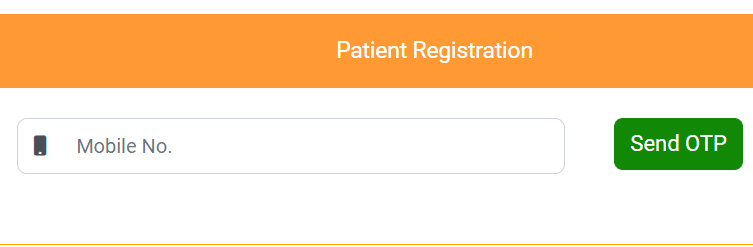
STEP 2 - Enter the mobile number and click on "Send OTP". Verify the OTP to open the e Sanjeevani OPD patient registration form.
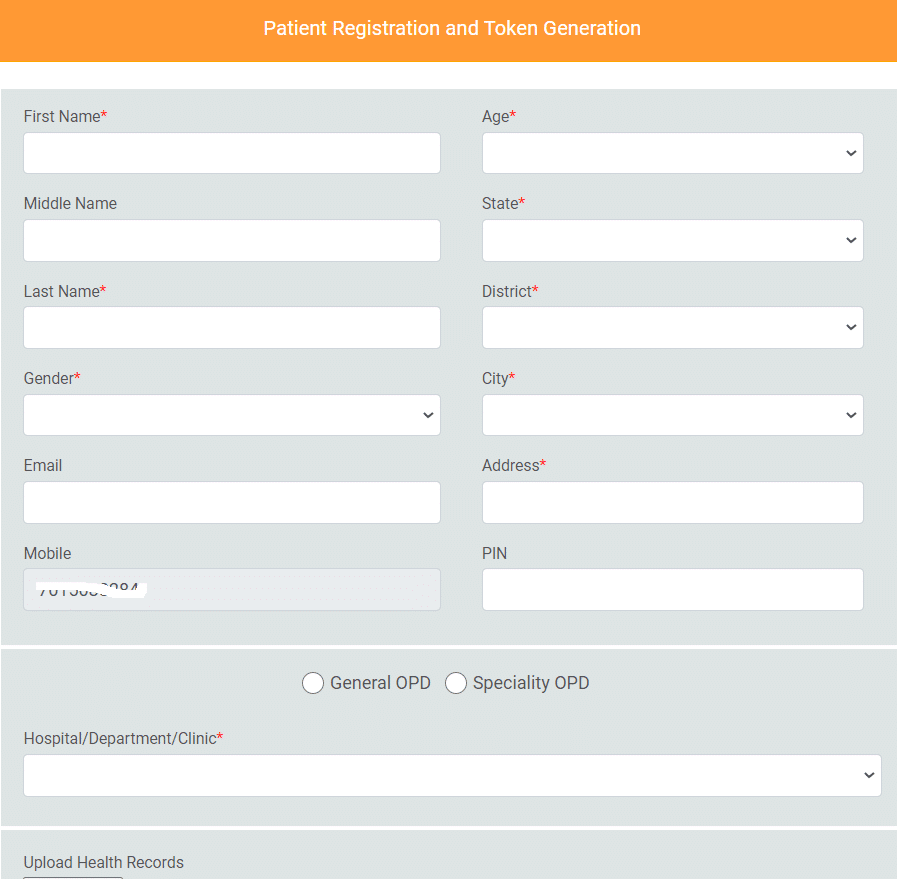
STEP 3 - Fill in the basic details like name, age, gender and address, and set a password for future logins. This is a one-time registration, so there is no need to register again. If the password is lost, the "Forgot Password" option on the login page helps.
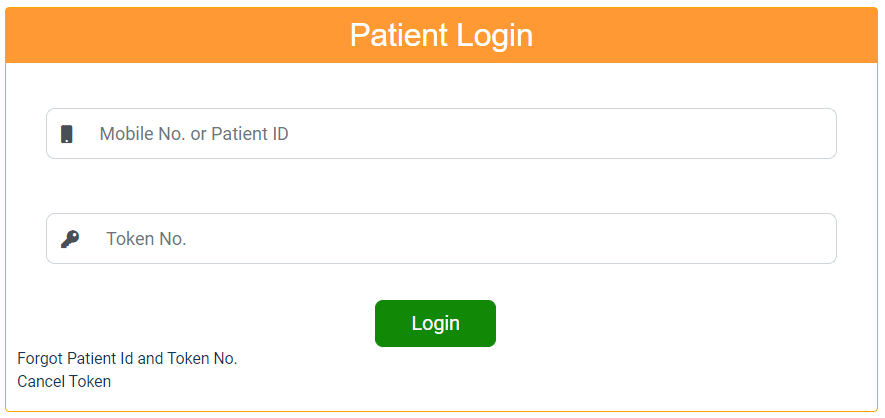
STEP 4 - Login with the patient ID or mobile number and password. Select the state, choose a specialty like General Medicine, Gynecology, Pediatrics, Dermatology or Mental Health, and click on "Get Token".
STEP 5 - The portal shows the queue position and the wait time. When it is the turn, a notification arrives and the patient must join the video call within the given window.
If the "No Doctor Available" message appears, it is usually a timing issue. Each state runs its OPD only during set hours, mostly on weekday mornings. Trying between 9:30 and 12:30 on a weekday is the best bet.
| Detail | Information |
|---|---|
| Scheme Name | e Sanjeevani OPD |
| Launched By | Ministry of Health and Family Welfare |
| Beneficiaries | All citizens of India |
| Benefit | Free video consultation and e prescription |
| Application Mode | Online |
| Official Website | esanjeevani.mohfw.gov.in |
| Helpline | 1800-11-8181 |
e Sanjeevani OPD Waiting Room and Consultation
Here is the procedure followed at the e Sanjeevani OPD waiting room and consultation with the doctor.
Wait
- eSanjeevani OPD assigns a doctor to the patient. The wait depends on the length of the queue.
- As the doctor is assigned, the "CALL NOW" button gets activated.
- User has to click "CALL NOW" within the given time window.
- Upon clicking "CALL NOW", the doctor shows up in video.
Consultation
- Patient consults the doctor.
- During the consultation, the doctor can view the patient's health records if uploaded.
- The doctor prepares an electronic prescription (e prescription).
- At the end of the consultation, the doctor sends the e prescription and closes the call.
- The e prescription shows up on the patient's end.
- Patient logs out after saving or printing the received e prescription.
After the call, the e prescription appears under "Consultation History" or "My Consultations" in the patient account. It can take a couple of hours to show up, and it downloads as a PDF. If nothing appears after about a day, the "Report Issue" option or the helpline is the next move.
Salient Features of e Sanjeevani OPD
The main features of this citizen friendly web-based National Teleconsultation Service are as follows.
- Patient registration and token generation.
- Queue management with live wait time.
- Audio-video consultation with a government doctor.
- Free e prescription after the call.
- SMS and email notifications.
- ABHA ID linking for a single digital health record.
- Free service for all citizens.
How to Download e Sanjeevani App from Google Play Store
e Sanjeevani app is available on Google Play Store for android users. The direct link to download the app is eSanjeevani - MoHFW on Google Play.
The official e Sanjeevani app download page at Google Play Store will open as shown below.
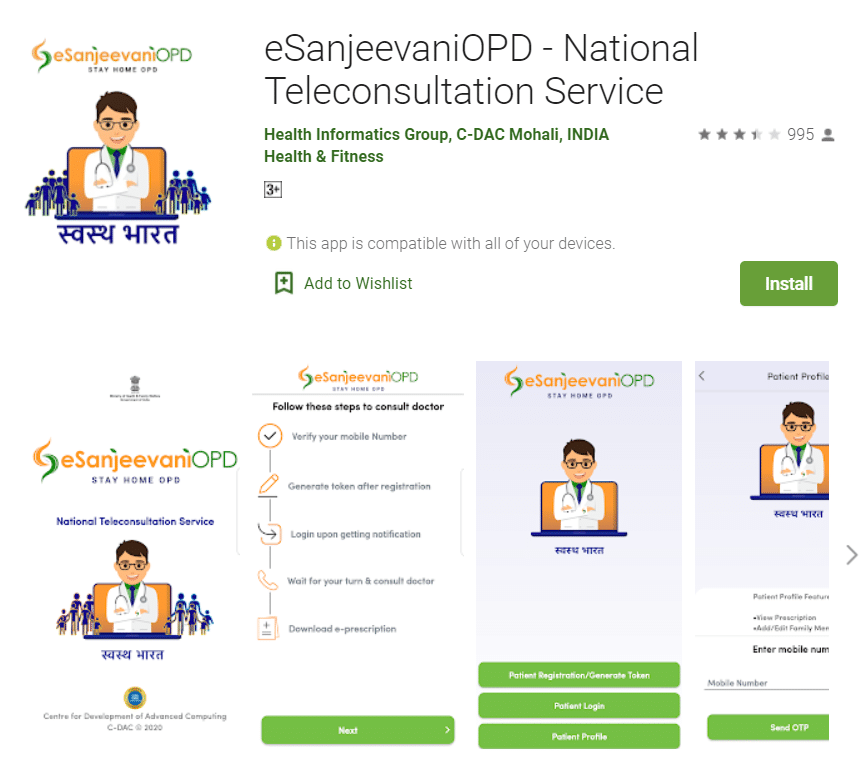
Upon clicking on the "Install" button, the e Sanjeevani app will start downloading on the smartphone. The OPD patient service can also be used directly on the portal at esanjeevani.mohfw.gov.in.
Salient Features of eSanjeevani Mobile App for Android Users
Here are the important features of e Sanjeevani mobile app for android users.
| Size | 31 MB |
| Current Version | 1.0.31 |
| Requires Android | 7.0 and up |
| Offered by | Health Informatics Group, C-DAC, Mohali, India |
| Developer ID | esanjeevaniopd@cdac.in |
Check Patient Profile and Timings at eSanjeevani Portal
Patients can check their profile to download the prescription and add or edit family member details. The timings can be checked on a state-wise basis at the e Sanjeevani portal at esanjeevani.mohfw.gov.in.
Frequently Asked Questions (FAQ's)
What is the use of e Sanjeevani OPD Registration
To get consultation & e prescription from doctors just like in OPD while staying at home
From where can we make e Sanjeevani OPD Registration
At the esanjeevani.mohfw.gov.in Portal or e Sanjeevani App
Do I have to pay for National Tele-consultation Service
No, you don't have to pay anything to anybody for using National Tele-consultation Service
Can I generate 2 tokens on one day
A new token cannot be generated until the existing token is used. Yet, there is no provision to cancel your token.
Can I Share my Existing Health Records with Doctor
Yes, at the time of registration you can upload up to three electronic or digital health records. During the teleconsultation doctor will be able to view the health records uploaded by you.
What is the procedure to use e Sanjeevani OPD App
Use of e Sanjeevani OPD involves Registration, Token, Login, Wait, Consultation and e Prescription
For how long token will remain valid
Token once generated will be valid till it is consumed, i.e. till the ePrescription is generated after the teleconsultation. However, if the token is not used or consumed it will automatically expire at the end of the day.
For more FAQ's, visit the official portal at esanjeevani.mohfw.gov.in. In case of any query, call the toll-free helpline at 1800-11-8181.
I think that blog is very good various article. very good article.
how to doctor registration ???