
Central government runs e Sahaj Portal at esahaj.gov.in for online security clearance applications in the aviation sector. Organisations, firms, companies and individuals working in aviation can register on the portal, submit their application from anywhere and check status of their request without visiting any office.
Portal is designed, developed and hosted by National Informatics Centre (NIC), and its content is owned by Ministry of Civil Aviation. Applications submitted here are reviewed by Directorate General of Civil Aviation (DGCA) and Bureau of Civil Aviation Security (BCAS), which helps in faster and clear processing of security clearance requests for the aviation sector.
e Sahaj Portal Registration Process 2026
Registration on e Sahaj Portal is simple and takes only a few steps. Applicants need a valid mobile number and email ID handy before starting, since both are used for verification during signup.
STEP 1 - Go to the official website at esahaj.gov.in and check the homepage for the current registration link.
STEP 2 - Click on the "Registration" link present in the header of the homepage.
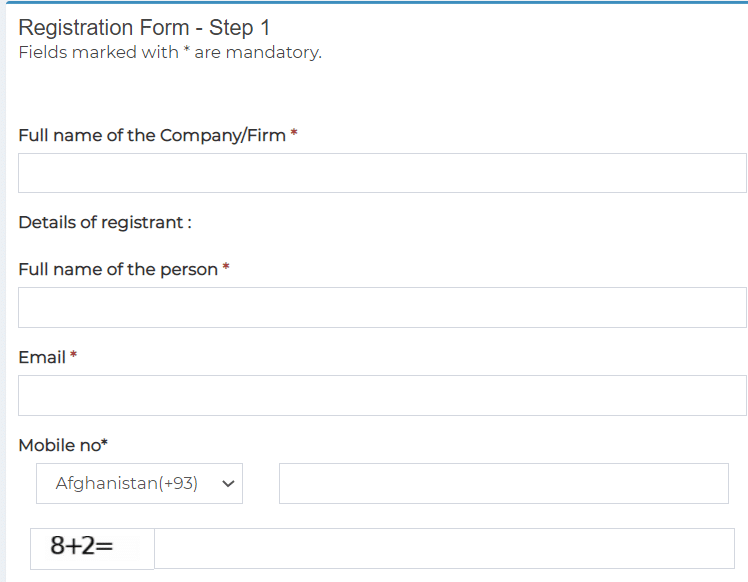
STEP 3 - This form is used for online registration of organizations, firms or companies seeking security clearance in the aviation sector. Registration is done once by the authorized person, who gets verified through OTP. A valid ID proof also needs to be attached at this step.
STEP 4 - If an individual is applying for security clearance, registration needs to be completed by that person directly on the portal, not through a third party.
STEP 5 - After registration, an email verification link is sent to the applicant's email ID. Once verification is complete, a registration ID (login ID) is sent by email, while the password is sent to the registered mobile number.
After logging in, applicants need to fill and submit the applicable security clearance form on the portal. User Help Manual, available on the Guidelines page, explains the types of clearances and features available. Once the online application is submitted, applicants should take a printout of the submitted form and check it carefully for any mistakes.
Scope of e Sahaj Portal Security Clearances
e Sahaj Portal is currently used for security clearances related to civil aviation only. This is a change from the wider set of ministries covered earlier, and the portal now handles clearance requests connected with aviation activity, such as ground handling, cargo operations and other roles that need prior security clearance before an organisation or individual can start work.
Ministry of Home Affairs remains the nodal ministry for security clearance across various sensitive sectors before issue of licence, permit or contract to companies, bidders or individuals by the administrative ministry concerned. National security clearance helps assess potential security and economic threats, and gives a risk view before investment and project proposals are cleared in key sectors, in line with the goal of Ease of Doing Business.
| Detail | Information |
|---|---|
| Portal Name | e Sahaj Security Clearance Online Portal |
| Owned By | Ministry of Civil Aviation |
| Developed By | National Informatics Centre (NIC) |
| Current Scope | Security clearance for civil aviation sector |
| Reviewing Bodies | DGCA and BCAS |
| Application Mode | Online |
| Official Website | esahaj.gov.in |
Guidelines for e Sahaj Portal
Applicants should keep a few points in mind while using e Sahaj Portal for aviation security clearance:-
- Portal allows organizations, firms, companies and individuals connected to the aviation sector to apply for security clearance from anywhere over the Internet, without visiting any government office in person.
- User Help Manual on the Guidelines page explains the types of clearances, along with the facilities and features available on the portal, and can be downloaded from esahaj.gov.in/guidelinesPpt.
- After submitting the application, applicants must take a printout of the form and check it for errors. Any discrepancy should be reported to the Technical Support Team of eSahaj Portal or MoCA at support-esahaj[at]gov[dot]in.
- For any technical issue, applicants can contact the support team using the phone number listed on the Contact Us page at esahaj.gov.in/contactus.
Portal remains compatible with Mozilla Firefox, Safari and Google Chrome on both desktop and mobile browsers, and a video tutorial is also available on the Guidelines page to help first-time applicants fill the form correctly.
FAQ's
What is e Sahaj Portal used for now?
Portal is currently used for online security clearance applications connected with the civil aviation sector, reviewed by DGCA and BCAS.
Who can register on esahaj.gov.in?
Organizations, firms, companies and individuals working in or seeking to work in the aviation sector can register and apply for security clearance.
How will applicants get their login details?
After successful registration and email verification, registration ID is sent by email and password is sent to the registered mobile number.
Where to report a problem with an application?
Applicants can email the Technical Support Team of eSahaj Portal or MoCA at support-esahaj[at]gov[dot]in, or use the contact number on the Contact Us page of esahaj.gov.in.
we are trying to open web site to apply security clearance but we are unable to open even the page will reply timeout..
pls do the needfull.
the site seems to be down. we are also trying to open the site to apply for security clearance but the page does not open.
We are trying to Open the web site to check the status but the page does not open
We have applied for security clearance for Kannur international Airport, Kannur. Please let us know present status
We are also trying to open it on daily basis to check the application status but not working. Please do the needful.