
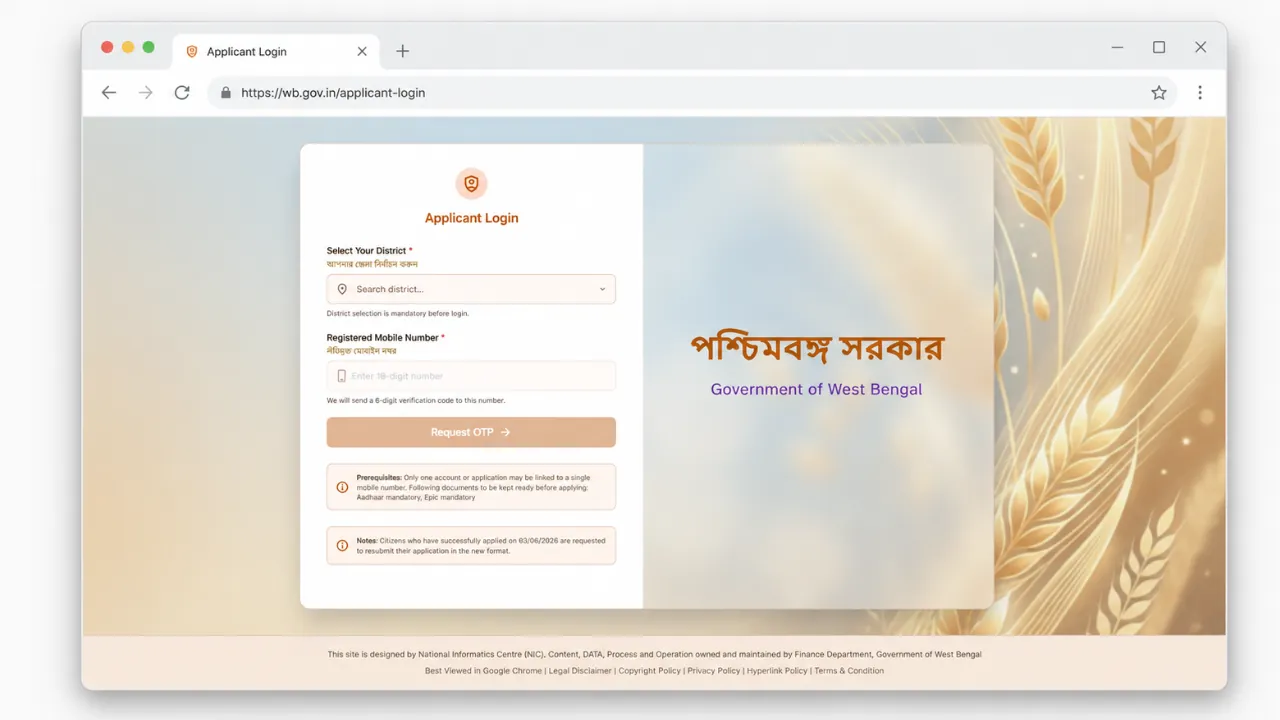
Annapurna Yojana online application is now open on the new West Bengal social registry citizen portal. Lakhs of women who are looking for the official website link to login, and check their status or verification can now visit the official portal at socialregistry.wb.gov.in. Here any women applying for herself or anyone on her behalf can can select the district, enter mobile number, fill the captcha and request an OTP to login.
Annapurna Bhandar scheme gives ₹3,000 per month to eligible women in West Bengal, directly into their Aadhaar linked bank account through DBT. Around 28.25 lakh women have already started getting the money, and the government is now collecting fresh family level data through this new portal. Below is the correct official link, the full login and apply steps, and how to check your verification and payment status on the official Annapurna yojana portal.
LATEST UPDATE: Applicant login & new application option has been disabled on the official portal by the government, however, once it is enabled again, you can follow the below process.
The official Annapurna Yojana citizen portal link is https://socialregistry.wb.gov.in/citizen/.
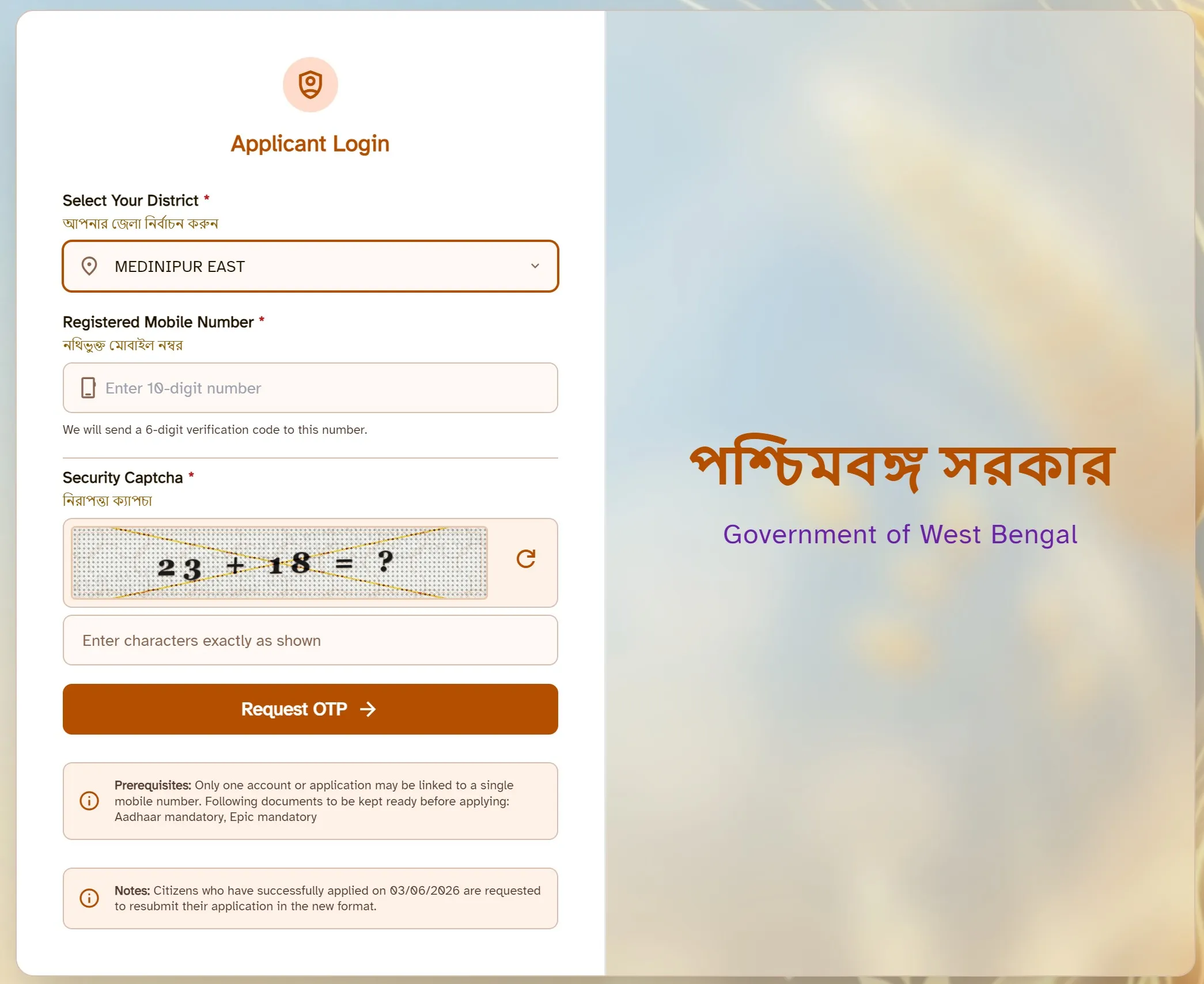
When you open the portal, you will see the "Applicant Login" box on the left side and "Government of West Bengal" written on the right (on desktop computer). This is the website where you can login to apply, check your status or update your details. Here is how the Annapurna yojana official portal login screen looks after you select a district and the security captcha appears.
How to Login and Apply Online on Annapurna Yojana Portal
For logging in, you need your registered mobile number, so keep your phone with you to receive the OTP and follow these steps one by one.
STEP 1 - Open the official portal at socialregistry.wb.gov.in/citizen/ on your phone or computer browser.
STEP 2 - In the "Select Your District" box, type or pick your district from the dropdown list.
STEP 3 - Enter your 10 digit registered mobile number in the next box. This should be the mobile number linked with your application or bank account, because only one account can be linked to one mobile number.
STEP 4 - Solve the security captcha shown on the screen. If the captcha is not clearly visible, click the refresh icon to get a new one.
STEP 5 - Click on the "Request OTP" button. A verification code will be sent to your mobile number within a few seconds. Enter this OTP on the next screen to log in.
STEP 6 - Once you are logged in, the login dashboard and application form section will open. Fill all the sections carefully with your name, date of birth, category, Aadhaar number, voter card (EPIC) details, ration card and bank account information. Add your family members where asked, tick the declaration box and submit. Keep your application or reference number safe after submitting.
Before you start, keep your Aadhaar and EPIC (voter card) ready as these two are the mandatory documents.
Also Check: Annapurna Yojana installment Schedule.
Annapurna Yojana Verification Status and Payment Status Check
After you login into the portal, your beneficiary status and application details will show on your dashboard. For checking your verification status online, log in at the same socialregistry.wb.gov.in/citizen with your district, mobile number and OTP, then click on the "Application Status" link.
If your application is still under check, it will show as pending or under verification, and once approved it will show as accepted.
For payment status of the ₹3,000 monthly amount, existing beneficiaries can also check their migration and payment details there.
To confirm whether your name is in the approved list, check Annapurna Yojana beneficiary list.
Annapurna Yojana Scheme Highlights
| Detail | Information |
|---|---|
| Scheme Name | Annapurna Yojana (Annapurna Bhandar) |
| State | West Bengal |
| Launched By | Government of West Bengal |
| Beneficiaries | Eligible women aged 25 to 60 years |
| Benefit Amount | ₹3,000 per month through DBT |
| Application Mode | Online and Offline |
| Online Portal | socialregistry.wb.gov.in/citizen |
Who Can Apply for Annapurna Yojana
This scheme replaces the older Lakshmir Bhandar scheme, and the rules are a little stricter now. Before you apply, check that you match the basic conditions, otherwise your form may get rejected during verification.
- You must be a woman and a permanent resident of West Bengal, as the scheme is only for women of the state.
- Your age should be between 25 and 60 years, since women below 25 or above 60 are not eligible for the monthly money.
- You should not be an income tax payer and your family should not have a permanent or retired government employee drawing a regular salary or pension.
- Your Aadhaar must be linked with your bank account, because the ₹3,000 is sent directly through DBT to the Aadhaar seeded account.
One important point is that existing Lakshmir Bhandar beneficiaries are being moved into this scheme automatically, so many women do not need to apply fresh. New applicants who were not in the old list should fill the form, either online on the portal or offline at the BDO and SDO office.
Documents Needed Before You Apply
- Aadhaar card, which is mandatory for the application and for linking your bank account.
- Voter card or EPIC, which is also marked as mandatory on the portal.
- Bank passbook with an Aadhaar linked account where the money will come.
- Ration card and a recent mobile number that is registered in your name.
If you find it hard to fill the form yourself, you can take help from a nearby common service center, or visit your local government duare sarkar camp where staff help women complete the application.
FAQ's
What is the official website for Annapurna Yojana online apply?
The official citizen portal for online apply is socialregistry.wb.gov.in/citizen. You select your district, enter your mobile number, fill the captcha and request an OTP to log in and apply.
How do I check my Annapurna Yojana verification status online?
Log in at socialregistry.wb.gov.in/citizen using your district, registered mobile number and OTP. Your verification and application status will show on your dashboard after login.
Where can I check the Annapurna Yojana payment status?
For the ₹3,000 monthly payment status, the West Bengal government uses socialsecurity.wb.gov.in. Existing beneficiaries can check their migration and payment details there.