

 AI Summary
Citizens across India can now check the VB-RAM G daily attendance from the comfort of their homes. By visiting the official government website, people can view the daily attendance report that shows how many workers were recorded under the scheme on any given day.
Understanding the VB-RAM G Act
Viksit Bharat Guarantee for Rozgar and Ajeevika Mission, known as VB-RAM G, is the new rural employment scheme of the Indian government. It replaced the Mahatma Gandhi National Rural Employment Guarantee Act (MGNREGA) from July 1, 2026. Under this act, every rural household whose adult members volunteer for unskilled manual work gets a guarantee of up to 125 days of wage employment in a financial year. The earlier NREGA offered 100 days.
The act plays a big role in providing a safety net for those in need and helping economic growth within rural areas. New state-wise wage rates under VB-RAM G came into force from July 1, 2026, and the scheme now uses face authentication for daily attendance.
Also Read: All India NREGA Job Card List
What is a Job Card?
A job card is a vital document issued to citizens who are selected for participation in the scheme. This card is essential for availing employment opportunities under the program and serves as proof of their eligibility. It aims to support citizens from economically weaker families, enabling them to achieve self-sufficiency. The wages earned through the work are paid by the central government within 15 days of completion.
Purpose of the Daily Attendance Report
The daily attendance report is launched to track the participation of workers under the scheme. This online facility provides state-wise data, making it easy for citizens to see how many workers are engaged in their respective states. Users can view essential information, including the number of works, muster rolls, and person-days generated by entering their state and the desired date.
Also read: Check NREGA Job Card Number
Summary of VB-RAM G Daily Attendance
| Key Highlights | Details |
|---|---|
| Name of the Scheme | VB-RAM G Daily Attendance |
| Launched By | Government of India |
| Implemented From | July 1, 2026 |
| Purpose | Provide employment opportunities |
| Beneficiaries | Citizens of India |
| Target Beneficiaries | Unemployed adult citizens |
| Advantage | 125 days of employment |
| Eligibility Criteria | Unemployed citizens |
| Required Documents | Aadhaar Card, Bank Account, Job Card |
| Application Process | Online |
| Official Website | vbgram.dord.gov.in |
| Expected Benefits | 125 days of employment |
| Contact Details | jsit-mord[at]nic[dot]in |
Benefits of VB-RAM G
The scheme offers several clear benefits to rural workers across the country.
- VB-RAM G replaced NREGA from July 1, 2026 to strengthen rural employment support in the country.
- Eligible citizens can get employment within 15 days after applying to the scheme.
- Unskilled and semi-skilled citizens are provided with employment opportunities, making sure widespread support.
- Payments are made online through a DBT method, keeping the process clear.
Key Features of VB-RAM G
Some main features make this scheme easy to use and track for every worker.
- Employment support: The scheme connects citizens to job opportunities.
- Clarity: Payments are directly deposited into workers' bank accounts within 15 days after work completion.
- Unemployment reduction: The scheme aims to lower the unemployment rate in India.
- Easy information access: Citizens can check the daily attendance just by entering their state and selected date.
How to Check VB-RAM G Daily Attendance Online?
STEP 1 - Citizens wanting to check the daily attendance should first visit the official VB-RAM G website.
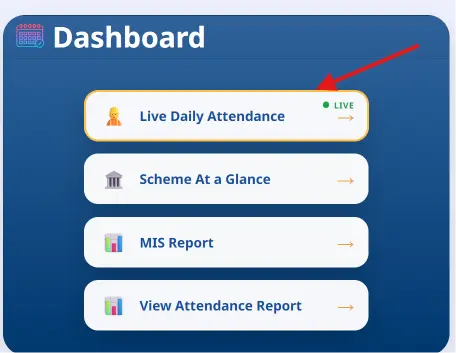
STEP 2 - On the homepage, click on the "Live Daily Attendance" option or "View Attendance Report" as shown in below image.
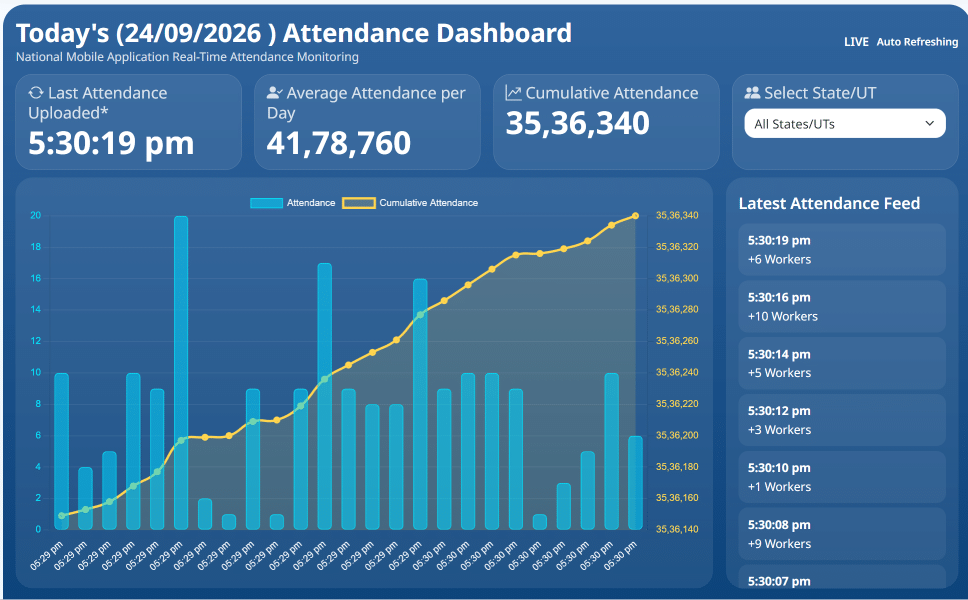
STEP 3 - After clicking on live attendance link, a new page will open, where you can choose your state to check live attendance records.
STEP 4: If you want to see the day wise and state wise daily attendance report, then click on "View Attendance Report" link, then select your state, date and an option from Skilled / Unskilled and click on "Show Attendance" button.
STEP 5: You will see the next screen as below with number of works, number of muster rolls and person days generated.
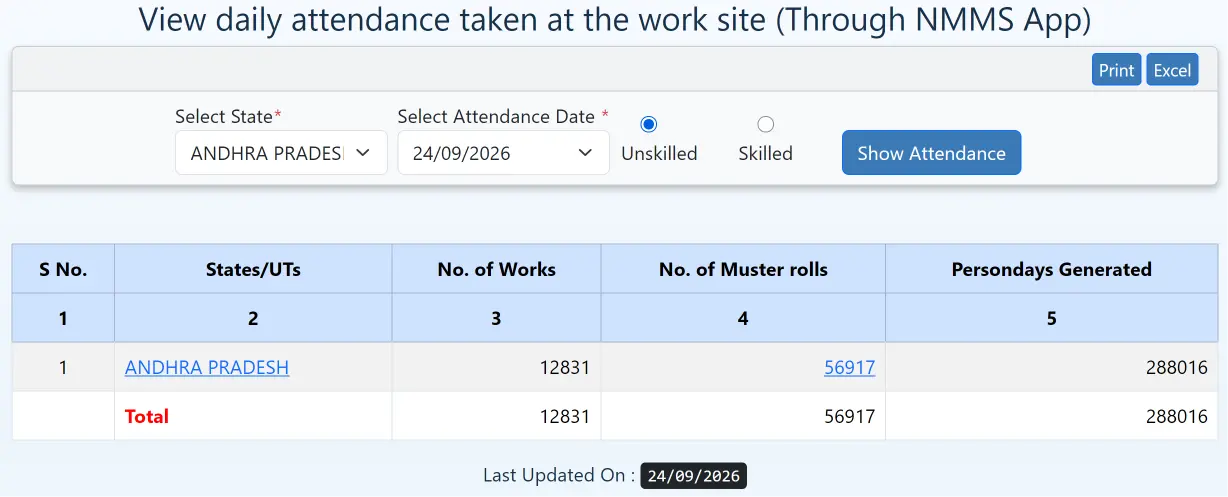
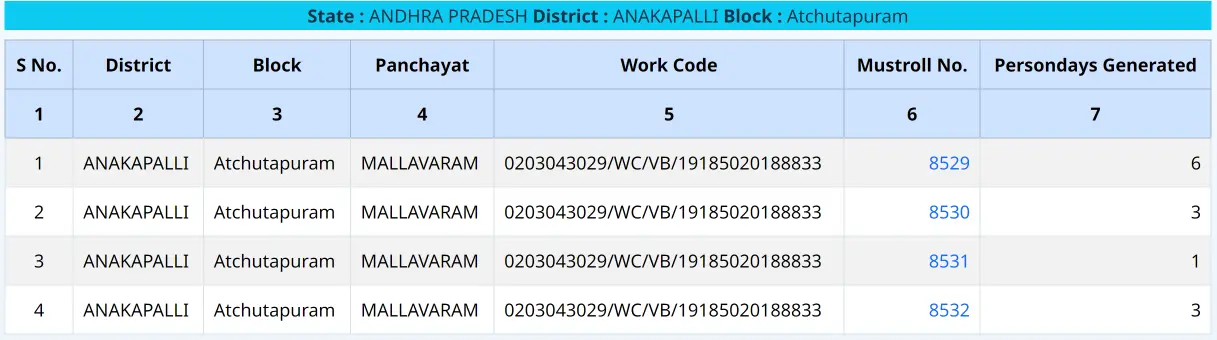
STEP 6: Click on the state name or no of muster rolls number, then district, block, panchayat to view detailed report like below.
Detailed Information Available on the Attendance Dashboard
The dashboard gives a clear state-wise picture of the day's work under the scheme.
- States/UTs
- Number of Works
- Number of Muster Rolls
- Person Days Generated
Download NMMS App
STEP 1 - To download the NMMS App, visit the App Store or Play Store on your mobile device.
STEP 2 - Search for "NREGA NMMS App" and click on the first result.
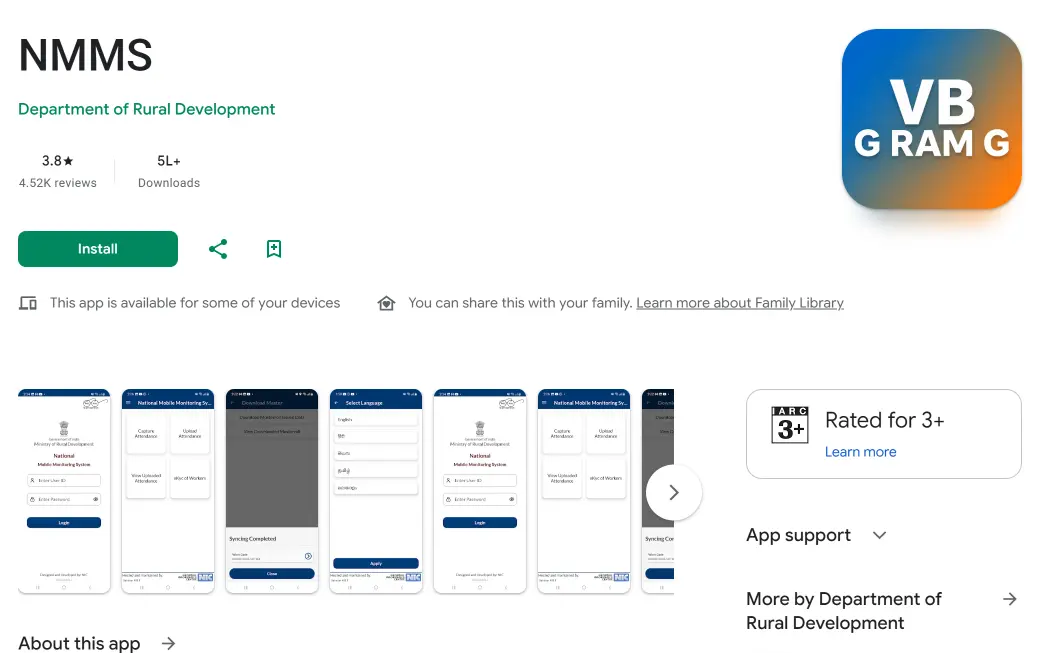
STEP 3 - Hit the "Download" button to start the process.
Contact / Helpline
If you need support or more information, you can reach them at the phone number: 9454465001.
FAQ's
How many days of employment can one avail under the VB-RAM G scheme?
Under the VB-RAM G scheme, a total of 125 days of employment is available in a financial year.
What do I need to check the VB-RAM G daily attendance?
Just your state name and the date you want to check are enough to look up the attendance list.
What is the primary goal of the VB-RAM G scheme?
The main objective of VB-RAM G is to provide employment to citizens and address unemployment in the country.
How can I get a job card?
To obtain a job card, make sure you meet the eligibility criteria and apply through the official VB-RAM G portal.
What benefits does the VB-RAM G scheme offer?
VB-RAM G provides job opportunities, makes sure timely payments, and helps reduce the overall unemployment levels in India.