

 AI Summary
Central government Parivesh Portal registration 2026 and login process is available at parivesh.nic.in. PARIVESH stands for Pro Active and Responsive facilitation by Interactive, Virtuous and Environmental Single-window Hub. The portal is now running as PARIVESH 2.0 and continues to accept online applications for environment, forest, wildlife and CRZ clearances.
Project proponents can register once on the portal and then submit, edit and track their proposals online. This article explains the complete process of how to apply online for environment, forest, wildlife and CRZ clearances through the Parivesh Portal in 2026.
About PARIVESH Portal at parivesh.nic.in
PARIVESH is a web based, role based workflow application which has been developed for online submission and monitoring of the proposals submitted by the proponents for seeking Environment, Forest, Wildlife and CRZ Clearances from Central, State and district level authorities. It automates the entire tracking of proposals which includes online submission of a new proposal, editing/updating the details of proposals and displays status of the proposals at each stage of the workflow.
The portal is designed, developed and hosted by the National Informatics Centre (NIC) with support from the Ministry of Environment, Forest and Climate Change (MoEFCC). In 2026, the portal continues to function as the single window for all types of environmental clearances and has been upgraded to PARIVESH 2.0 with improved modules.
Parivesh Portal Registration 2026 & Login
Parivesh Portal increases efficiency, clarity and responsibility in the EC, FC, Wildlife and CRZ Clearances process. Here is the complete process to make Parivesh Portal Registration 2026 and login:-
STEP 1: Firstly visit the Parivesh official website at https://parivesh.nic.in/
STEP 2: At the homepage, click at the "New Registration" link as shown in the image below:-
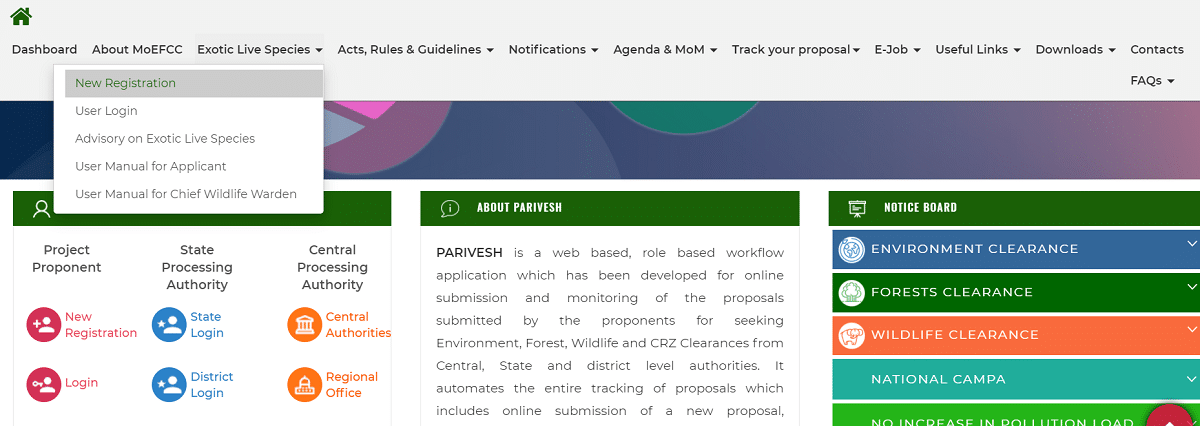
STEP 3: Direct Link - https://parivesh.nic.in/newupgrade/#/userRegistration
STEP 4: Afterwards, the PARIVESH Portal registration form fillup page will open as shown below:-

STEP 5: One time registration of User Agency is required on the Portal.
STEP 6: User Agency can register more than one Applicant (or branch offices) under same name.
STEP 7: An applicant (with same user id) can submit more than one proposal on the portal.
STEP 8: Once entered, Email Id of User Agency can not be modified.
STEP 9: Below both forms need to be filled for registration and if User Agency and Applicant details are same then fill the same details.
STEP 10: After registration process is complete, click here to make Parivesh Portal Login - https://parivesh.nic.in/parivesh-ua/#/. The page to make New Login will appear as shown below:-
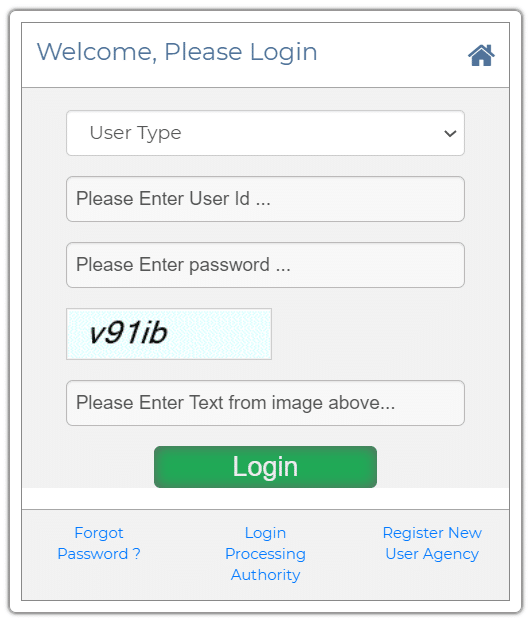
STEP 11: Select User Type, enter User ID, password and then hit at "Login" button to make Parivesh Portal Login.
Parivesh Portal Highlights
Key details of the Parivesh Portal are given in the table below:-
| Detail | Information |
|---|---|
| Portal Name | PARIVESH (PARIVESH 2.0) |
| Full Form | Pro Active and Responsive facilitation by Interactive, Virtuous and Environmental Single-window Hub |
| Launched By | PM Narendra Modi |
| Launch Date | 11 August 2018 |
| Managing Ministry | Ministry of Environment, Forest and Climate Change (MoEFCC) |
| Technical Support | National Informatics Centre (NIC) |
| Clearances Covered | Environment, Forest, Wildlife and CRZ |
| Application Mode | Online |
| Official Website | parivesh.nic.in |
Parivesh Portal Launch by PM Narendra Modi
PARIVESH Portal was launched by PM Narendra Modi on the occasion of World Biofuel Day i.e 11 August 2018. This is a Single window Integrated Environmental Management System for Forest, Wildlife, Environment and Coastal Regulation Zone (CRZ) clearances. E-Governance is the core objective and this is a major step towards Ease of Doing Business.
PARIVESH portal is developed under the Digital India scheme of the Modi govt. and helps realize the dream of Minimum Government and Maximum Governance. At PARIVESH portal, people can easily submit their applications online and can also track the status of such proposals at various stages of processing. This is a workflow based application which is based on the concept of web architecture.
Salient Features of PARIVESH Integrated Environment Management Portal
The important features and highlights of PARIVESH Portal are as follows:-
- Single Registration and Single Sign-In for all type of Environment, Forest, Wildlife and CRZ clearances.
- Unique ID for all types of clearances which are necessary for a particular project.
- Single Window Interface to submit applications to get all type of clearances.
- PARIVESH Portal offers a framework to generate economic growth and to strengthen Sustainable Development through Egovernance.
- This portal improves the overall performance and efficiency of whole process. It helps the processing authorities as it has single window system for all types of Central, State and District level clearances and has the facility of online generation of approval letters.
- This results in ease and uniformity in processing of clearance applications, online submission and monitoring of compliance reports including geo-tagged images of site by inspection officers.
- Facility of Geographic Information System (GIS) interface helps the appraisal committee to analyse the proposal efficiently. Alerts (via SMS & E-mails) help the concerned officers, committee members and higher authorities to check the delays.
- PARIVESH enables project clients and citizens to view, track and interact with other scrutiny officers. This assists in generating online clearance letters, online mailers and alerts to state functionaries in case the processing of applications takes longer than expected.
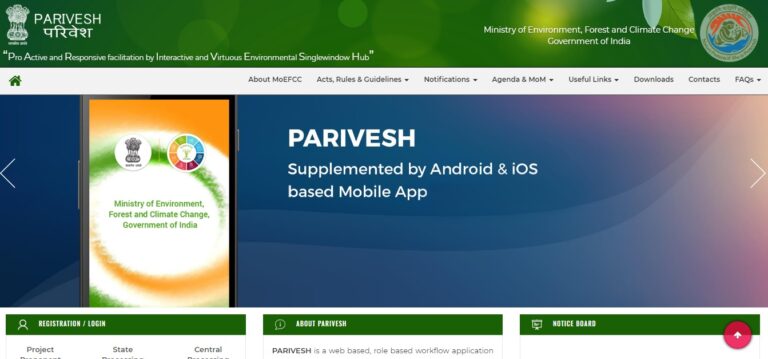
To make more people aware of this facility, 10 lakh SMS and e-mails were sent through NIC, My Gov and CII.
Why PARIVESH Portal is Launched
PARIVESH Portal has been launched in order to make online submission, monitoring and management of proposals which are submitted by Project Proponents to the Ministry of Environment, Forest and Climate Change (MOEFCC). Moreover, projects submitted to the State Level Environmental Impact Assessment Authorities (SEIAA) are also taken into account. For more details, visit the official website parivesh.nic.in
Project proponents can seek various types of Environment, Forest, Wildlife and CRZ Clearances from Central, State and district-level authorities. Ministry of Environment, Forest & Climate Change designs, develops and hosts this portal with technical support from National Informatics Centre (NIC), New Delhi. In 2026, the portal has been upgraded to PARIVESH 2.0 with new modules such as Know Your Approval (KYA) and the Land Bank Module.
Parivesh Portal Helpdesk
For any help related to registration, login or submitting a proposal on the Parivesh Portal, users can call the toll free helpdesk number 1800119792 from 9:00 AM to 5:30 PM on working days.
Birds fram
New registration
New registration..for birds