

 AI Summary
MSME Udyam Registration is the official online process through which micro, small and medium enterprises register themselves with the Ministry of Micro, Small and Medium Enterprises at udyamregistration.gov.in. The registration is free, paperless and based on self declaration. Since 1 July 2020, an enterprise can register using just its Aadhaar number without uploading any document. This is a central government scheme.
In 2026, the Udyam Registration portal continues to accept new registrations and lets existing enterprises update their details, download the Udyam Registration Certificate and print it online. The certificate carries a dynamic QR code through which the enterprise details can be checked on the portal. The registration is free of cost and there is no need for renewal.
MSME Udyam Registration Portal 2026
The Udyam Registration process was introduced by the central government on 26 June 2020 through a notification that allowed online registration of new enterprises based on self declaration. From 1 July 2020, there is no need to upload documents or certificates for the registration. An enterprise can register on the basis of its Aadhaar number and give the other details on self declaration basis.
The system is fully integrated with the Income Tax and GST networks, so the investment and turnover details of the enterprise are taken automatically from government databases. Exports of goods or services are excluded while calculating the turnover of any enterprise, whether micro, small or medium. An enterprise registered under this process is known as an MSME, and the registration process is called Udyam Registration.
| Detail | Information |
|---|---|
| Scheme Name | MSME Udyam Registration |
| Launched By | Ministry of Micro, Small and Medium Enterprises |
| Beneficiaries | Micro, small and medium enterprises |
| Application Mode | Online, free and paperless |
| Official Website | udyamregistration.gov.in |
Salient Features of Udyam Registration
Udyam Registration comes with several features that make it easy for enterprises to register and manage their identity. The main points are given below.
- Any enterprise can register on the portal at udyamregistration.gov.in. The process is fully digital and paperless, and no document needs to be uploaded.
- The registration process is completely free. No cost or fee is to be paid to anyone for the registration.
- An e-certificate, namely the Udyam Registration Certificate, is issued online once the registration process is completed.
- The certificate has a dynamic QR code through which the web page on the portal and the details of the enterprise can be accessed.
- The online system is fully integrated with the Income Tax and GSTIN systems, so the investment and turnover details are taken automatically from government databases. Exports are not taken as part of the turnover.
- Those who have EM-II or UAM registration issued by any authority under the Ministry of MSME will have to re-register themselves.
- No enterprise can file more than one Udyam Registration. However, any number of activities including manufacturing or service or both can be added in one registration.
Requirements for Udyam Registration
Only a few details are required to complete the Udyam Registration. Only the Aadhaar number is enough to start the registration, and having a PAN and GST number is required from 01.04.2021. The Aadhaar number must be of the proprietor in the case of a proprietorship firm, of the managing partner in the case of a partnership firm and of the karta in the case of a Hindu Undivided Family (HUF). In the case of a company, a limited liability partnership, a cooperative society, a society or a trust, the organisation or its authorised signatory has to provide the GSTIN and PAN along with the Aadhaar number.
Benefits of Udyam Registration
Taking the Udyam Registration gives an enterprise a clear identity and opens the door to several government schemes. The benefits are given below.
- It is a permanent registration and gives a basic identification number to the enterprise. There is no need for renewal of the registration.
- MSME registration is paperless and based on self declaration, so there is no need to submit any document.
- Any number of activities, including manufacturing or service or both, can be added in one registration. Along with the registration, the enterprise can register on the GeM and Samadhaan portals and can also onboard on the TReDS platform.
- The registration helps MSMEs get the benefits of schemes of the Ministry of MSME such as the Credit Guarantee Scheme, Public Procurement Policy, an edge in government tenders and protection against delayed payments.
- It makes the enterprise eligible for priority sector lending from banks.
How to Apply Online for Udyam Registration
New entrepreneurs who are not registered yet as an MSME can apply online for Udyam Registration by following the steps given below.
STEP 1 - Visit the official Udyam Registration portal at udyamregistration.gov.in.
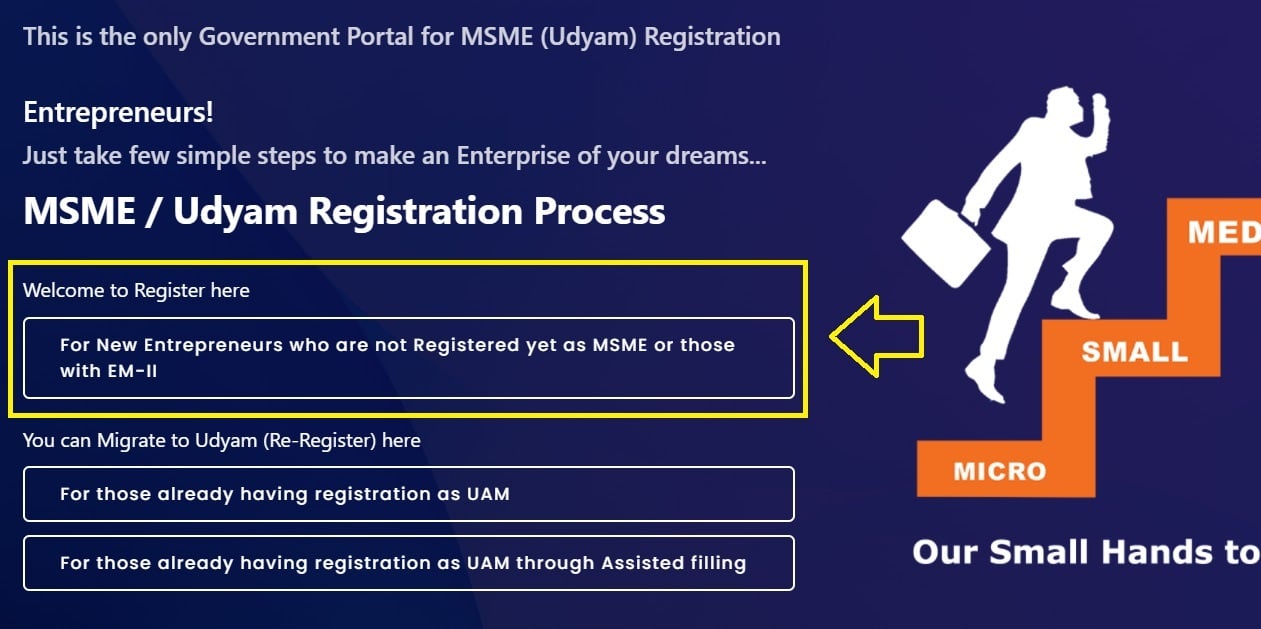
STEP 2 - On the homepage, click on the "For New Entrepreneurs who are not Registered yet as Micro, Small and Medium" tab.
STEP 3 - The Udyam Registration form for a new enterprise will open. Enter the Aadhaar number and the name of the entrepreneur.
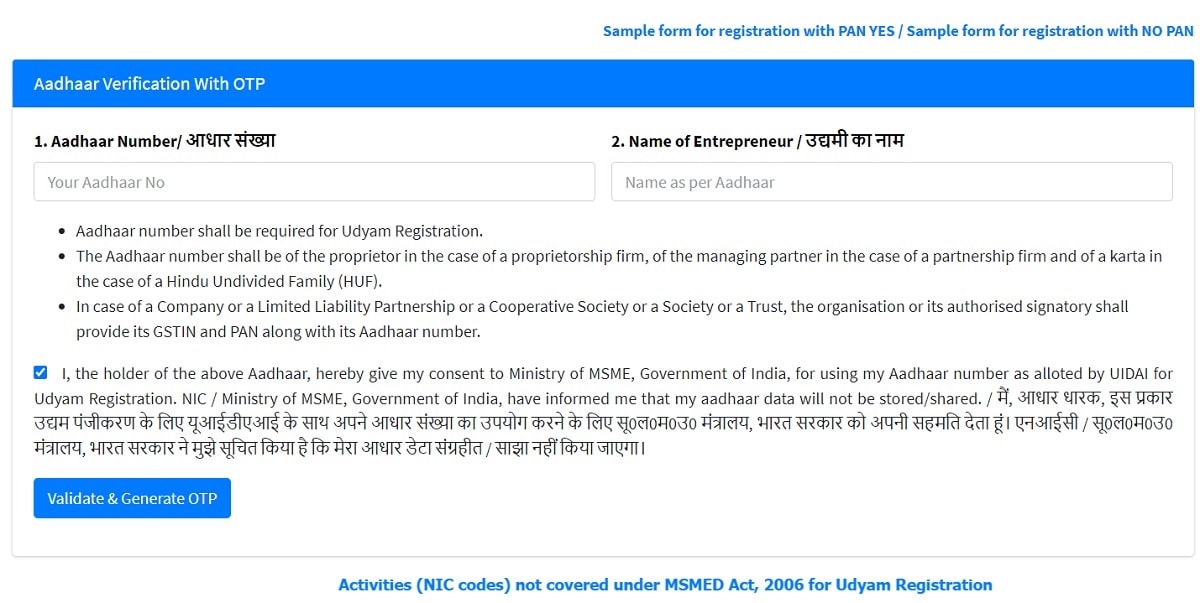
STEP 4 - An OTP will be sent to the mobile number registered with Aadhaar. Enter the OTP to validate the mobile number.
STEP 5 - Select the type of organisation, enter the PAN number and validate the PAN card. Then fill in the remaining details in the form.
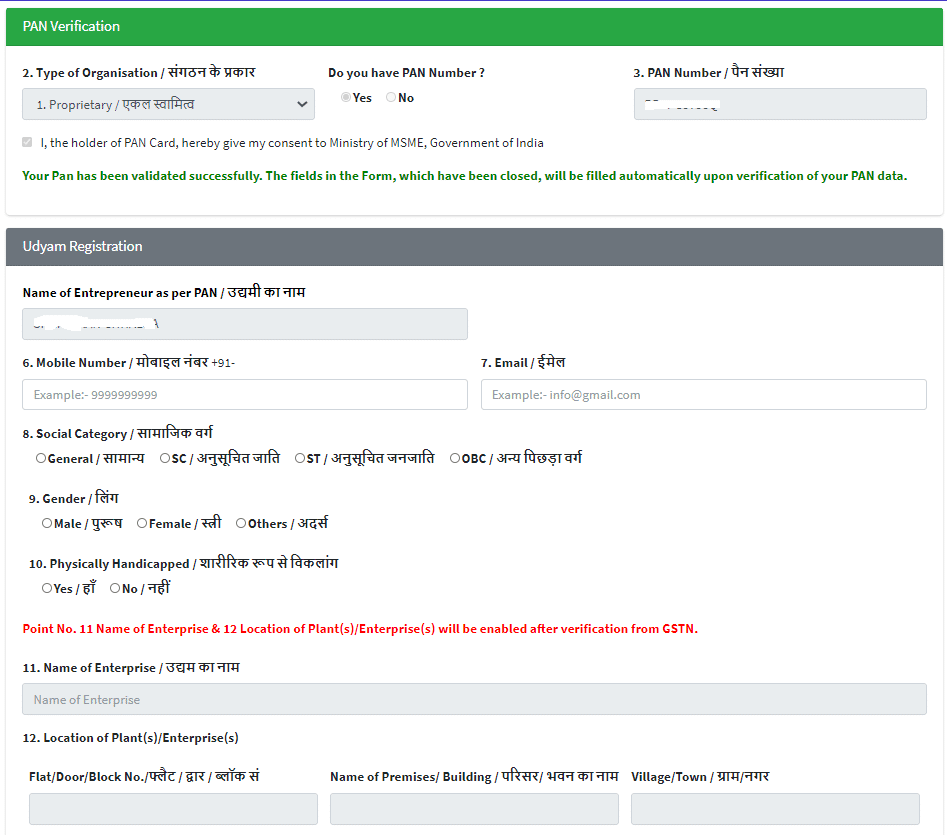
STEP 6 - Submit the form and make a login to complete the Udyam Registration process.
Migrate to Udyam for those already with UAM
All existing enterprises registered under the Udyog Aadhaar Memorandum (UAM) have to register again on the Udyam Registration portal. The process to migrate to Udyam is given below.
STEP 1 - Visit the official Udyam Registration portal at udyamregistration.gov.in.
STEP 2 - On the homepage, click on the "For those already having registration as Udyog Aadhaar Memorandum" link under the "Migrate to Udyam (Re-Register) Here" section.
STEP 3 - The Udyam Registration form for existing entrepreneurs will open. Enter the Udyog Aadhaar number and validate the OTP sent on mobile or email.
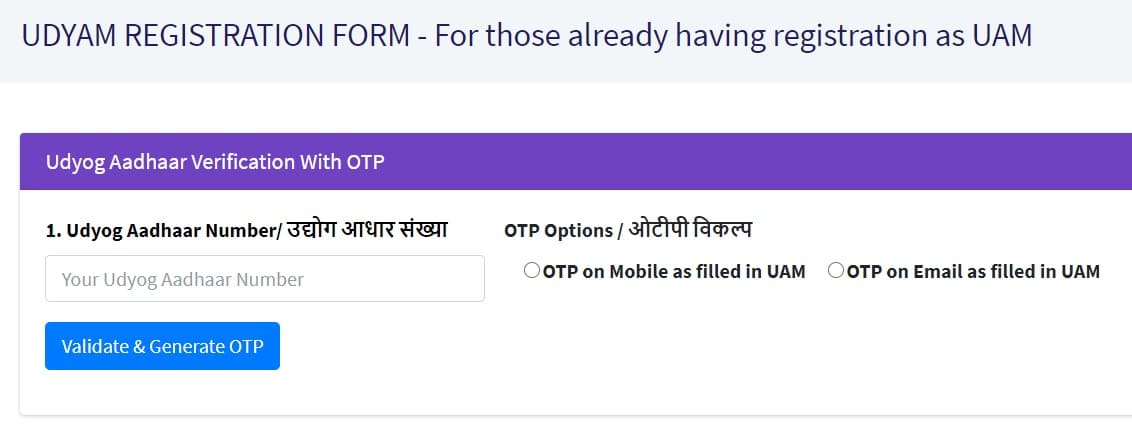
STEP 4 - Fill in the remaining details in the application and complete the registration process.
Assisted Filling for UAM holders
Those who already have a UAM registration through assisted filling can migrate to Udyam using the assisted filling option. The steps are given below.
STEP 1 - Visit the official Udyam Registration portal at udyamregistration.gov.in.
STEP 2 - Click on the "For those already having registration as UAM through Assisted filling" link under the "You can Migrate to Udyam (Re-Register) here" section.
STEP 3 - Enter the Udyog Aadhaar number and choose the OTP option, either OTP on mobile or OTP on email as filled in the UAM.

STEP 4 - Click on the "Validate and Generate OTP" button and complete the Udyog Aadhaar verification with the OTP to finish the registration.
Download / Print Udyam Registration Certificate
Applicants can download or print the Udyam Registration Certificate online. The process is given below.
STEP 1 - Go to the Udyami Login page at udyamregistration.gov.in/PrintUdyamCertificate.aspx.
STEP 2 - Enter the 19 digit Udyam Registration Number in the format UDYAM-XX-00-0000000.
STEP 3 - Enter the mobile number as filled in the Udyam application.
STEP 4 - Choose any one option for the OTP, either on mobile or on email as filled in the application.
STEP 5 - Click on the "Validate and Generate OTP" button and enter the OTP received.
STEP 6 - Click on the "Validate OTP and Login" button to open the certificate and print or download it.

Verify Udyam Registration Number
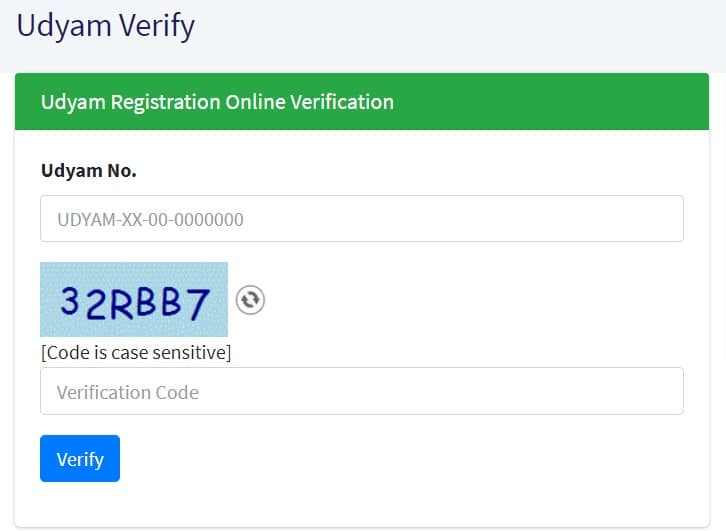
Applicants can verify their Udyam Registration Number online on the portal. The verification can be done by entering the 19 digit Udyam number and the verification code shown in the captcha image. The verification code is case sensitive.
Print UAM Certificate / Check Application Status
Those who have an old Udyog Aadhaar registration can print the UAM certificate and check the application status online. The direct links are given below.
Print UAM Certificate - udyamregistration.gov.in/UA/PrintAcknowledgement_Pub.aspx

Print UAM Application - udyamregistration.gov.in/UA/PrintApplication_Pub.aspx

Verify Udyog Aadhaar - udyamregistration.gov.in/UA/UA_VerifyUAM.aspx
Udyami Login to Update / Cancel Udyam Registration
Udyami Login can be made at the official website udyamregistration.gov.in to update or cancel the Udyam Registration. The steps are given below.
STEP 1 - Go to the Udyami Login page at udyamregistration.gov.in/PrintUdyamCertificate.aspx.
STEP 2 - Enter the Udyam Registration Number and the mobile number as filled in the application.
STEP 3 - Choose any one option for the OTP and click on the "Validate and Generate OTP" button.
STEP 4 - Enter the OTP received and click on the "Validate OTP and Login" button.

Facilitation Mechanism for Entrepreneurs
The MSME ministry has set up a strong facilitation system for MSMEs in the form of single window systems at the district and regional level. This helps entrepreneurs who are not able to file the Udyam Registration for any reason. At the district level, the District Industry Centres (DIC) are responsible for helping the entrepreneurs. The Champions Control Rooms across the country also help such entrepreneurs in the registration process.
People who do not have a valid Aadhaar number can approach the Udyam Registration portal for help. Such people have to carry their Aadhaar enrollment request or identity, bank photo passbook, voter ID card, passport or driving license with them. The portal will help them register as an enterprise after getting the Aadhaar number.
An enterprise having a Udyam Registration Number (URN) has to update their information in the portal. This includes the details of the ITR and the GST return for the previous financial year and such other additional information as may be required on self declaration basis.
New Definition of MSMEs
The MSME ministry has revised the classification of micro, small and medium enterprises with effect from 01 April 2025. The new definition of MSMEs is given below.
| Category | Investment Limit | Turnover Limit |
|---|---|---|
| Micro Enterprise | Up to ₹2.5 crore | Up to ₹10 crore |
| Small Enterprise | Up to ₹25 crore | Up to ₹100 crore |
| Medium Enterprise | Up to ₹125 crore | Up to ₹500 crore |
For more details on the legal framework for the classification of MSMEs, read the official document at udyamregistration.gov.in.
Calculation of Investment
The calculation of investment in plant and machinery or equipment is based on the Income Tax Return (ITR) of the previous year filed under the Income Tax Act, 1961. Plant and machinery includes all tangible assets other than land, building, furniture and fittings.
All units with a Goods and Services Tax Identification Number (GSTIN) listed against the same Permanent Account Number (PAN) are considered as one enterprise. These units are used for the calculation of turnover and investment to decide the category as micro, small or medium enterprise.
Complaint Redressal Mechanism
In case of any discrepancy or complaint, the General Manager of the District Industries Centre of the concerned district shall carry out an inquiry to verify the details of the Udyam Registration submitted by the enterprise. The person will then forward the matter with the remarks to the Director or Commissioner or Industry Secretary of the state government. These officers will issue a notice to the enterprise and, after giving it an opportunity to present its case, may amend the details or cancel the Udyam Registration Certificate.
FAQ's
Is Udyam Registration free?
Yes, the Udyam Registration is completely free. No cost or fee is to be paid to anyone for the registration.
Is PAN and GSTIN required for Udyam Registration?
Having a PAN and GSTIN is required for Udyam Registration from 01.04.2021.
Can the Udyam Registration Certificate be downloaded online?
Yes, the Udyam Registration Certificate can be downloaded and printed online through the Udyami Login page at udyamregistration.gov.in.
hi dear sir i am intrested sir i want excess of saral haryana govt portal please provide me
registration is not possible now
The registration process at Udyam Registration Portal will begin soon. Current status of site is "Site Under Updation for new Udyam Registration Portal".
does not open for regd. sir what do i do
vinay sagar jain
pritamgroup
ug-10
lusa tower commercial complex
azadpur
delhi-110033
Radial
Tanzania
Persevering
background
e-markets
Games
sir for Udyam9new regisration] how o get NSC CODE For Tailoring,Electrical repairer ,Misc clerical ork Patent holder.2how to shoew Turn over for New enterprener.I will be thankful if my problem is solved. THANKS
Sir,
GOI is informing that neither any registration fee is charged by GOI nor any one can charge the fee for registration for UDYAM but being similar websites, I was directed on wrong website and I got a regn No. UDYAM-HR-18-0004925 on 25-03-2021.
Now they are asking payment of Rs 1,994/- for issue of UDYAM Registration certificate.
May I request you to please atleast inform me that above said regn no. is correct and authentic. If not authentic then can we register on Govt website http://udyamregistration.gov.in a fresh.
Mob 9310501787
Go to the link - https://udyamregistration.gov.in/PrintUdyamCertificate.aspx. Enter your udyam registration number, mobile number filled in application, choose OTP option, then click at "Validate & Generate OTP" button. If your udyam registration certificate appears on screen then it is a valid udyam registration number otherwise not.
Also you need not pay any amount to anybody for the issuance of Udyam Registration Certificate.