

 AI Summary
Punjab Enaksha, also known as Online Building Plan Approval System (OBPAS), is accepting building plan applications online at enaksha.lgpunjab.gov.in. This E-Municipal Naksha platform is a single place where architects and citizens can submit their drawings and documents for building plan approval. It covers 165 Urban Local Bodies (ULBs) in addition to 27 Improvement Trusts.
People can check the Naksha pass fees easily and get the house map approval through online mode at enaksha.lgpunjab.gov.in.
Punjab Enaksha Online Building Plan Approval System (OBPAS)
State government is elected by the people and is accountable to them. So, the state government is making sure of clarity through e-governance. Government is also focusing on modernizing the infrastructure in all Urban Local Bodies (ULBs) of the state.
Punjab E-Naksha or OBPAS is a fully online platform where no building plan is allowed to be submitted manually.
One important update for investors is that with effect from 15.05.2025, building plan applications under certain categories are no longer accepted on the eNaksha portal. These categories are Industry, Hotel, Nursing home/Hospital and Institutions. Investors have to submit such applications through the Punjab Bureau of Investment Promotion (Invest Punjab) instead. For all other categories, including residential buildings, the eNaksha portal continues to accept applications online.
Punjab E-Municipal Naksha Registration - House Map Approval Online
Below is the complete procedure to make Punjab E-Municipal Naksha registration and to apply online for house map approval at the OBPAS portal:
STEP 1: Firstly, visit the official website enaksha.lgpunjab.gov.in
STEP 2: At the homepage, click on the "New Professional Registration" tab
STEP 3: Then the Punjab E-Naksha Online Building Plan Approval System (OBPAS) Online Registration Form will appear as follows:
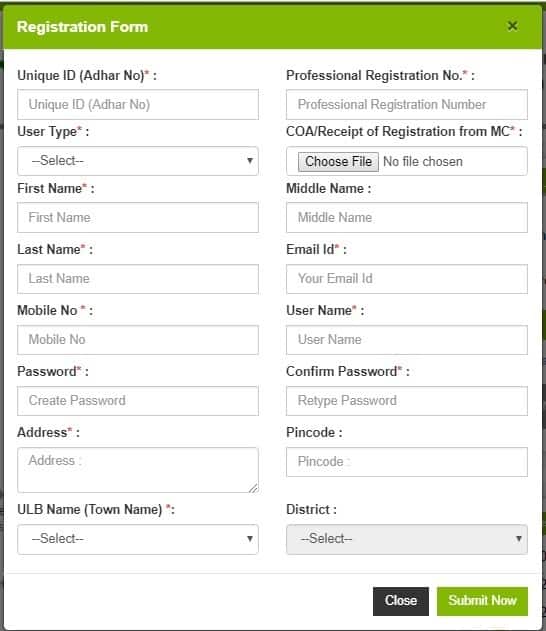
STEP 4: Here candidates have to fill all the details correctly and then click on the "Submit Now" button to complete the registration process.
STEP 5: Finally, candidates have to make "Login" to submit their drawings and get house map approval online at the official Punjab Enaksha Portal.
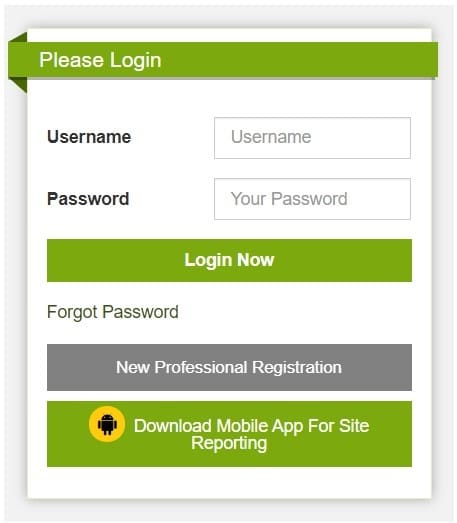
STEP 6: Here applicants can enter their username and password and click on the "Login Now" button to complete the Punjab E-Municipal Naksha or OBPAS registration process.
This is a six step process and after its rollout, people do not have to make unnecessary rounds at the government offices to get their maps and drawings approved. This saves the precious time and energy of the general public and architects. Government has integrated this with the e-Governance portal as already mentioned in the G2C objective.
For the application for settlement of non compoundable violation in the Punjab One Time Voluntary Disclosure and Settlement of Building Constructed in violation of the Building Bye Laws Act 2019, click the link - Form A Application under the Amendment Act 2019.
Punjab Naksha Pass Fees at E-Naksha Portal
Applicants who want to apply for online map approval can check the Punjab Naksha Pass Fees. For this, applicants can visit the same official website at enaksha.lgpunjab.gov.in.
Then click the "Fees" link present in the header and then click the respective fees for building, malba as well as compounding fees, direct links here:
Building Map Approval Fees - Residential & Commercial
The building application tax @ Rs. 2.50 per sq.ft. for the total covered area and @ Rs. 5.00 per sq.ft. on the area of the plot to be charged.
- Category 1: Rs. 2.50 per sq.ft of the proposed covered area for each floor for residential / Government and government aided school, institution or hospital buildings.
- Category 2: Rs. 5/- per Sq.Ft. of the proposed covered for commercial / industrial / institutional buildings etc.
- Construction of boundary walls @ Rs. 2.50 per running Ft. for the buildings specified under category (I) above and @ Rs. 5/- per running Ft. for the buildings specified under category (ii).
Check out the complete official building map approval fee notification.
Malba Fees
Malba Fee based on total covered area on all floors.
Up to 500 sq.ft. - Rs. 500.00
501 sq.ft to 1000 sq.ft. - Rs. 1000.00
1001 sq.ft to 1500 sq.ft. - Rs. 1500.00
1501 sq.ft to 2000 sq.ft - Rs. 2000.00
Above 2000 sq.ft. - Rs. 0.50 p for each additional sq.ft. of covered area.
Maximum Period: Six months from the date of commencement of construction as per the notice given by the owners under the relevant provisions of the Acts.
Area of road/street: Maximum upto 10' .0" or Half of the Road/street Width whichever is less.
Check the complete malba fee notification.
Compounding Fees
Compounding fee details can be checked in the notification at the below link.
https://enaksha.lgpunjab.gov.in/help/New%20Doc%202018-09-28%20(2).pdf
Checklist for Building Plan Approval / CLU at E-Naksha Portal Punjab
You can download the checklist for building plan approval from this link.
https://enaksha.lgpunjab.gov.in/help/purposed_buildin_plan.pdf
The checklist for Building Plan Approval at E-Naksha Portal Punjab will appear as shown below:
| No. | Tasks | Yes | No | N/A |
|---|---|---|---|---|
| 1 | Standard Program (Allocated) | |||
| 2 | Primary Program (Allocated) | |||
| 3 | Whether there is evidence of providing information about a significant new product | |||
| 4 | Whether there is evidence that the email address of a responsible person has been taken off the action list | |||
| 5 | Lookup List | |||
| 6 | Saheed List | |||
| 7 | List of All Events | |||
| 8 | Tech List | |||
| 9 | Analytics and Segment | |||
| 10 | Product Pricing and Sales Data / Regulatory Clearance | |||
| 11 | Business with External Monitoring Block | |||
| 12 | Business with External Monitoring Partners' Generalities and Relationships | |||
| 13 | Final Approval from an M.O. | |||
| 14 | Final Approval for the Design from M.O. | |||
| 15 | External Events Approval from M.O. | |||
| 16 | Whether M.O. provided Approval/Warning for any other potential harm | |||
| 17 | Did the health team receive counsel or approval from the relevant organization regarding the harm warning |
The checklist for CLU at Punjab E-Naksha portal will appear as shown below:-

enaksha.lgpunjab.gov.in User Manual
Here is the direct link to access the User Manual at the official website at enaksha.lgpunjab.gov.in portal - https://enaksha.lgpunjab.gov.in/help/LGP_User%20Manual_Version%201.6.pdf
Check Your Enaksha Application Status
Here is the direct link to check your Enaksha application status - https://enaksha.lgpunjab.gov.in/application_status.php
The page to check Punjab E-Naksha Application Status will appear as shown below:-
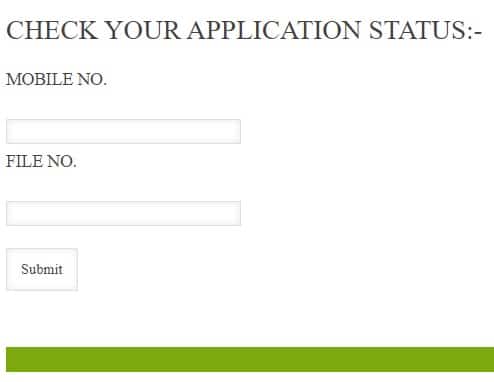
Here applicants can enter their mobile number and file no. and click on the "Submit" button to check their application status.
Punjab Enaksha Help Desk Contacts
- 0172 - 2619247
- 0172 - 2619248
- enakshahelpdesk@gmail.com
- Timing: (10AM-06PM - Monday To Friday)
The next focus area of the state government is starting the e-CLU system. This scheme will bring in clarity and these citizen friendly services will save time and money of people. For more details, visit the official website www.enaksha.lgpunjab.gov.in
HI, I AM ANKUL KUMAR. I FORGOT MY USERNAME FOR LOGIN ON ENAKSHA PORTAL.KINDLY HELP ME TO LOGIN ON ENAKSHA PORTAL.
Hi, how much charges to pass the naksha in chandigarh sector 12.
hello, I want to add another ulb. Is there any way to apply for ulb online and get it? Also, how can I pay fees of architects online and license from the required ulb
Dear Sir
I have not applied for any NOC, and in any way I have not approached your office for any kind of work or otherwise, but I m getting some msgs from your office, Kindly look into the matter and relieve me from these unwanted msgs. I have also requested you in this regard through an e-mail.
Building Fees PDF download link in not working
hi, can i pay fee of registration fee direct to axis bank? how i do this kindly inform mee