

 AI Summary
eBloodServices App is a mobile application launched by the Central government's Health Ministry in partnership with the Indian Red Cross Society (IRCS) to make safe blood easily available. It was launched on 26 June 2020 by the then Health Minister Harsh Vardhan. All Android smartphone users can download eBloodServices App from Google Play Store and request various blood components from the IRCS National Headquarters Delhi.
People can now place a blood request right at their doorstep through the eBloodServices mobile app. The app is still active and continues to help those who need blood, especially when travelling from one blood bank to another is difficult. Through this app, users can also track the status of their request from within the app.
This app was launched after the government received several complaints over the past few months from people on lack of access to safe blood. Safe blood is very important, particularly for people who need regular blood transfusion owing to chronic blood disorders.
eBloodServices App Download From Google Play Store
Here is the direct link to download eBloodServices App from Google Play Store - eBloodServices App on Google Play Store. The eBloodServices mobile app download page at Google Play Store will appear as shown below:-
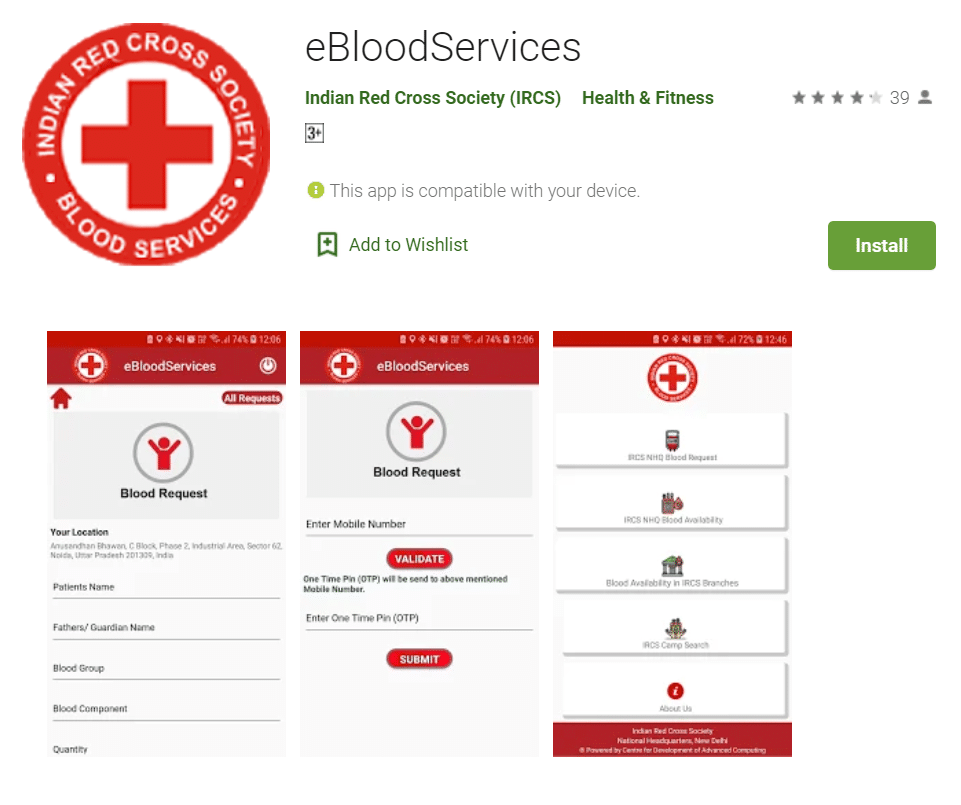
Upon reaching the app page on Google Play Store, people can follow the steps below:-
- People can click at the "Install" button to start downloading the app on their Android smartphones.
- The eBloodServices app provides facilities to search for blood stock and camps at various IRCS blood banks.
- Users can also search for IRCS blood stock by selecting a particular State/District.
- Moreover, this app also enables users to call, send an email or navigate to the selected blood bank.
eBloodServices app enables people to access the blood bank from home. All you need to do is go to Google Play from your Android device to download the app. This app includes features such as IRCS NHQ Blood Request, IRCS NHQ Blood Availability, Blood Availability in IRCS Branches and IRCS Camp Search. To know more about the features of this app, continue reading.
Features of eBloodServices Mobile App for Android Users
Here are the important features of eBloodServices App available at Google Play Store:-
1) Last Updated: 22 May 2026
2) Downloads: 10,000+
3) Rating: 3.7 stars
4) Offered By: Indian Red Cross Society (IRCS)
5) Category: Health & Fitness
6) Developed by: directorbloodbank@indianredcross.org
This eBloodServices app is developed by the E-Raktkosh team of Centre for Development of Advanced Computing (CDAC) under the Digital India scheme. Through this app, 4 units of blood can be requisitioned at a time and the blood bank will wait for as long as 12 hours for the person to collect it.
Highlights of eBloodServices App
Here is a quick look at the main details of the eBloodServices App:-
| Detail | Information |
|---|---|
| Scheme Name | eBloodServices App |
| Launched By | Central government Health Ministry with Indian Red Cross Society (IRCS) |
| Launch Date | 26 June 2020 |
| Beneficiaries | People needing blood transfusion |
| Application Mode | Google Play Store (Android) |
| Offered By | Indian Red Cross Society (IRCS) |
| Official Website | eraktkosh.mohfw.gov.in |
For more details on blood availability, users can also check the official e-Raktkosh blood bank portal of the Health Ministry. The Indian Red Cross Society also provides an official page for the eBloodServices mobile app where users can book emergency blood requests, view donation history and check blood availability at IRCS blood centres across the country.
People collecting blood from an IRCS blood centre must carry a valid Government ID card and proof of relationship with the patient. A signed and stamped blood requisition form is required, which can be downloaded from the IRCS blood requisition form page.
पहले मुझे मेल आता था अब नहीं आता है