

 AI Summary
AP Transport Learners Licence (LLR) Apply Form 2026: Andhra Pradesh govt. offers an online system to apply for Learner's Licence (LLR) and Driving Licence (DL). Candidates can fill the AP Transport LLR online application form, book an online test slot, check application status and then apply for a permanent Driving Licence. Learner Licence services include LLR Fresh Test, LLR Retest and LLR Endorsement. All eligible candidates can apply for LLR at aptransport.org or aprtacitizen.epragathi.org.
Candidates above 16 years of age can apply online for Motor Cycle Without Gear (MCWG) class of vehicles. For Non Transport category of vehicles, the applicant must be above 18 years of age. For Transport category of vehicles, the applicant must be above 20 years of age and must possess a valid Non-Transport Licence for at least 1 year.
Under Motor Vehicle Act 1988, every individual must possess an effective Driving Licence issued by the Licensing Authority to drive a motor vehicle in a public place.
AP Transport Learners Licence (LLR) Online Application Form 2026
Below is the complete procedure to apply online for AP Transport Learners Licence (LLR).
| Detail | Information |
|---|---|
| Scheme Name | AP Transport Learners Licence (LLR) |
| State | Andhra Pradesh |
| Launched By | Transport Department, Government of Andhra Pradesh |
| Beneficiaries | Candidates above 16, 18 and 20 years as per vehicle class |
| Application Mode | Online |
| LLR Validity | 6 months, renewable for another 6 months |
| LLR Fee | Rs. 15 per class of vehicle |
| Official Website | aptransport.org |
STEP 1 - First visit the official website aptransport.org.
STEP 2 - On the homepage, scroll over the "Licence" tab in the main menu and then click on the "Learner's Licence" section.
STEP 3 - Direct Link: All the candidates will be directed to a new website aprtacitizen.epragathi.org.
STEP 4 - In the "Licence Section" in the header, click on the "Learner's Licence (LLR)" link or Click Here. Then read the instructions carefully and click on the "Click Here to Apply for Learner Licence" button at the bottom.
STEP 5 - Then candidates have to select the Type of Service: LLR Fresh Test (if the candidate does not possess DL / LLR), LLR Retest (if failed in LLR Test), LLR Endorsement (if already having DL).
STEP 6 - Afterwards, AP Transport Learner's Licence online application form for Fresh Test will appear as follows.
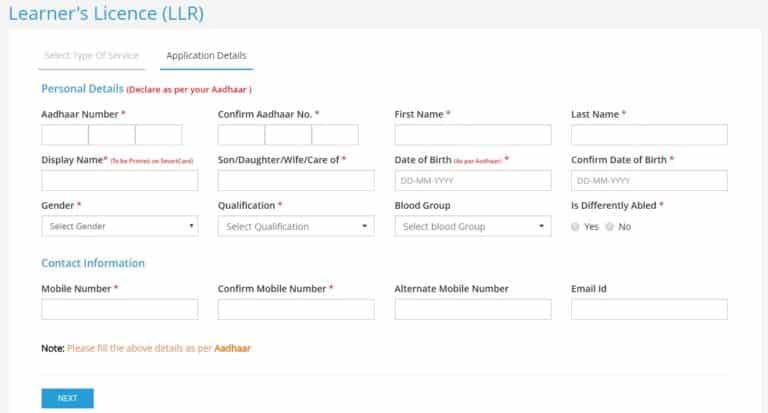
STEP 7 - Here fill all the details, book test slot online and make the required fee payment to complete the registration process and to appear for the LLR Exam.
On clearing the LLR Exam, candidates will obtain a Learner's Licence (LLR). Candidates can use this LLR number to apply online for Permanent Driving Licence (DL) directly through the link: AP Transport Fresh Driving Licence (DL) Application Form and Driving Licence (DL) / Learner's Licence (LLR) Renewal Application Form.
Check LLR Test Slot Availability & Book Online
After registration for the Learner's Licence, all candidates need to pass an exam conducted by the Licensing Authority. To appear for the exam, candidates must book a time slot online in advance. Candidates can check test slot availability online and also book a test slot through the links given below.
- AP Transport DL / LLR Test Slot
- Book Learner and Driving Licence Slots
- Check slot availability and book one slot for yourself as shown in the figure.
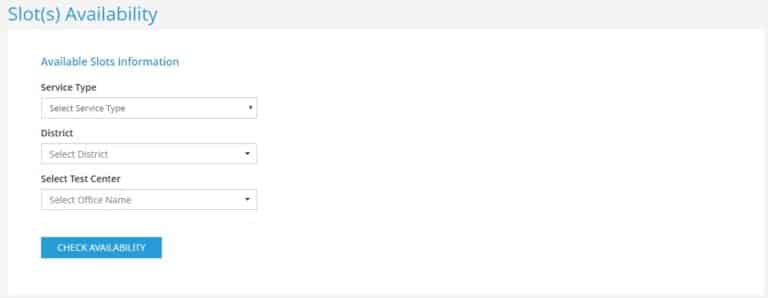
After booking a test slot, the candidate must be physically present for the LLR examination. Upon clearing the examination, candidates will be issued a Learner's Licence / Driving Licence by the Licensing Authority.
Check LLR & DL Application Status
Applicants must check their LLR and DL application status regularly to know the exact date and time for issuing of Licence. This can be done by entering their application number or with their ID and other details through the link given below.
- LLR / DL Application Status
- The page for checking the DL / LLR application status will appear as follows.
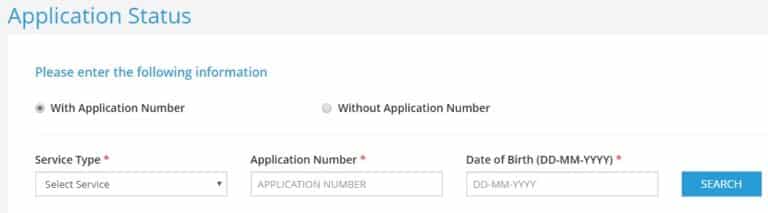
For finding status with application number, candidates can enter the Service Type as either Learner's Licence (LLR) or Driving Licence (DL), Application Number and Date of Birth (D.O.B). To check status without application number, candidates can enter Service Type, Search By (Aadhaar Number / Passport Number and Issued Office), Mobile Number and D.O.B.
References
-- Renewal & Duplicate LLR / DL Fees
-- AP Transport LLR / DL Forms Download
-- AP Transport LLR / DL Print
Sir i have applied llr endorsement the stayus of application is enforsement is done then how to download my LLR application
have you got the solution for this
Even i am waiting for the solution. Please guide me
hii sir i have attended LLR test and got my LLR ,but i missed the print out , how can i download LLR
GO TO RTA CITIZEN APP....GO TO STATUS IN DRIVING LICENCE (DL) ... FILLUP THE DETAILS...YOU WILL GET LLR APPLICATION
sir how can i download LLR application plzzz
I have learning licence but expaired already apply renewal. I want status of learning licence.
sir i applied for LLR endorsement(i have two wheeler DL, I need license for 4 wheeler) and done with the payment also. In application process no where it shows slot booking option, even in acknowlegment also Date & Time of test is empty. Am i need to edit the LLR test date and time. Some websites showing no need to write test again. please help me out. what i have to do now.
Did your issue resolved. Please update me how to resolve.
Hi, how you have proceeded? I'm also facing the same issue
iam aslo having the same issue can u please riply me
Call the helpline
After 30 days go to application status and check, Weather you will get navigation from there
how can i know my llr result
I lost my LLR Application number, please help me to get that
Go and apply again with same details it will appears like error already there is an application number so u can copy that number it’s simple
B.A fast year
B.A fast year 2019
My llr payment failed my application no doesn't know but again I'm applying there is error message one more record found I do i apply the Llr test again
in that error message you can find application id and from that cancel previous llr and apply again
Go to application status>Application Status provide details and download llr