
West Bengal MGNREGA (Now VB-GRAMG) Job Card List for 2026 has been released on the official NREGA portal at vbgramg.dord.gov.in. People of West Bengal can now easily check their name online in the 2026-2027 job card list or download the complete gram panchayat wise job card list in PDF format.
As per the latest data of August 2026, West Bengal has 54839 active job cards in 23 districts, 345 blocks, and more than 3,300 Gram Panchayats under VB-GRAMG. More than 2.38 crore workers in the state are linked with the scheme. Women form a large part of the MGNREGA workforce in West Bengal, showing how this scheme is helping rural families earn steady income.
West Bengal VB-G RAMG Job Cards List
Select your district, block and gram panchayat to view job cards.
Job Card Details
West Bengal Job Card Online at vbgramg.dord.gov.in
Follow these simple steps to check your name or download the 2026 West Bengal job card list from the official website.
Check Name in West Bengal Job Card List
STEP 1 - Visit the official VB-G RAM G portal at vbgramg.dord.gov.in. On the homepage, click on the "MIS Reports" link under the "Analytics & Reports" section.
STEP 2 - On the next page, enter security answer, select your state, West Bengal, from the list of states and union territories, then click on "Category wise Household/Workers" link as shown in below image.
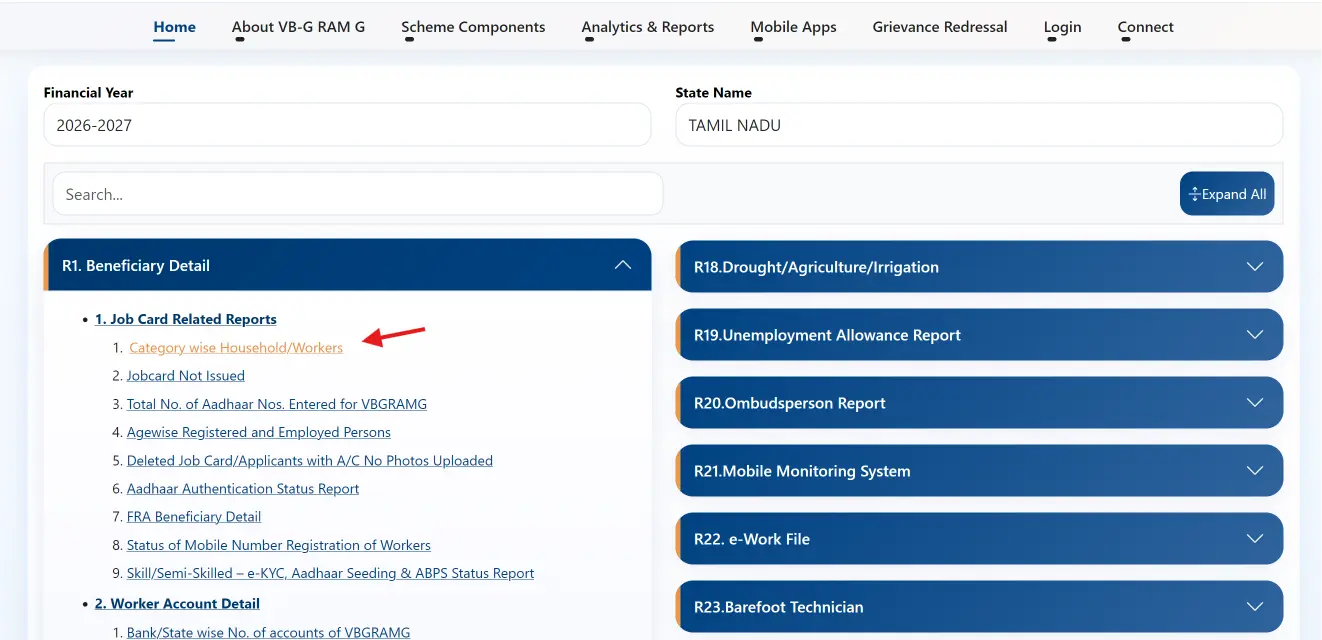
STEP 3 - Now select your district name, then the block name, and then your Gram Panchayat name from the lists shown on the page.
STEP 4 - On the next page, click on the "Job card / Employment Register" link under the first section of R1. Job card / Registration.

STEP 4: Press "Ctrl+F" on your computer or use "Find in Page" option on your mobile browser to search your name in the list.
STEP 5: Type your name in the search box and hit enter. The matching names will be highlighted on the screen as shown in below image.

STEP 6: If multiple similar names appear, click on the job card number and verify your family details in the job card page to confirm it's yours.

Download West Bengal Job Card List PDF
You can also download the full job card list of any Gram Panchayat in West Bengal using this simple print option.
On the job card list page, press "CTRL+P" on your keyboard. In the print window, select "Save to PDF" under Destination, then click "Save". This will download the list in PDF format for future reference.

If checking on mobile, open the share menu, tap "Print", then choose "Print as PDF" to save the file.
Documents Required for West Bengal MGNREGA Job Card
To apply for a new job card in West Bengal, visit your local Gram Panchayat office with the following documents ready.
- Aadhaar Card for identification
- Bank account passbook for wage payment
- BPL or Ration card
- Recent passport size photo
- Income certificate (if applicable)
Download West Bengal Job Card PDF
To save your individual job card as PDF, use the same print method on your job card details page.
Press "CTRL+P" on your computer, choose "Save to PDF", then click "Save". On mobile, open the share menu, tap "Print", and select "Print as PDF".

Details Mentioned on MGNREGA Job Card
- Job Card Number
- Name of Head of Household
- Father's or Husband's Name
- Category (SC/ST/OBC/General)
- Date of Registration
- Village, Block, and District Name
- Number of days worked and payment details
- Muster roll number and assigned work details
- Unemployment allowance (if any)
- Delay compensation details