

 AI Summary
Accounting Information Management System (AIMS) portal of the Indian Railways is available at aims.indianrailways.gov.in. This accounts and finance portal, developed by Centre for Railway Information Systems (CRIS), lets railway employees check salary slips, pension details, PF balance, loans and income tax documents from a single place. More than 13 lakh railway employees use this portal for their day to day service related work.
This article explains the main features of AIMS portal, the way to register as a new user, the steps to download the Indian Railway pay slip, and the details about the RESS mobile app. It also covers the supplier bill status option, the public grievance process and the helpline numbers for support.
Indian Railway Salary Slip at AIMS Portal
AIMS portal has been built by the Indian Railways to make the process of downloading payslips easy through online mode. Railway employees no longer need to visit the divisional office every month for their salary slip. Through the Accounting Information Management System, all railway employees can get their pay slips and carry out many other tasks while sitting at home.
Major Benefits and Features of AIMS Portal
Here are the main benefits and features of AIMS portal started by the Indian Railways authorities:
- Railway employees can check their salary, pension, PF and other service details through AIMS portal.
- Payslips and salary slips can be downloaded in PDF format through the portal.
- Employees can view their personal bio-data, leave balance, family details and income tax details.
- With this portal, employees save the time that was earlier spent in visiting government offices for service related work.
- The portal is easy to use and works well on both desktop and mobile phones.
Highlights of AIMS Portal
Here is a quick overview of the Accounting Information Management System portal:
| Detail | Information |
|---|---|
| Scheme Name | AIMS Portal |
| Launched By | Indian Railways authorities |
| Developed By | Centre for Railway Information Systems (CRIS) |
| Beneficiaries | Railway employees |
| Objective | To make service procedures easy through online mode |
| Benefits | Check salary, pension, PF, loans and income tax details online |
| Official Website | aims.indianrailways.gov.in |
How to Register Online at AIMS Portal
To register at AIMS portal, a railway employee needs to follow the simple steps given below:
STEP 1 - First visit the official website at aims.indianrailways.gov.in.

STEP 2 - On the homepage, click the "Employee Self Service" link on the left side of the page.
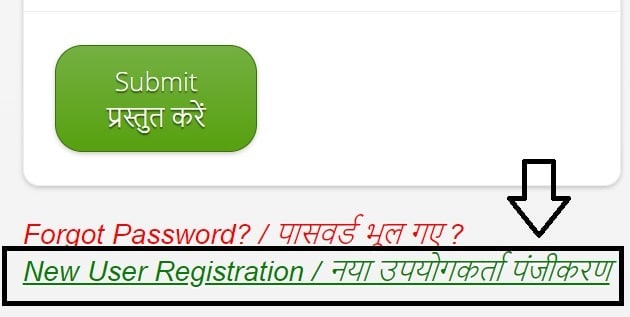
STEP 3 - The "Railway Employee Self Service" page will open. Newly recruited employees need to click the "New User Registration" link.
STEP 4 - The AIMS portal online registration form will appear. Enter the employee number, mobile number and date of birth, then click the "Submit" button.
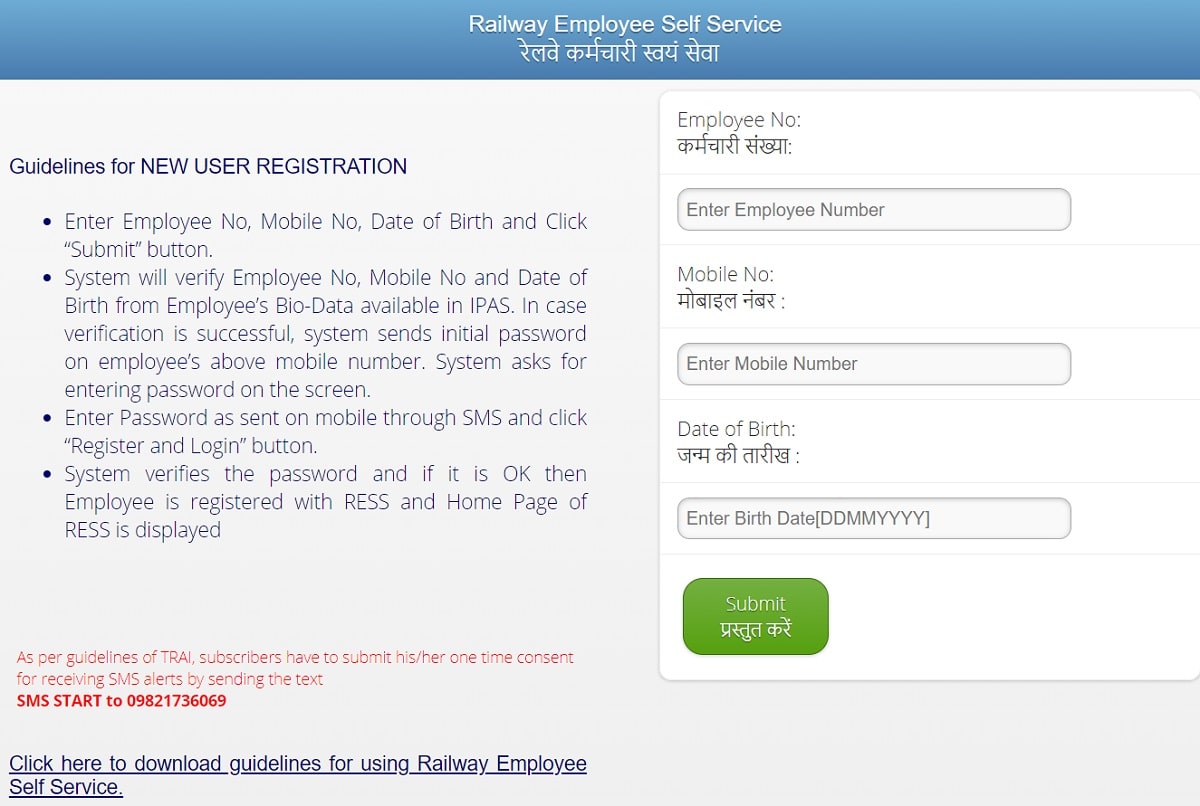
STEP 5 - The system checks the employee number, mobile number and date of birth from the employee bio-data available in IPAS. If the details match, an initial password is sent to the registered mobile number.
STEP 6 - Enter the password received through SMS and click the "Register and Login" button. Once the password is accepted, the employee is registered with RESS and the RESS home page opens.
RESS Indian Railway Pay Slip
RESS Indian Railway Pay Slip is available online. Employees of Indian Railways can check their payslip and salary details after registering at the AIMS portal. Here is the complete process to check the payslip:
STEP 1 - Visit the official website at aims.indianrailways.gov.in.
STEP 2 - On the homepage, click the "Employee Self Service" link to open the Railway Employee Self Service page.
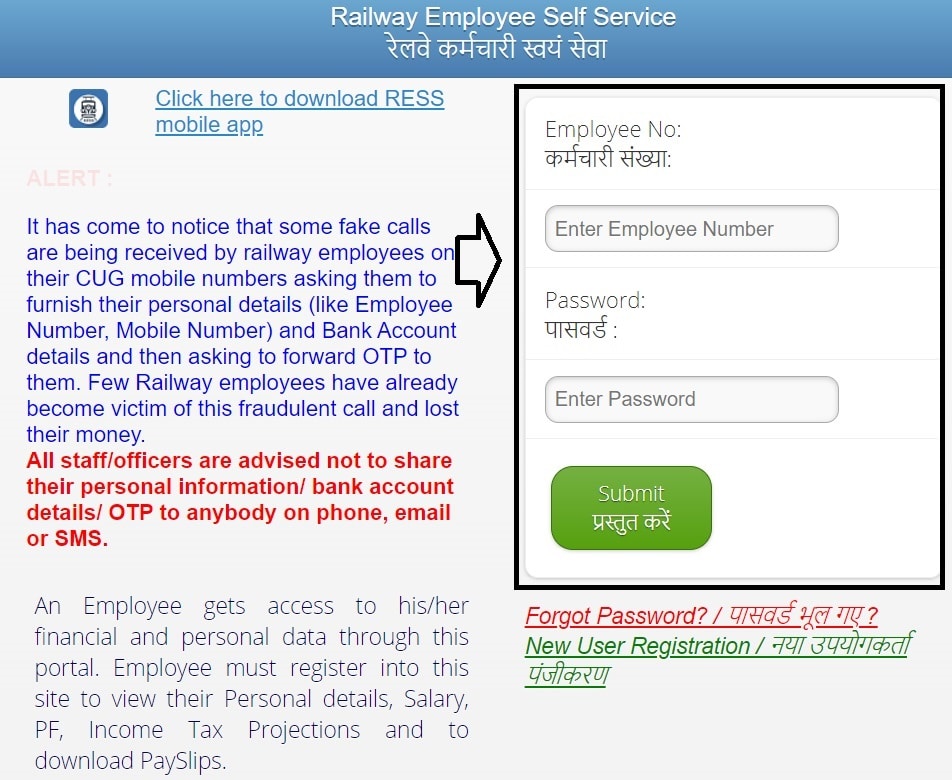
STEP 3 - Enter the employee number and password in the login section.

STEP 4 - Click the "Submit" button to log in. After login, open the salary section, select the month and year, and download the payslip in PDF format.
Dearness Allowance (DA) for railway employees is 58% of basic pay, revised from 55% with effect from 1 July 2025. The latest salary slip shows the DA column at 58%.
RESS Mobile App Download
RESS mobile application is available for railway employees on both Android and iOS. The Android app can be downloaded from the Google Play Store using the app ID cris.org.in.ress. Apple users can get the app through the official AIMS portal page. Here are the steps to install the app:
STEP 1 - Open the official AIMS portal at aims.indianrailways.gov.in.
STEP 2 - From the homepage, click the direct link to download the Railway Employee Self Service mobile app, or open RESS Mobile App on Google Play.
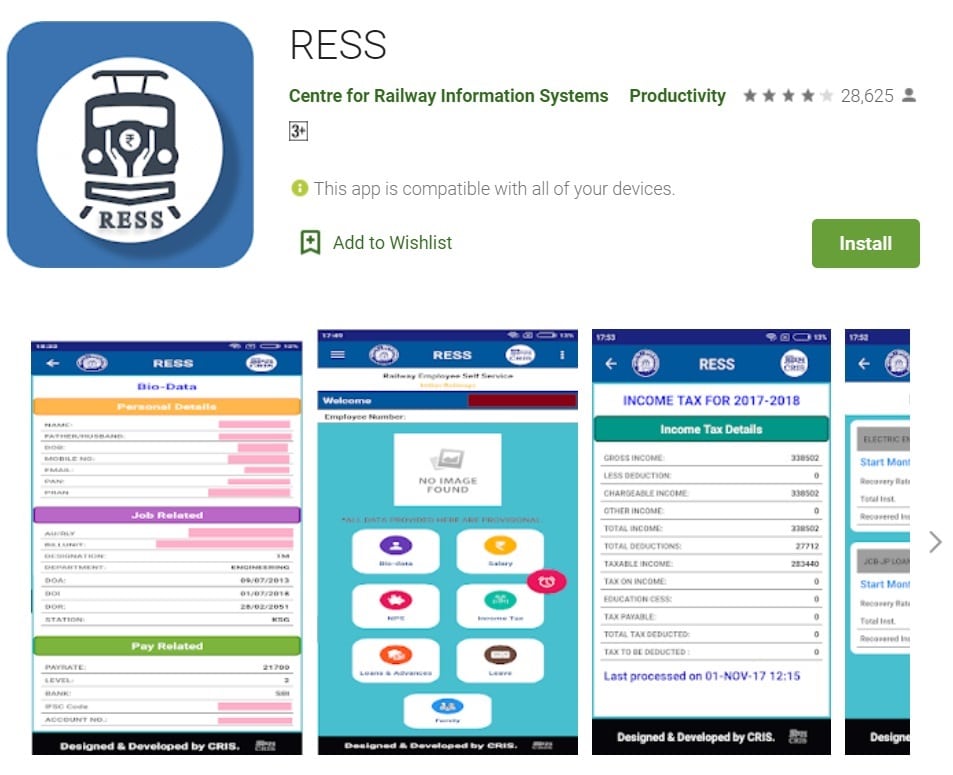
STEP 3 - Click the "Install" option to start downloading the RESS mobile app. After installation, open the app and enter the employee details of the Indian Railways.
This RESS app is developed by the Centre for Railway Information Systems. Railway employees can view their bio-data, salary details, income tax, PF and NPS ledger, loans and advances, and many more details through the app.
Railway Employee Self Service (RESS)
Railway Employee Self Service is an online system for Indian Railway employees and officers, developed by the Centre for Railway Information Systems (CRIS). Through this application, railway employees can view their personal bio-data, service and pay details, salary details, provident fund and NPS details, salary related loans and advances, income tax details including monthly deduction, leave and family details, and pension benefits for retired employees. Download of the payslip in PDF format is also available.
RESS Registration Process
To register with RESS, an employee needs to make sure that the date of birth and mobile number are updated in IPAS. The initial password is sent on the registered mobile number. Here is the registration process:
STEP 1 - Open the AIMS portal and click the "Employee Self Service" link.
STEP 2 - Click the "New Registration" link in the application.
STEP 3 - Enter the employee number, mobile number and date of birth.
STEP 4 - A verification code is sent on the mobile number. Enter the verification code.
STEP 5 - Registration is complete and the verification code works as the password.
What a Registered Railway Employee Can View at RESS
A registered railway employee can view the following details in the RESS app:
1. Bio-data (personal, job and pay related details)
2. Salary details (monthly and yearly summary)
3. Download payslip in PDF
4. Financial year wise supplementary payments
5. Provident Fund (PF) ledger and status of the last PF withdrawal application
6. NPS recoveries during a financial year
7. Loans and advances details
8. Income tax projections and total deductions
9. Leave balances
10. Family details
11. Details of OT, TA, NDA, NHA, KMA and Child Education Allowance
If an employee forgets the password, the "Forgot Password" link can be used. Enter the user ID (employee number or Aadhaar), mobile number and date of birth, and a new password is sent on the registered mobile number. The desktop version of RESS is available at aims.indianrailways.gov.in.
Check Supplier Bill Status at AIMS Portal
To check the supplier bill status, follow the steps given below:
STEP 1 - Go to the official website of the Indian Railways accounts and finance portal.
STEP 2 - On the homepage, click the "Supplier Bill Status" link or open Supplier Bill Status page.
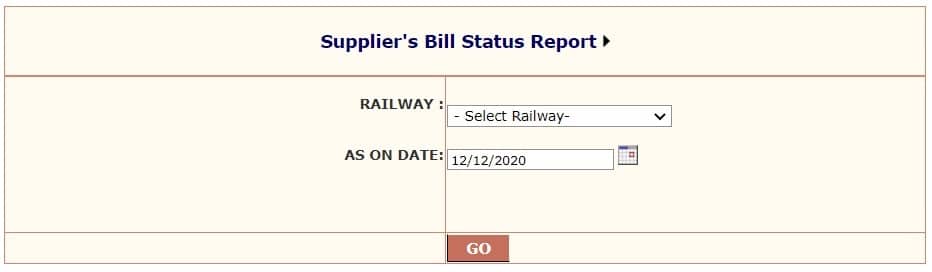
STEP 3 - Select the railway and date, then click the "Go" button.
STEP 4 - The supplier bill status report of the Indian Railways will appear on the screen.
Filing Grievance at AIMS Portal
To place a grievance at the AIMS portal, follow the steps given below:
STEP 1 - Open the official web page of the Indian Railways authorities.
STEP 2 - On the homepage, click the "Public Grievance" option or open pgportal.gov.in.
STEP 3 - The CPGRAMS portal will open. Go to the grievance option and select "Lodge Public Grievance".
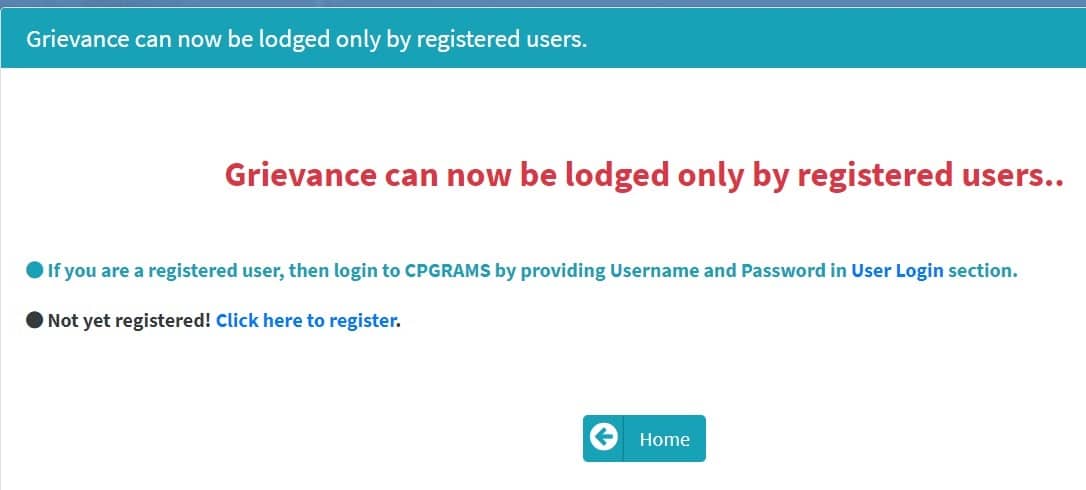
STEP 4 - Fill the application form with all required details and click the "Submit" button.
Check Indian Railway Employees Complaint Status
To check the complaint status, follow the steps given below:
STEP 1 - Go to the official website of the Indian Railways accounts and finance portal.
STEP 2 - On the homepage, click the Public Grievance link to get redirected to a new page.
STEP 3 - In the grievance option, click the view status link.
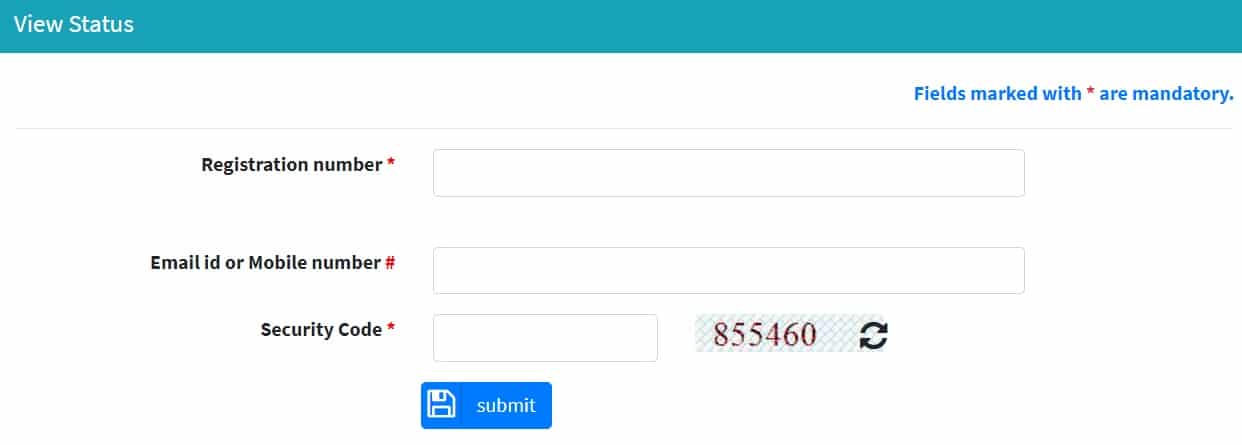
STEP 4 - Enter the registration number, email id, mobile number and security code, then click the "Submit" button. The complaint status will appear on the screen.
AIMS Portal Helpline Number
For any queries, railway employees can contact the CRIS Centralised Helpdesk team on the following numbers:
IPAS Helpdesk - 9216-1-8028592
RESS Helpdesk - 9216-1-8028593
E Mail Id - aimshelpdesk@cris.org.in
For more details, visit the official website of AIMS portal at aims.indianrailways.gov.in.
very informational post. thank you and keep it up.