

 AI Summary
Fruits Karnataka Portal registration and login process for farmers is available at fruits.karnataka.gov.in website. Both Central Government and Karnataka state govt. run several schemes to support farming activities and help farmers. Karnataka government launched FRUITS portal to build a single farmer database across the state.
Farmer Registration and Unified Beneficiary Information System (FRUITS) helps the government organize and check farmer data so that scheme benefits reach the right people. More than 1 crore farmers have already registered on this portal. This article explains FRUITS objective, benefits, features, eligibility criteria, required documents, registration, login and other details. So to get benefits of Fruits Karnataka Portal, read this article till the end.
FRUITS - Farmer Registration & Unified Beneficiary Information System
Karnataka state runs several schemes for the benefit of farmers. Farmers take up different agriculture and agriculture related activities like growing Agriculture crops, Horticulture crops, Sericulture, Dairy, Poultry, Fishery etc. Each of these activities needs specialised knowledge and experience. So the state has set up separate departments to help farmers carry out farming activities well.
While separate departments bring a focused approach for each of these activities, farmers still need to approach different departments for any type of support and benefits. It is common for all the departments to ask for documents from farmers before giving benefits under any scheme. Farmers end up submitting the same set of documents to different departments every year. Sometimes they have to submit one set of documents for every scheme in the same department.
A well organized and checked farmer database will save farmers from running from one office to another for benefits. It also helps the departments solve these problems. DPAR e Governance department along with NIC has developed a software application called Farmer Registration & Unified Beneficiary Information System - FRUITS.
Objectives of Fruits Karnataka Portal
The main aim of Fruits Karnataka Portal is to organize and check the database of farmers across the state. From now onward, farmers do not need to submit their documents in different departments separately to get scheme benefits. Farmer data will now be kept on Fruits Portal which will save a lot of time and money and will bring clarity to the system. With the proper use of Fruits scheme, farmers will be able to spend their time on farming activities rather than running from one department to another to submit their documents.
Overview of Fruits Karnataka Portal
| Detail | Information |
|---|---|
| Name of Portal | Fruits Karnataka Portal |
| Full Form | Farmer Registration and Unified beneficiary InformaTion System (FRUITS) |
| Launched By | Government of Karnataka |
| Beneficiaries | Farmers |
| Objective | Authentication of farmers during registration and Aadhaar based payment |
| Official Website | https://fruits.karnataka.gov.in/ |
| Applicable Year | 2026 |
| State | Karnataka |
| Article Type | Registration, Login |
| Developed By | DPAR e-Governance Department with NIC |
Salient Features of Fruits Karnataka Portal
Fruits Karnataka Portal comes with several useful features for farmers. Some of the main features are given below.
- Fruits Karnataka Portal has been launched by the state government of Karnataka.
- Through fruits.karnataka.gov.in portal the database of farmers is maintained and monitored.
- Farmers do not need to visit different departments to submit their documents manually to get benefits of several schemes.
- A lot of time and money of farmers is saved through this scheme.
- FRUITS stands for Farmer Registration and Unified Beneficiary Information System.
- Any farmer doing agricultural activities in the state can make Fruits Karnataka Portal registration and login.
- DPAR e government portal and NIC have developed fruits.karnataka.gov.in portal.
- Through FRUITS, farmers can save their time and invest it in farming activities rather than running from one department to another to submit their documents.
Fruits Karnataka Portal Registration / Login for Farmers
Here is the complete process to make Fruits Karnataka Portal registration and login for farmers:-
STEP 1 - Firstly visit the official website of Fruits Karnataka Portal at https://fruits.karnataka.gov.in/

STEP 2 - At the homepage, click at the "Citizen Login" link or directly click https://fruits.karnataka.gov.in/OnlineUserLogin.aspx to open the Fruits Karnataka Portal Citizen login page as shown below:-
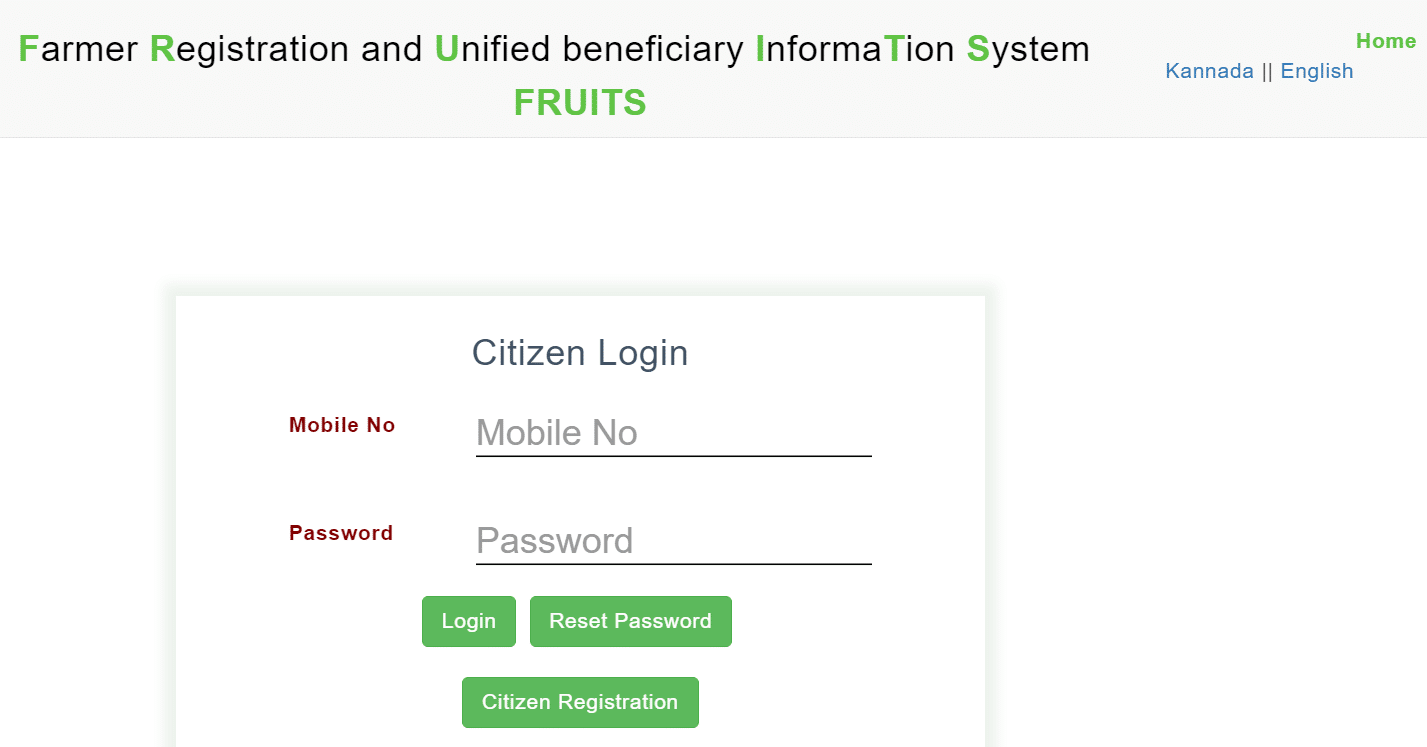
STEP 3 - All the existing users can enter mobile number, password and click at the "Login" button to make Fruits Karnataka Portal Login for Citizens.
STEP 4 - All the new users will have to click at the "Citizen Registration" tab to make Fruits Karnataka Portal Registration for Citizens:-
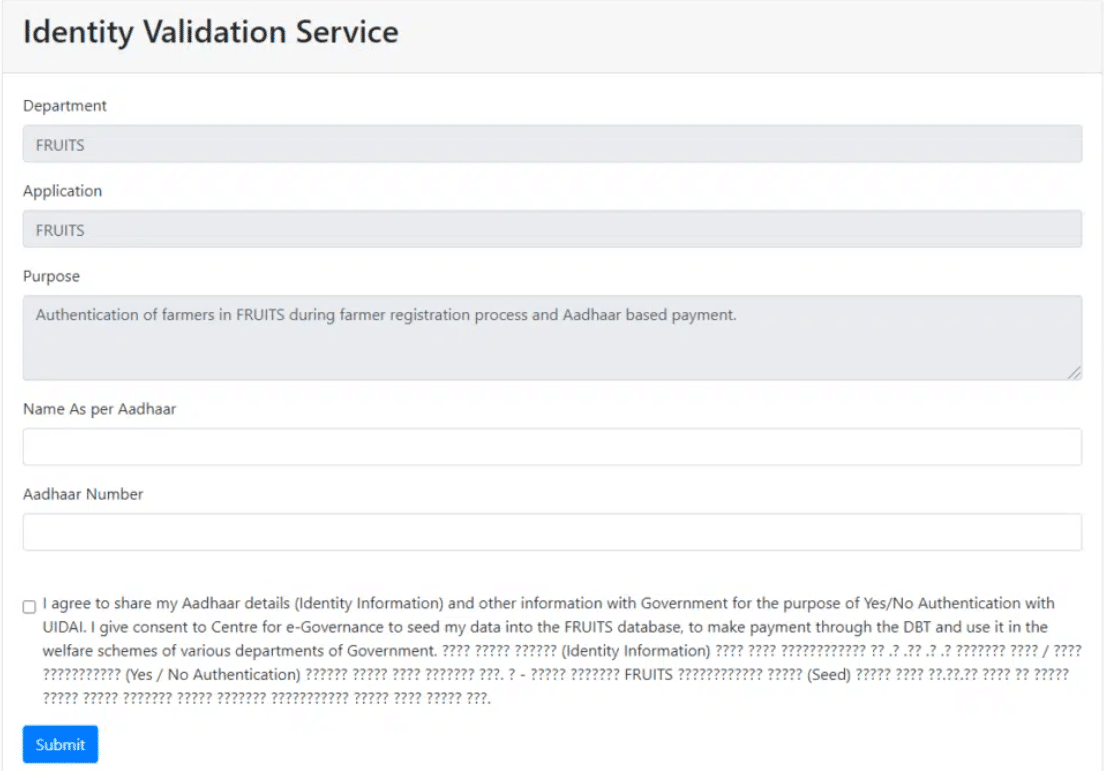
STEP 5 - Here farmers will have to enter name as per Aadhaar and Aadhaar number on the Fruits registration page. Afterwards, you can click at the "Submit" button.
STEP 6 - Next a new page to create account at Fruits Portal will open. Here your name will be auto-filled and you will have to enter mobile number and specify whether you have a valid e-mail ID or not as displayed here:-

STEP 7 - Upon clicking at the "Proceed" button, a new window will open. Then in the new window, you can enter the OTP received on your registered mobile number, next create a strong password which will be used for login. After successfully creating Fruits account, click at the "Take Me to the Login Page" link.
STEP 8 - Next make login using mobile number and password created earlier and click at the "Login" button. After signing in, you can scroll over the registration tab and click at "Online Registration" link to open Fruits Karnataka Farmers Online Registration Form:-

STEP 9 - In this Fruits Scheme farmers registration form, enter details such as farmer details, place of residence details, land status, approving department, other details, identification details, owner land details, account details, address proof details, upload photo from (browse and upload, copy photo from EPIC, copy photo from ration card) and click at the "Save Draft" button. Check the details entered and final submit the details to complete the Fruits Karnataka Portal registration / login process.
List of Documents Required to Apply at Fruits Karnataka Portal
Before starting the registration, keep these documents ready so that the process goes smoothly.
- Aadhaar card
- Residence certificate
- Age proof
- Land details
- Income certificate
- Bank account details
- Passport size photograph
- Mobile number
STEP 1 - Firstly visit the official website of Fruits Karnataka Portal at https://fruits.karnataka.gov.in/
STEP 2 - At the homepage, click at the "Login" link to open the Fruits Karnataka Portal Authorities login section as shown below:-

STEP 3 - In this authorities login section, enter username, password, captcha and click at the "Login" button to make Fruits Karnataka Portal Authorities Login.
Procedure to Download Mobile App
FRUITS also has a mobile app for registered farmers. Here is how to download it.
- First of all go to the official website of Fruits Karnataka at https://fruits.karnataka.gov.in/
- At the homepage, you are required to click on the "Android app logo".
- As soon as you click on this logo the app will start downloading in your device.
- You have to click on install option in order to install this app in your device.
Give Feedback at Fruits Karnataka Portal
STEP 1 - Firstly visit the official website of Fruits Karnataka Portal at https://fruits.karnataka.gov.in/
STEP 2 - At the homepage, click at the "Feedback" link or directly click https://fruits.karnataka.gov.in/Feedback.aspx to open the Fruits Karnataka Portal Feedback / Grievance section as shown below:-

STEP 3 - Here you can select type as feedback or grievance, enter name, mobile number, give feedback or grievance details and click at the "Send OTP" button. Next enter OTP received on your registered mobile number and finally, click at the "Submit" button.
Stakeholder Departments
FRUITS is used by several departments for different farming activities. The main stakeholder departments are given below.
- Agriculture
- Horticulture
- Sericulture
- Animal Husbandry and Veterinary
- Fisheries
Contact Information
For any help related to the portal, farmers can reach the FRUITS help desk. The contact details are given below.
- FRUITS-PMU, Centre for e Governance, DPAR (e Gov), M S Building, Bengaluru
- Helpline Number - 080-22208333, 080-22209331, 080-22209332
- e-Mail - fruitshelpdesk@karnataka.gov.in
FAQ's
What is FRUITS and how is it used?
Farmer Registration & Unified Beneficiary Information System - FRUITS is a web-based software system. It helps in registration of farmers or any person who wants to get benefit from the Government. In addition, details of benefits availed get recorded in FRUITS and thus it becomes a record of farmers, land and benefits given to them.
What is the official link to access Fruits Karnataka Portal?
The FRUITS official website or Fruits Karnataka Portal can be accessed at https://fruits.karnataka.gov.in
How to register in FRUITS?
Registration may be done by visiting Raitha Samparka Kendra (RSK) or the nearest taluka or Horticulture department office. Citizens may also register on their own by visiting "Citizen login" on the FRUITS website.
How can a citizen register on his/her own?
Any citizen can register by visiting Citizens Log-In and clicking on citizen registration. Aadhaar number and name as per Aadhaar shall be entered and verified. One can attach his/her land by fetching it from Bhoomi and select approver. Once approved by the concerned officer, registration will be complete. Mobile number shall be used as user ID. The registration is based on OTP authentication; OTP is sent to the Aadhaar linked mobile.
Which are the records required to register in FRUITS?
To register in FRUITS, one shall have an Aadhaar number. To register as a land owned farmer, land details (RTC) are required. In case anybody wants to register under any particular category (like Schedule Caste and Schedule Tribes) related certificates would also be required.
Can information be updated in FRUITS?
Yes. One can update land details, phone numbers, address, name as per Aadhaar (if name is changed in Aadhaar), Gender (if wrongly entered earlier), Bank details, Caste and Date of Birth.
Can joint owners be registered in FRUITS?
Yes. Joint Owners records (RTC) is treated as a single record in Bhoomi. However, joint owners may have registered in FRUITS in any one of the following three types. (a) Joint record as a whole, in which case FRUITS ID will be given for one of the Joint Owners. (b) Each first owner separately with self-declaration, land extent will be attached to each owner as per declaration. (c) Joint Owner separately with equal share.
How can a citizen give feedback to the FRUITS website?
A citizen can take part in the process by clicking on the "Feedback" menu on the homepage and submit their valuable feedback.
Can a citizen lodge a complaint about the information available in the FRUITS portal?
A grievance menu is made available on the home page, which redirects the user to the Public Grievance Redressal Website. The citizen can lodge a complaint by clicking on the grievance menu.
For more details about Fruits Karnataka Portal, visit the official website at https://fruits.karnataka.gov.in/
Sir namge Mani Ella sir please help Madi plz matte tumba Saal ede sir please help Madi plz sir 🙏🙏
There is any disadvantages in this scheme