

 AI Summary
mPassport Seva App, now known as Passport Seva App, was launched by External Affairs Minister on 26 June 2018 (6th Passport Divas). Anyone who wants to apply online for a passport can now register anywhere and anytime in India through their personal mobile phones. Applicants can fill the Passport Application Form, check slot availability, get confirmation and make inquiry at this app without visiting the official portal.
This app is available on the Google Play Store for Android smartphone users and is also available for iOS platforms. Consular, Passport & Visa (CPV) Division has specifically designed this app to merge all passport facilities into a single app. The app includes facilities to apply online, check status, make fee payment and schedule appointments for passport services.
This passport revolution will help applicants choose their Regional Passport Office (RPO), Passport Seva Kendra (PSK) and Post Office Passport Seva Kendra (PO-PSK).
Passport Seva App: How to Apply and Fill Passport Online Application Form
Below is the complete procedure to apply online for a passport and fill the online application form through the Passport Seva mobile application:-
STEP 1: Firstly go to the 'Google Play Store' and search for "Passport Seva" App or directly click the link to download the Passport Seva App - https://play.google.com/store/apps/details?id=gov.mea.pspv2
STEP 2: Then download the Passport Seva app, install it and open it on your mobile phone to apply online for a passport. After opening, this app will appear as follows:-
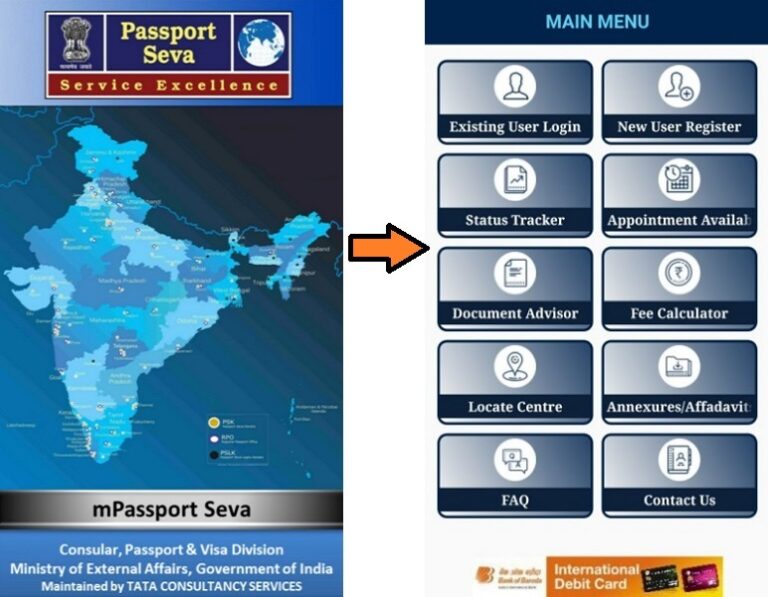
STEP 3: In the main menu, click at the "New User Register" tab to open the User Registration Form for a passport. This passport form will appear as follows:-
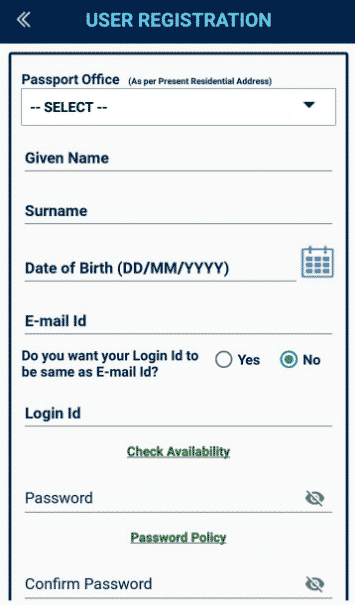
STEP 4: Fill personal details, Date of Birth, E-mail ID, Login ID & Password and hit the "Submit" button to complete the registration process. Next make login using the "Existing User Login" tab.
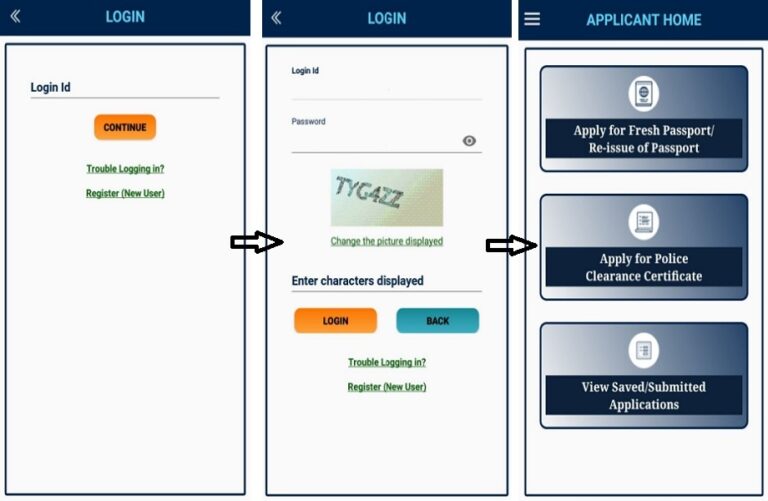
STEP 5: After making login, candidates can apply online by filling the Passport Online Application Form as below:-
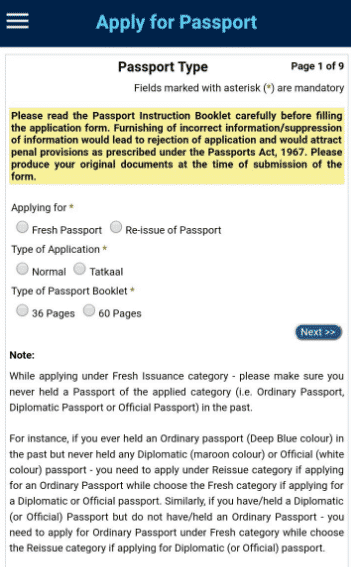
All candidates need to furnish all the details correctly, pay online fees and book slots as per the availability to make a visit at the PSK. After the Documents & Police Verification process is complete, the concerned RPO will print the passport and dispatch it to the applicants.
Passport Seva App Highlights
| Detail | Information |
|---|---|
| App Name | Passport Seva App (mPassport Seva) |
| Launched By | Ministry of External Affairs |
| Launched On | 26 June 2018 |
| Beneficiaries | Indian citizens applying for passport |
| Application Mode | Online (mobile app) |
| Official Website | passportindia.gov.in |
Passport Seva App: Confirmation, Availability, Inquiry (Status)
This new app has all essential services like new user registration, passport appointment availability, checking application and RTI status etc. to simplify the Passport Application process. The complete list of services at this Passport Seva App are mentioned in the table below:-
Passport Seva App Services List
| Status Tracker (Application Confirmation & RTI Status) | Appointment Availability |
| Document Advisor | Fee Calculator |
| Existing User Login | New User Register |
| Locating Centres | Annexures / Affidavits |
| FAQs | Contact Us |
This scheme is expected to benefit the applicants who are unable to apply at a PSK or POPSK near their ordinary place of residence. Now applicants can easily choose their RPO, PSK and PO-PSK where they wish to submit their applications. It is not mandatory that the present residential address as specified in the application form lies within the jurisdiction of the selected RPO or not. Moreover, police verification (if necessary) will be carried out at the same address as mentioned in the application form.
Now with this mobile application, it is not necessary for an applicant to have access to a computer and printer to apply for passport services. This app will connect directly with the citizens as the entire Passport Online Application Process has been simplified.
Passport application fees were revised with effect from 1 July 2026. Applicants are advised to check the revised fee before making payment.
FAQ's
Is the Passport Seva App free to download?
Yes. The app can be downloaded free from the Google Play Store and Apple App Store.
Can I check my passport application status through the app?
Yes. Open the app, tap on Status Tracker, enter your File Number and Date of Birth, then tap Track to view the latest status.
Is the app mandatory for passport applications?
No. The app is optional. All services are also available on the official Passport Seva portal.
References
-- For any query and suggestions on Passport Seva, please contact the Passport Seva Call Center at 1800-258-1800 (Toll Free).
-- For any further clarification, visit the official passport portal - passportindia.gov.in
THANKS
This is a very good step initiated by External Affairs Minister Sushma Swaraj.I was not able to renew my passport since past one year due to leave etc .Now ,Imay renew it possibly. Thanks & Regards
Yes, I have passport my full name shobha nagesh gouda, present address : ambarkodla, ankola, uttarkannda (kar war). Mob.:9481388091, I go went to london. Money problem account number: 36686262787
Already I have passport my name : shobha gouda,