

 AI Summary
Himachal Pradesh government runs Him Pragati portal, developed by MeitY, to help private investors set up projects in the Power, Tourism and Industrial sectors. This is the official web portal of the Chief Minister's Office, Himachal Pradesh. Portal address has moved from the earlier himpragati.nic.in link to himpragati.hp.gov.in, and investors can complete private user project registration at the new address.
Private investors can raise their concerns regarding projects to speed up the entire execution process. This site is useful as it carries the list of HP government schemes, employment generation activities, Jan Manch section and gives links to other government departments and officials too.
Content on Him Pragati portal is owned by respective organizations, who may be contacted for further information or suggestion. Also, neither NIC nor Chief Minister's Office (CMO) is liable for any inadvertent or typing errors on the site.
Him Pragati Portal Private User Registration
Follow the steps below to complete private user registration on Him Pragati Portal:
| Detail | Information |
|---|---|
| Portal Name | Him Pragati Portal |
| Launched By | Chief Minister's Office, Himachal Pradesh |
| Developed By | NIC (National Informatics Centre), Himachal Pradesh |
| Beneficiaries | Private investors and project executing agencies |
| Sectors Covered | Power, Tourism and Industrial projects |
| Registration Mode | Online, through mobile OTP verification |
| Helpline Number | +91 177 2625400 / +91 177 2621154 |
| Official Website | himpragati.hp.gov.in |
STEP 1 - Visit the official website himpragati.hp.gov.in
STEP 2 - On the homepage, click the "Private User Registration" tab present in the header, or directly open this link
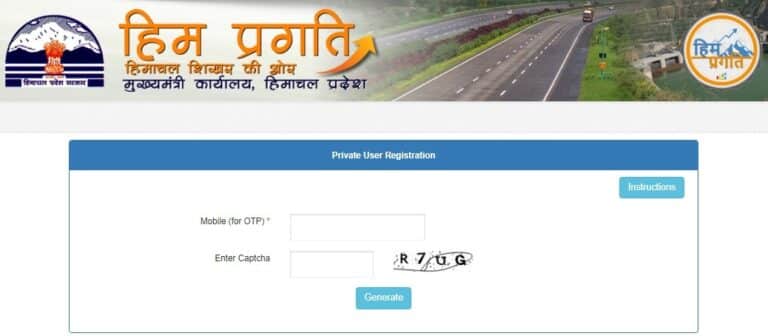
STEP 3 - Read the instructions on this page and enter the "mobile number" to generate OTP, as shown in the figure below:
STEP 4 - After OTP verification, the private user project registration form appears, as shown below:

STEP 5 - Select the project sector, execution mode, description, location and status, fill in the project related details and upload the required documents.
STEP 6 - Click the "Save" button to submit the project application for faster execution.
Also, investors can Login to complete the application process, or directly write to CM to raise concerns regarding implementation of their projects.
Investors looking into other Himachal Pradesh government support schemes for business and self-employment can also check the HP CM Startup Scheme, which offers registration and support for new startups in the state.
FAQ's
What is Him Pragati Portal used for?
Him Pragati Portal lets private investors register their projects in the Power, Tourism and Industrial sectors in Himachal Pradesh, and raise concerns directly with the Chief Minister's Office for faster resolution.
How can investors register on Him Pragati Portal?
Investors need to visit himpragati.hp.gov.in, open the Private User Registration link, verify their mobile number through OTP, and then fill in project details and upload documents to complete registration.
Has the Him Pragati Portal address changed?
Yes. Portal address earlier used to be himpragati.nic.in, which has now moved to himpragati.hp.gov.in. Investors should use the new address for registration and login.
Is registration on Him Pragati Portal free?
Yes, private user project registration on Him Pragati Portal is free of charge for investors.
Who can investors contact for help with Him Pragati Portal?
Investors facing issues can call the helpline number +91 177 2625400 or +91 177 2621154, or send an email at cm-hp[at]nic[dot]in.
References
-- Press Release in Himachal Pradesh - http://himachalpr.gov.in/PressRelease.aspx
-- Contact CM Office - https://himpragati.hp.gov.in/CMOffice/index.html
-- In case of any difficulty, investors can contact at the helpline number : +91 177 2625400 or +91 177 2621154 or can send an e-mail at cm-hp[at]nic[dot]in
-- For more details, visit the official website https://himpragati.hp.gov.in/
Post registering the project no option is there for getting password also no reply we get on mail / message for login password. Kindly advise how to get the password for logging in the portal.